Instruction Parameters
Supported PLC Series
| PLC-AES | PLC-FB | PLC-ES |
|---|---|---|
| ✓ | ✓ | ✓ |
Supported Data Registers
| M | X | Y | K | L | F | T | C | S | Z | R | Q | D | @D | Constant | |
|---|---|---|---|---|---|---|---|---|---|---|---|---|---|---|---|
| S | ✓ | ✓ | ✓ | ✓ | ✓ | – | ✓ | ✓ | – | ✓ | – | ✓ | ✓ | ✓ | – |
| D | ✓ | – | ✓ | ✓ | ✓ | – | ✓ | ✓ | – | ✓ | – | ✓ | ✓ | ✓ | – |
| n | ✓ | ✓ | ✓ | ✓ | ✓ | ✓ | ✓ | ✓ | – | ✓ | ✓ | ✓ | ✓ | ✓ | ✓ |
Supported Flags
| Flag | Bit | Support |
|---|---|---|
| Error | F11.0 | ✓ |
| Zero | F11.1 | – |
| Carry | F11.2 | – |
Number of Steps
| Steps |
|---|
| 4 |
Operands
| Operand | Description |
|---|---|
| S | The first operand. Entries are only WORD data registers. This is the starting register to find the largest possible number. The signed value range is -32,768 ~ 32,767 (216). The unsigned value range is 0 ~ 65,535 (216-1). The Hexadecimal value range is H0000 ~ HFFFF. |
| D | The second operand. Entries are only WORD data registers. This is where the maximum value found and its data register are saved. This requires 3 WORD data registers. |
| n | The third operand. Entries are WORD data registers or constants. This is the amount of data registers to search through starting at D. The value range is 1 ~ 32,767 (215-1). |
Notice
Error Flag (F11.0) Notice
The error flag, F11.0, will be ON for one scan when the address of the data register assigned by @D exceeds the range of the data register, D. The range of the data register, D, is dependent on the CPU type. F11.0 turns ON when the value of the data for n exceeds the value range 1 ~ 32,767 (215-1).
Instruction Behavior
The MAX and MAXP instructions behave as follows:
- Both instructions require 3 data registers starting at the data register, D.
- D saves the maximum number found in the search range.
- D+1 saves the first occurrence index of the maximum number found in the search range.
- D+2 saves the amount of times the maximum number was found in the search range.
- If n is less than 1 or greater than 32,767, neither instruction will execute.
Ladder Diagram Examples
MAX

The MAX instruction searches n number of WORD data registers, starting at S, for the maximum possible value. The result of the search is saved in 3 assigned data registers starting at D.

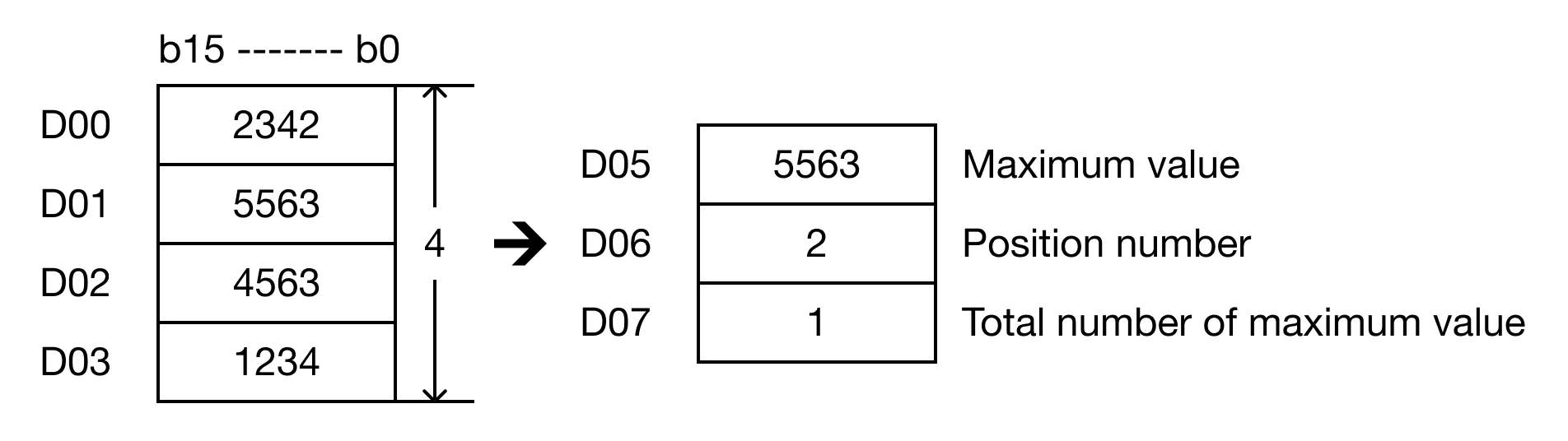
When the contact, M0.0 is ON (1), the instruction finds the maximum WORD value of 4 data registers, D0, D1, D2, and D3. The largest value found is saved in D5. The position in which the data register was found is saved in D6. The total amount of times the number is found is saved in D7.

Result
MAXP

The MAXP one-shot instruction searches n number of WORD data registers, starting at S, for the maximum possible value. The result of the search is saved in 3 assigned WORD data registers starting at D. Every time this instruction executes, it energizes the output only once.

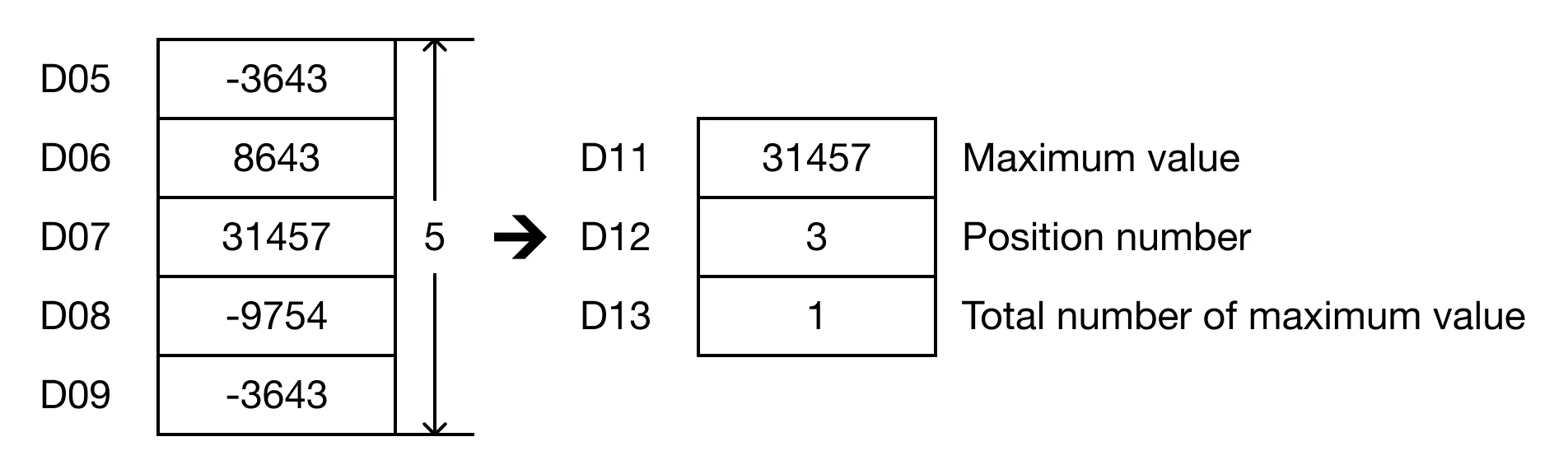
When the contact, M0.1 is ON (1), the instruction finds the maximum WORD value of 5 data registers, D5, D6, D7, D8, and D9. The largest value found is saved in D11. The position in which the data register was found is saved in D12. The total amount of times the number is found is saved in D13.

Result