Instruction Parameters
Supported PLC Series
| PLC-AES | PLC-FB | PLC-ES |
|---|---|---|
| ✓ | ✓ | ✓ |
Supported Data Registers
| M | X | Y | K | L | F | T | C | S | Z | R | Q | D | @D | Constant | |
|---|---|---|---|---|---|---|---|---|---|---|---|---|---|---|---|
| S1 | ✓ | ✓ | ✓ | ✓ | ✓ | ✓ | ✓ | ✓ | – | ✓ | ✓ | ✓ | ✓ | ✓ | ✓ |
| S2 | ✓ | ✓ | ✓ | ✓ | ✓ | ✓ | ✓ | ✓ | – | ✓ | ✓ | ✓ | ✓ | ✓ | – |
| D | ✓ | – | ✓ | ✓ | ✓ | – | ✓ | ✓ | – | ✓ | ✓ | ✓ | ✓ | ✓ | – |
| n | ✓ | ✓ | ✓ | ✓ | ✓ | ✓ | ✓ | ✓ | – | ✓ | ✓ | ✓ | ✓ | ✓ | ✓ |
Supported Flags
| Flag | Bit | Support |
|---|---|---|
| Error | F11.0 | ✓ |
| Zero | F11.1 | – |
| Carry | F11.2 | – |
Number of Steps
| Steps |
|---|
| 5 |
Operands
| Operand | Description |
|---|---|
| S1 | The first operand. Entries are WORD data registers or constants. This is the starting data register for the first range of n data registers to compare to S2. This requires n data registers. The unsigned value range is 0 ~ 65,535 (216). The Hexadecimal value range is H0000 ~ HFFFF. |
| S2 | The second operand. Entries are only WORD data registers. This is the starting data register for the second range of n data registers to compare to S1. This requires n data registers. The unsigned value range is 0 ~ 65,535 (216). The Hexadecimal value range is H0000 ~ HFFFF. |
| D | The third operand. Entries are only WORD data registers. This is where the comparison result is saved. This requires n data registers. |
| n | The fourth operand. Entries are WORD data registers or constants. This is the amount of data registers to compare starting at S1 and S2. |
Notice
Error Flag (F11.0) Notice
The error flag, F11.0, will be ON for one scan when the address of the data register assigned by @D exceeds the range of the data register, D. The range of the data register, D, is dependent on the CPU type.
Ladder Diagram Examples
BKCMP<>
 instruction compares n number of WORD data registers starting at S1 to n number of WORD data registers starting at S2.”/>
The BKCMP<> instruction compares n number of WORD data registers starting at S1 to n number of WORD data registers starting at S2. For each data register in the range S1 ~ Sn that is not equal to each data register in the range S2 ~ Sn, each data register in the range D ~ Dn will turn bit 0 to ON (1).

 instruction will compare the following expressions for a true or false value:”/>
- The BKCMP<> instruction will compare the following expressions for a true or false value:
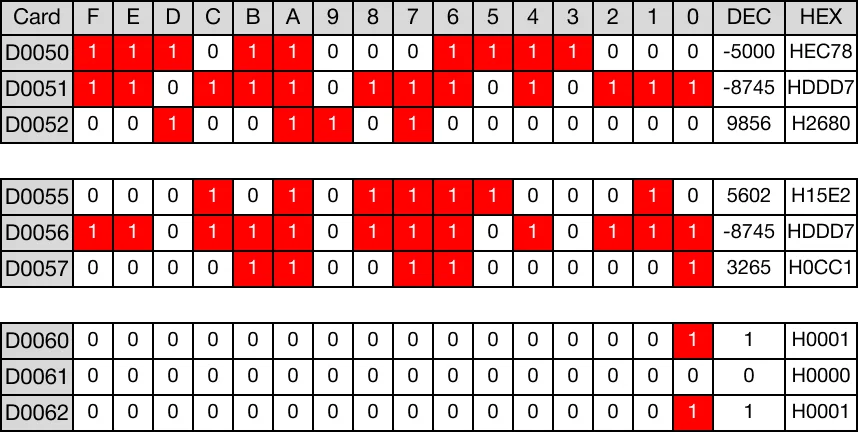
- D50 ≠ D55 → -5,000 ≠ 5,602
- D51 ≠ D56 → -8,745 ≠ -8,745
- D52 ≠ D57 → 9,856 ≠ 3,265


- When the open contact, M0.2, is powered ON (1), the values of the data registers are compared.
- D50 ≠ D55 → -5,000 ≠ 5,602 (TRUE → D60 = 1)
- D51 ≠ D56 → -8,745 ≠ -8,745 (FALSE → D61 = 0)
- D52 ≠ D57 → 9,856 ≠ 3,265 (TRUE → D62 = 1)
Memory Monitor
BKCMP<>P
 P one-shot instruction compares n number of WORD data registers starting at S1 to n number of WORD data registers starting at S2.”/>
The BKCMP<>P one-shot instruction compares n number of WORD data registers starting at S1 to n number of WORD data registers starting at S2. For each data register in the range S1 ~ Sn that is not equal to each data register in the range S2 ~ Sn, each data register in the range D ~ Dn will turn bit 0 to ON (1). Every time this instruction executes, it energizes the output only once.

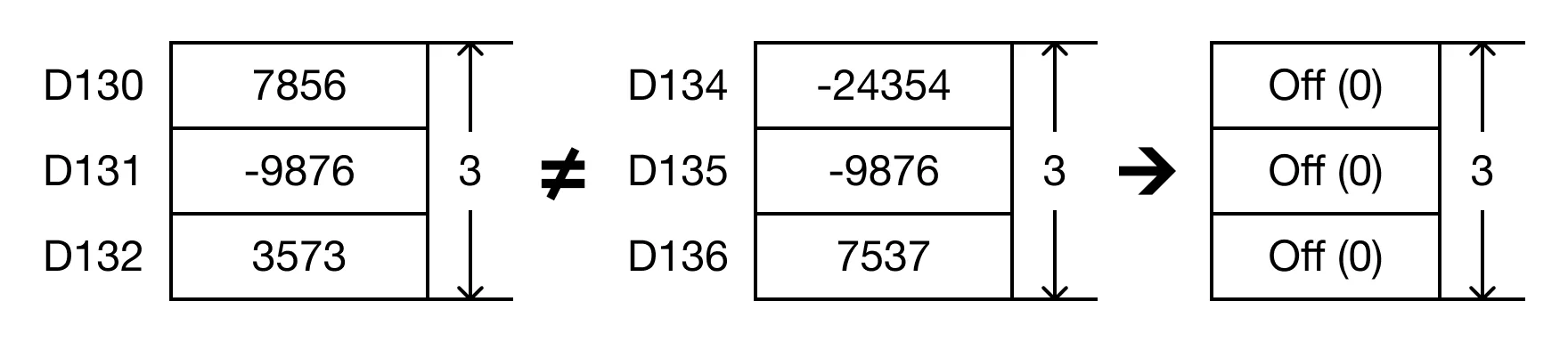 P instruction will compare the following expressions for a true or false value:”/>
- The BKCMP<>P instruction will compare the following expressions for a true or false value:
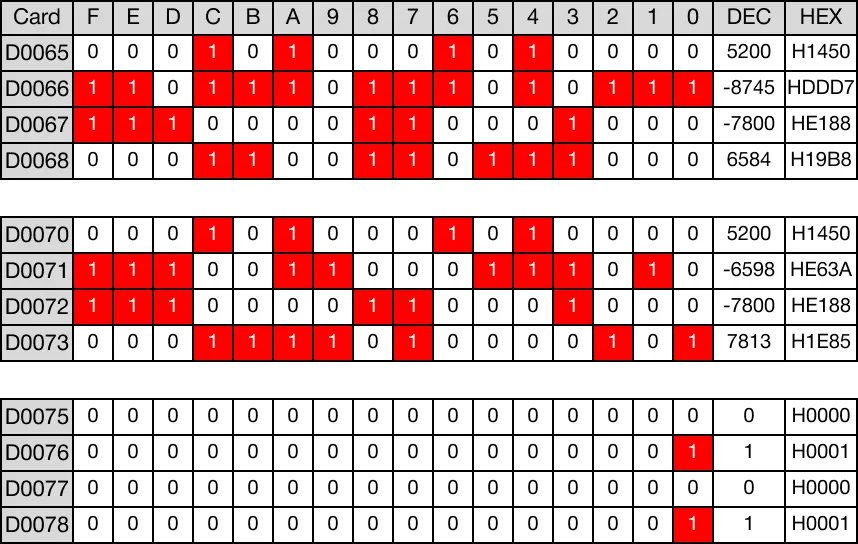
- D65 ≠ D70 → 5,200 ≠ 5,200
- D66 ≠ D71 → -8,745 ≠ -6,598
- D67 ≠ D72 → 7,800 ≠ 7,800
- D68 ≠ D73 → 6,584 ≠ 7,813

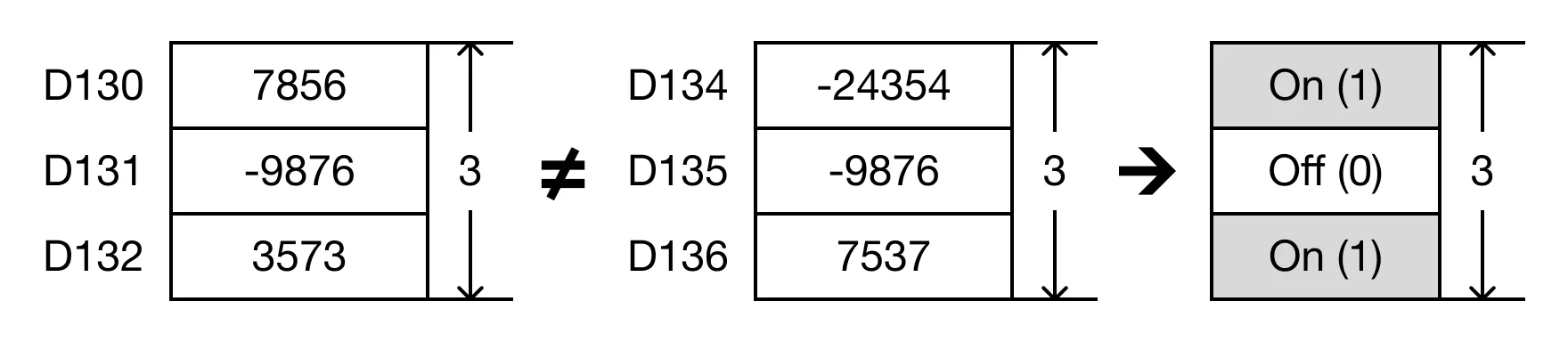
- When the open contact, M0.3, is powered ON (1), the values of the data registers are compared. ### Memory Monitor
- D65 ≠ D70 → 5,200 ≠ 5,200 (FALSE → D75 = 0)
- D66 ≠ D71 → -8,745 ≠ -6,598 (TRUE → D76 = 1)
- D67 ≠ D72 → 7,800 ≠ 7,800 (FALSE → D77 = 0)
- D68 ≠ D73 → 6,584 ≠ 7,813 (TRUE → D78 = 1)