
Built-in High Speed Counter for PLC-ES and PLC-FB Special Program
High-speed counting can be achieved using various hardware options, depending on your system requirements. It can be implemented using the PLC-ES modular or the Micro PLC CPU types, both of which are suitable for smaller, space-constrained projects that still demand reliable high-speed pulse counting
Registering the Special Program
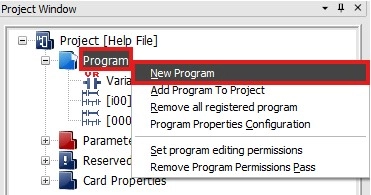
Step 1: In the Project Window, right-click Program and left-click New Program.
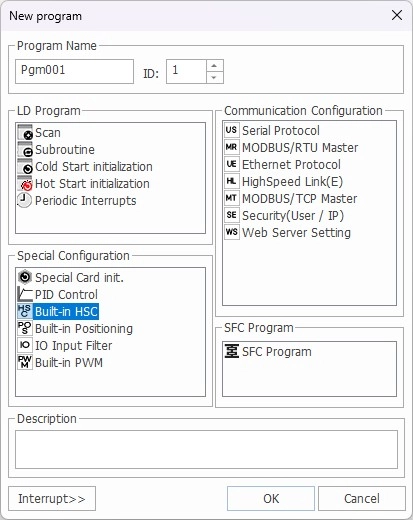
Step 2: In the New Program window, left-click HSC for PLC-ES.
- Optionally, for organization, under Program Name, the name of the program and ID can be changed.
Step 3: Left-click OK.
Configuring the High-Speed Counter Program
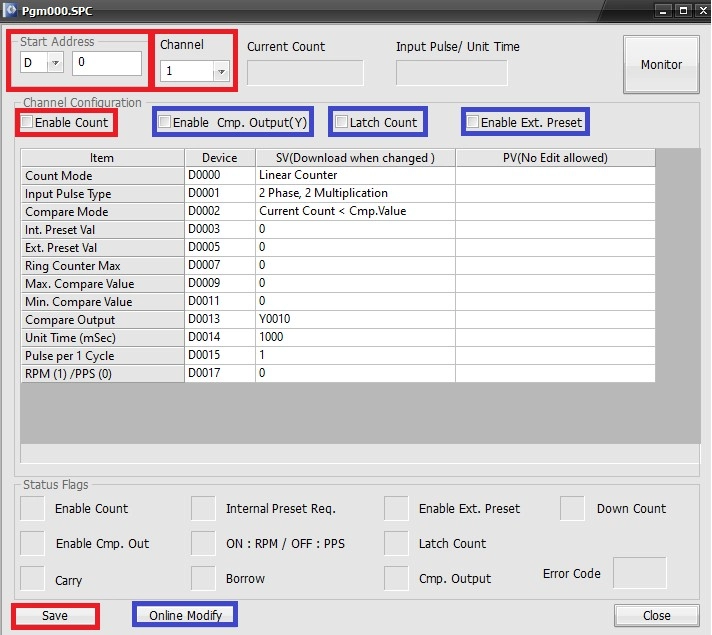
Step 4: Under Start Address, select the data register section to use.
- IMPORTANT: The high-speed counter program can reserve 52 WORDs, 26 for channel 1, 26 for channel 2, starting at the base data register.
- In this example, D0 ~ D51 are reserved.
- Please refer to the high-speed counter parameters for more information.
- In this example, D0 ~ D51 are reserved.
Step 5: Under channel, select channel 1 or channel 2.
Step 6: For the high-speed counter to actively count, check Enable Count.
- If this is unchecked, the high-speed counter won’t count up or down.
- Optionally, checking:
- Enable Cmp. Output(Y) enables comparison output.
- Latch Count enables non-volatile memory counting.
- The current value enables be retained if the device is powered off.
- Enable Ext. Preset enables an external preset value.
Step 7: Left-click Save to save the changes made to the high-speed counter program.
- Optionally, if the PLC is currently in RUN mode, left-click Online Modify.
Scan Program

Step 8: Create a new scan program.
- This example will always compare D100 ≤ D21.
- D21 is the current value of the high-speed counter on channel 1.

Step 9: After downloading the program to the PLC, the value of D21 can be monitored. The coil, Y10.D is deenergized.

Step 10: Once the value of D21 was greater than or equal to the value of D100, 45,678, the coil Y10.D energizes.