
High-Speed Counter (HSC)
Navigate to Online → Special Module Setup → HSC Module or click on the AD module within the Card Properties.
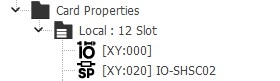
Applied Modules
- IO-SHSC02
HSC Module
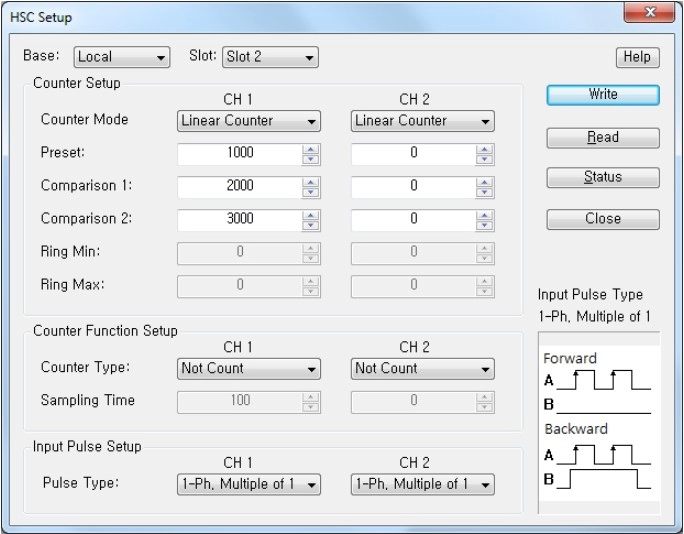
Step 1: Hold CTRL to configure all channels at once.
Step 2: Click Setup to configure the counter mode, preset value, comparison 1 and 2 values, ring minimum and maximum value, counter type, sampling time, or pulse type.
Counter Mode
- Linear Counter
- Ring Counter
Counter Type
- Not Count
- Latch Count
- Sampling Count
- Interval Pulse Count
Pulse Type
- 1-Ph. Multiple of 1
- 1-Ph. Multiple of 1 (B-Ph. Sw)
- 1-Ph. Multiple of 2
- 1-Ph. Multiple of 2 (B-Ph. Sw)
- CW/CCW
- 2-Ph. Multiple of 1
- 2-Ph. Multiple of 2
- 2-Ph. Multiple of 4
Step 3: Once the settings are configured, click OK to confirm and apply the changes.
Step 4: To save the configured parameters to the PLC, click Write.
Step 5: Click Read to check the parameters.
Step 6: For real-time monitoring and module diagnostics, click Status. This displays the current value, minimum and maximum values, firmware version of the module, and any error codes.