Instruction Parameters
Supported PLC Series
| PLC-AES | PLC-FB | PLC-ES |
|---|---|---|
| ✓ | ✓ | ✓ |
Supported Data Registers
| M | X | Y | K | L | F | T | C | S | Z | R | Q | D | @D | Constant | |
|---|---|---|---|---|---|---|---|---|---|---|---|---|---|---|---|
| S | ✓ | ✓ | ✓ | ✓ | ✓ | ✓ | ✓ | ✓ | – | ✓ | – | ✓ | ✓ | ✓ | – |
| D | ✓ | – | ✓ | ✓ | ✓ | – | ✓ | ✓ | – | ✓ | – | ✓ | ✓ | ✓ | – |
Supported Flags
| Flag | Bit | Support |
|---|---|---|
| Error | F11.0 | ✓ |
| Zero | F11.1 | – |
| Carry | F11.2 | – |
Number of Steps
| Steps |
|---|
| 3 |
Operands
| Operand | Description |
|---|---|
| S | The first operand. Entries are DWORD data registers or constants. The value range 0 ~ 86,399. |
| D | The second operand. Entries are only WORD data registers. This is where the conversion between seconds to hours is saved. This requires 3 data registers. |
Notice
Error Flag (F11.0) Notice
The error flag, F11.0, will be ON for one scan when the address of the data register assigned by @D exceeds the range of the data register, D. The range of the data register, D, is dependent on the CPU type. F11.0 turns ON when the value of the data for converting exceeds the data register assigned to D.
Data Register Format
The second-format data is formatted as follows when converted:
- The value from S is converted and saved into the data register D:
- D: Hour (0 ~ 23)
- D+1: Minute (0 ~ 59)
- D+2: Second (0 ~ 59)
Ladder Diagram Examples
HOUR

The HOUR instruction converts a DWORD second-formatted value, S, into hour, minute, and second date-format and saves the conversion into an assigned WORD data register, D.

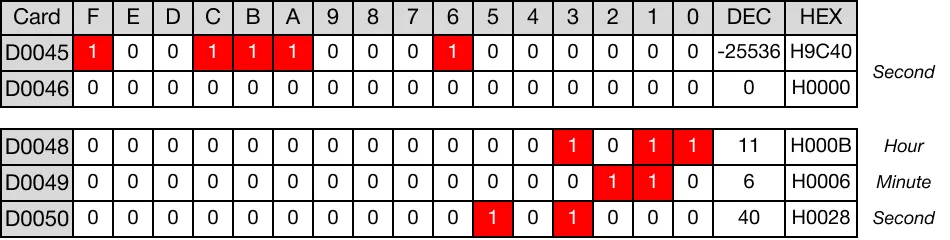
When the contact, M4.5, is powered ON (1), the DWORD value, 40,000, is converted into hour, minute, and second notation.

The result of the conversion is saved in the WORD date value data registers, D48, D49, and D50.
Memory Monitor
HOURP

The HOURP one-shot instruction converts a DWORD second-formatted value, S, into hour, minute, and second date-format and saves the conversion into an assigned WORD data register, D. Every time this instruction executes, it energizes the output only once.

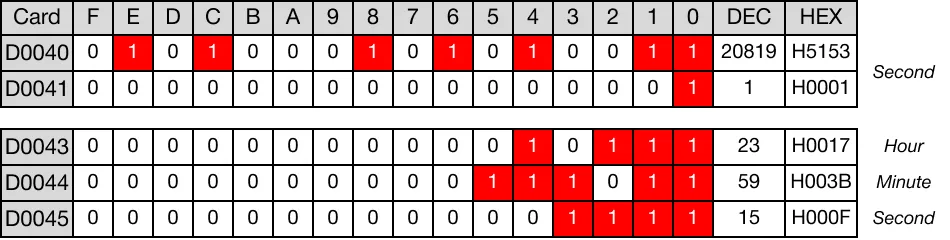
When the contact, M4.0, is powered ON (1), the DWORD value, 86,355, is converted into hour, minute, and second notation.

The result of the conversion is saved in the WORD date value data registers, D43, D44, and D45.
Memory Monitor