
Instruction Parameters
Supported PLC Series
| PLC-AES | PLC-FB | PLC-ES |
|---|---|---|
| ✓ | ✓ | ✓ |
Supported Data Registers
| M | X | Y | K | L | F | T | C | S | Z | R | Q | D | @D | Constant |
|---|---|---|---|---|---|---|---|---|---|---|---|---|---|---|
| – | – | – | – | – | – | – | – | – | – | – | – | – | – | – |
Supported Flags
| Flag | Bit | Support |
|---|---|---|
| Error | F11.0 | – |
| Zero | F11.1 | – |
| Carry | F11.2 | – |
Number of Steps
| Steps |
|---|
| 1 |
Notice
Instruction Behavior
The PEND instruction behaves as follows:
- The PEND instruction indicates the end of the program.
- The PEND instruction must be located at the end of a program.
- The PEND instruction cannot be located among other instructions.
- If a program needs to be terminated in the middle of a process, use the END instruction.
- The PEND instruction is a default instruction when the following programs are created:
- Scan Program
- Subroutine Program
- Cold Initialization Program
- Hot Initialization Program
- Periodic Interrupt Program
- This instruction CANNOT be manually deleted.
- As of MapleLogic version 8.30, the PEND instruction is not visible in the ladder diagram by default, but the instruction exists internally.
PEND Placement
The PEND instruction is automatically placed at the end of this program. The PEND instruction cannot be deleted or moved from the current location. If the PEND instruction is somehow moved or deleted, the program will not function properly.
Ladder Diagram Examples
PEND

The PEND instruction defines the end of a program.
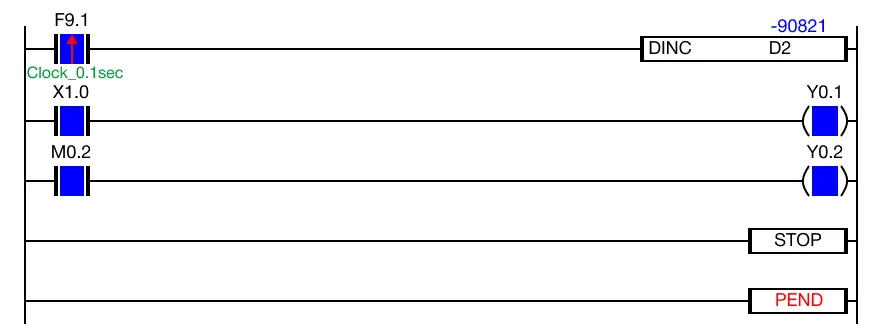
The PEND instruction is automatically placed at the end of the sequence program.