
Instruction Parameters
Supported PLC Series
| PLC-AES | PLC-FB | PLC-ES |
|---|---|---|
| ✓ | ✓ | ✓ |
Supported Data Registers
| M | X | Y | K | L | F | T | C | S | Z | R | Q | D | @D | Constant |
|---|---|---|---|---|---|---|---|---|---|---|---|---|---|---|
| – | – | – | – | – | – | – | – | – | – | – | – | – | – | – |
Supported Flags
| Flag | Bit | Support |
|---|---|---|
| Error | F11.0 | – |
| Zero | F11.1 | – |
| Carry | F11.2 | – |
Number of Steps
| Steps |
|---|
| 1 |
Notice
Notice
Compile errors occur when there is no END instruction in the following programs:
- Scan Program
- Periodic Interrupt Program
- Cold Initialization Program
- Hot Initialization Program
Instruction Behavior
The END instruction behaves as follows:
- The END instruction terminates a scan program where the END instruction is located.
- Instructions located after the END instruction are not executed except for the SBRT ~ RET instructions.
- The END instruction must be used at least once in a scan program.
- The END instruction can be located anywhere except the location between instructions which should make a pair.
- Example: The END instruction cannot be located between the FOR ~ NEXT, SBRT ~ RET, and the JMP/JMPP ~ JME instructions.
- When the END instruction is executed, the PLC CPU stops the scan program.
- If there are other scan programs that have not been executed yet, the PLC CPU starts the next scan program.
- The execution order for the scan programs is decided by the program ID (PID) number.
- Lower PID Number → Higher PID Number
- The execution order for the scan programs is decided by the program ID (PID) number.
- If there are other scan programs that have not been executed yet, the PLC CPU starts the next scan program.
Ladder Diagram Examples
END

The END instruction ends a scan program.
Ladder Diagram
Example 1
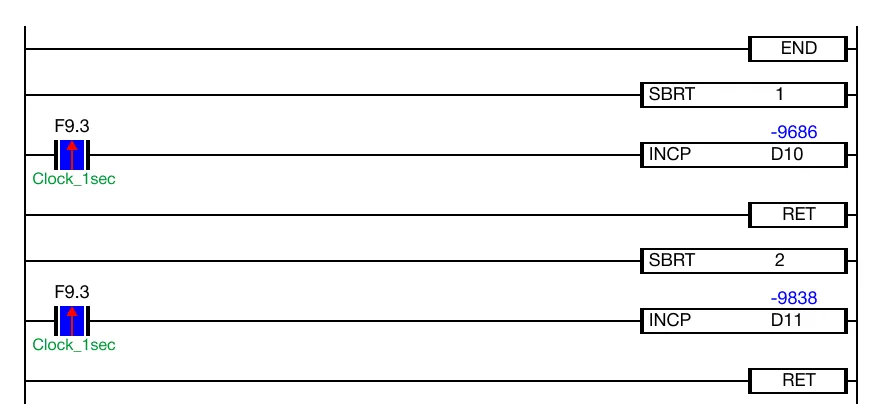
Any existing subroutine program must be placed after the END instruction.
Example 2
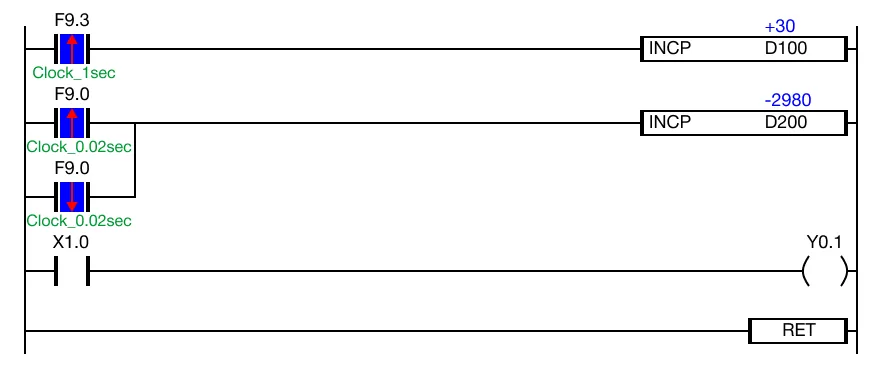
The END instruction must be used at least once in the any scan program.