
Overview & Concepts
The Email function in EasyBuilder Pro allows the HMI to send email notifications when defined conditions occur. By connecting the HMI to an SMTP email server, the system can automatically transmit messages to configured recipients. This capability is commonly used to notify maintenance personnel or supervisors of alarms, system events, or production conditions without requiring direct interaction with the HMI.
To enable email functionality, the project must be configured with SMTP server settings and a list of recipient contacts. Key configuration elements include:
- The SMTP server address and communication port
- Login credentials for the email account used to send messages
- Recipient email addresses stored in the contact list
- The conditions or events that trigger an email message
Once configured, the HMI can send email notifications when specific events occur, such as alarms being triggered or system conditions reaching defined thresholds. Email messages can include descriptive text and relevant information about the event that initiated the notification.
Implementation
E-mail is configured within the EasyBuilder Pro System Parameters Menu.
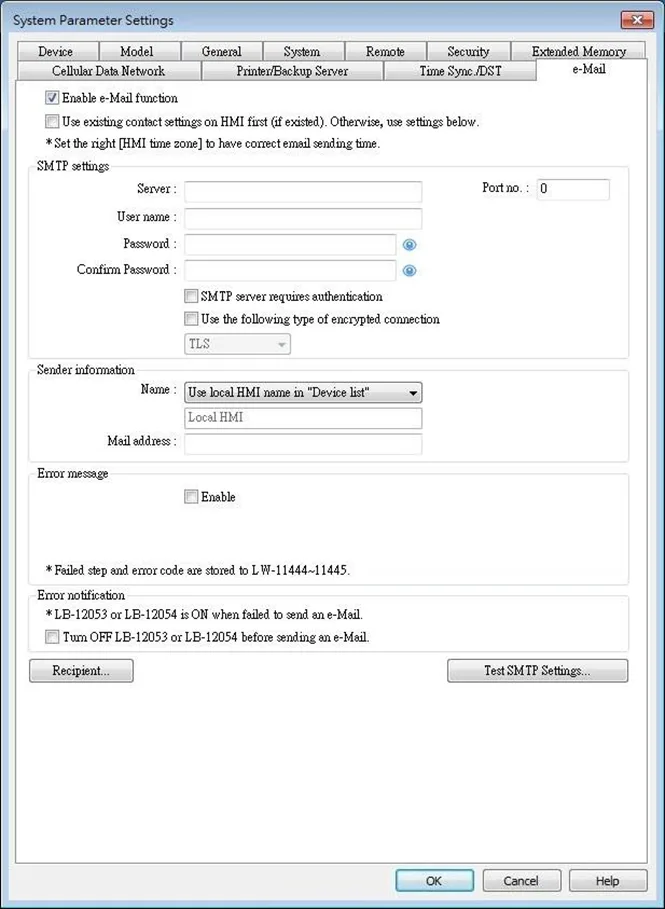
Select [Enable e-Mail function] check box to configure the parameters.
When [Use existing contact settings on HMI] check box is selected, the system will use the contact settings in HMI after downloading the project to HMI. When there are no contacts within the HMI, they are configured from this menu.
| Setting | Description |
|---|---|
| SMTP Settings | Server: Set SMTP Server. Port: Set communication port. User name: Set e-mail address. Password: Set e-mail password. Confirm Password: Confirm e-mail password. SMTP server requires authentication: Decide whether Secure Password Authentication is needed when log in e-mail. Use the following type of encrypted connection: Decide whether an encrypted connection (TLS, SSL) is required when sending e-mails. Please note that TLS support is limited to TLS 1.0. |
| Sender Information | Name: Enter the sender name or use the local HMI name in the device list, or the name specified using system register LW-10884 (HMI name). Mail Address: Setting e-mail address. |
| Error message | When an error occurs in email delivery, the error message sent from SMTP server can be shown in the designated address. |
| Error notification | Turn OFF LB-12053 or LB-12054 before send an e-Mail When enabled, system registers LB-12053 or LB-12054 will be turned off before sending e-mail, otherwise, when an error occurs in email delivery, the register remains ON. |
| Test SMTP Settings | Verify SMTP settings in advance by sending a test email to the specified e-mail address. |
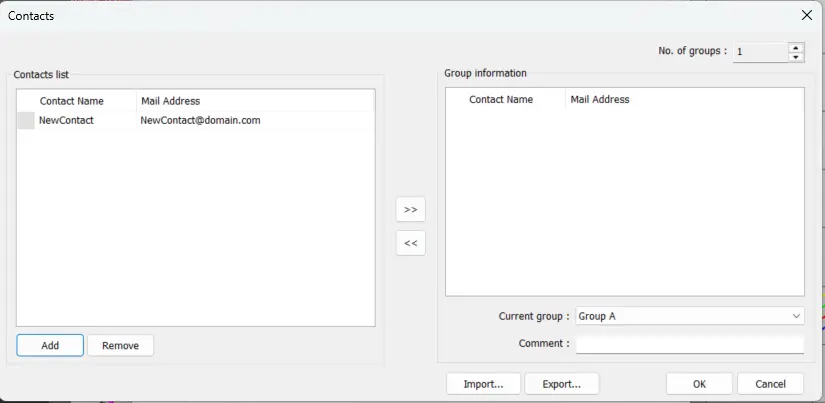
Click the Recipients button to open the contact editor dialog:
| Setting | Description |
|---|---|
| Contact list | Add or remove contacts from the list. |
| Group Information | Group up contacts. No. of groups: Set no. of contact groups, according to the number, the groups are named from A to P and up to 16 groups can be set. Current group: Displays the group that includes the contacts above. Comment: Enter a description for the current group. |