Overview & Concepts
Project Protection in EasyBuilder Pro provides security features that help protect an HMI project from unauthorized access, copying, or modification. These protections allow developers to control how project files are distributed and prevent others from retrieving or altering the original project logic after it has been deployed to an HMI device.
Project Protection is implemented through several protection methods, each designed to secure a different aspect of the project:
- Upload Restriction – Disables or restricts the ability to upload the project from the HMI back to a computer, helping prevent retrieval of the deployed project.
- HMI Binding (Project Key) – Locks the project to a specific HMI device so the compiled project can only run on that designated hardware.
- Decompilation Prohibited – Prevents the compiled project from being decompiled back into an editable project, helping protect the original project design and logic.
- .EXOB / .CXOB Password Protection – Adds password protection to compiled project files, preventing unauthorized users from opening or using the protected file without the correct password.
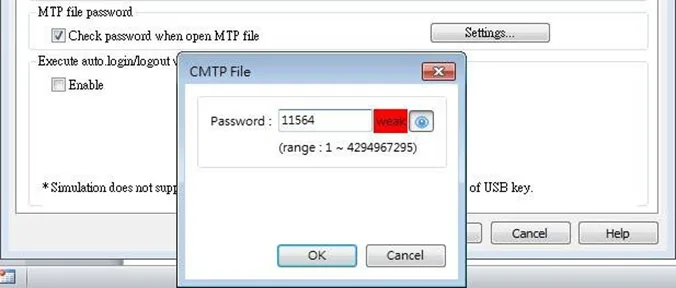
- .MTP File Password – Allows a password to be applied to the EasyBuilder Pro project files so that the file cannot be opened or used without the correct password.
These protection methods are commonly used when distributing projects to field installations or customers where intellectual property and system configuration must be safeguarded. By applying these controls, developers can protect the integrity of the deployed system while limiting unauthorized access to the project design.
NOTE: The below settings allow the Project Engineer to enable security on the project. As such, please remember that Maple Systems does not have a method to reset or decrypt these values if the password is lost or forgotten.
Implementation
Upload Restriction
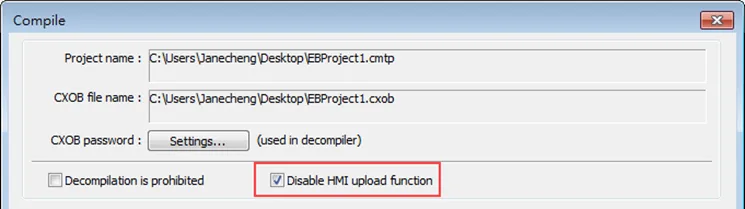
EasyBuilder Pro provides a system reserved register [LB-9033]. When this register is set ON, the .exob/.cxob file cannot be uploaded.
When attempting to upload an .exob/.cxob file with this register set ON, the file obtained after uploading is 0 byte, and cannot be decompiled.
The setting to enable this option is found in the Project Compile window; please reboot HMI for the changed setting to take effect.
HMI Binding (Project Key)
To enable the Project Key (setting which allows a project to only operate on the HMI to which it’s downloaded to), go to the following menu:
[System Parameters] » [General] » [Project key]

Enable and set the [Project key] (password range: 0 ~ 4294901750). System registers LW-9046 ~ LW-9047 (32-bit) can be used to set the [HMI key] for HMI. The values in LW-9046 and LW-9047 cannot be accessed by a remote device.
The .exob/.cxob file obtained after compiling can only be executed on HMI when [HMI key] and [Project key] match. If the keys don’t match, LB-9046 is set ON. To change [HMI key], please reboot HMI.
Note:
When [HMI Key] and [Project Key] don’t match, the HMI will not communicate with the PLC. Please re-download the project to the HMI, ensuring the HMI key and Project key match.
Decompilation Prohibited
After a project (.emtp/.cmtp) is edited, users can compile the project to .exob/.cxob format. The .exob/.cxob file can be downloaded to HMI.
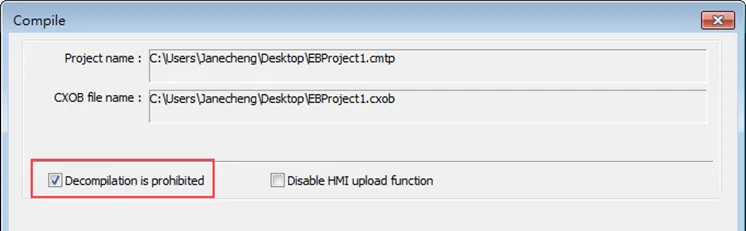
If [Decompilation is prohibited] check box is selected when compiling, the setting in [EXOB/CXOB password] will be ignored. Furthermore, the .exob/.cxob file cannot be decompiled to .emtp/.cmtp file.
This setting can be found in the Project Compile window.
.EXOB / .CXOB Password Protection
After editing a project (.emtp/.cmtp), users can compile the project to .exob/.cxob format.
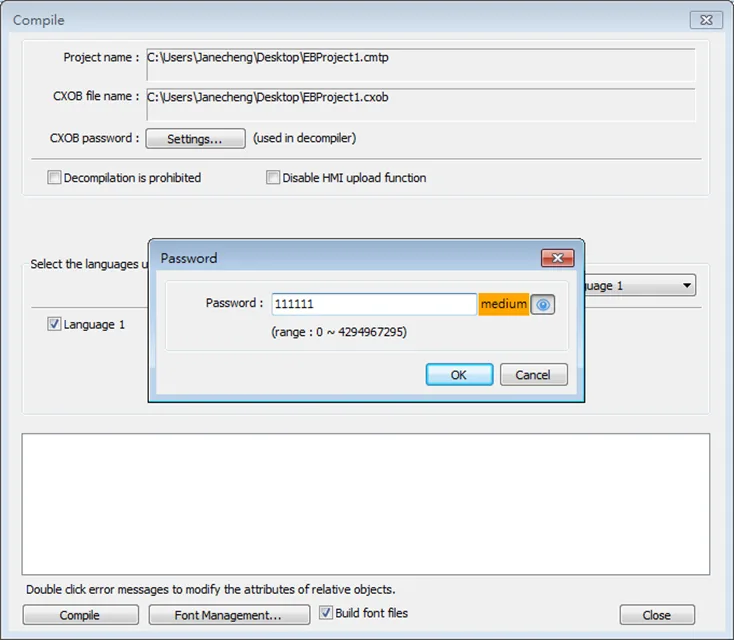
The .exob/.cxob file can be downloaded to HMI. Password can be set to protect the .exob/.cxob file in [EXOB/CXOB password] when compiling. (Password range: 0 ~ 4294967295)
A password is needed when attempting to decompile the .exob/.cxob file back to .emtp/.cmtp file. If the password is entered incorrectly for three times, please restart EasyBuilder Pro.
.MTP File Password
After a project (.emtp/.cmtp) is edited, a password can be set to protect the .emtp/.cmtp file. In [System Parameters] » [Security] tab, enable [Project password] and click [Settings] (password range: 1 ~ 4294967295).
The password will be needed when attempting to open the .emtp/.cmtp file.