
Overview & Concepts
The OPC -UA Server feature in EasyBuilder Pro allows the HMI to act as an OPC Unified Architecture (OPC-UA) data server, making its internal data and connected device registers available to external OPC-UA clients. This enables other systems (such as SCADA platforms, data historians, or monitoring software) to read data directly from the HMI using the OPC-UA protocol.
When OPC-UA Server is enabled, the HMI organizes selected registers into a structured address space that OPC-UA clients can browse. External applications connect to the HMI using its network address and can subscribe to or read data values provided by the server.
Key capabilities of the OPC-UA Server include:
- Publishing HMI and PLC register data to OPC-UA clients
- Allowing external systems to browse available data tags
- Supporting secure, standardized industrial data communication
Typical uses include:
- Sharing machine data with SCADA or supervisory systems
- Providing production data to historians or analytics platforms
- Integrating HMI-collected data into larger industrial monitoring systems
By acting as an OPC-UA server, the HMI becomes a gateway that exposes process data to other systems using a widely adopted industrial communication standard.
Implementation
OPC UA (Unified Architecture) is a communication technology often used in industrial automation fields. OPC UA features cross-platform interoperability, unified access, standardized communication, and security. In this architecture, cMT / cMT X Series HMI
models with built-in OPC UA server play a key role as Communication Gateway, and allow OPC UA clients to access HMI or PLC data by subscribing to tags to receive real-time updates. This new architecture can help you achieve vertical integration.
Hardware and Software Requirements:
- HMI Model: cMT / cMT X Series models. *A license must be loaded for cMT-SVR / cMT-SVR-200 and cMT-HDM / cMT-FHD / cMT-FHDX.
- Software: EasyBuilder Pro V5.06.01 or later
- Recommended OPC UA Client: Unified Automation UaExpert

Configuration
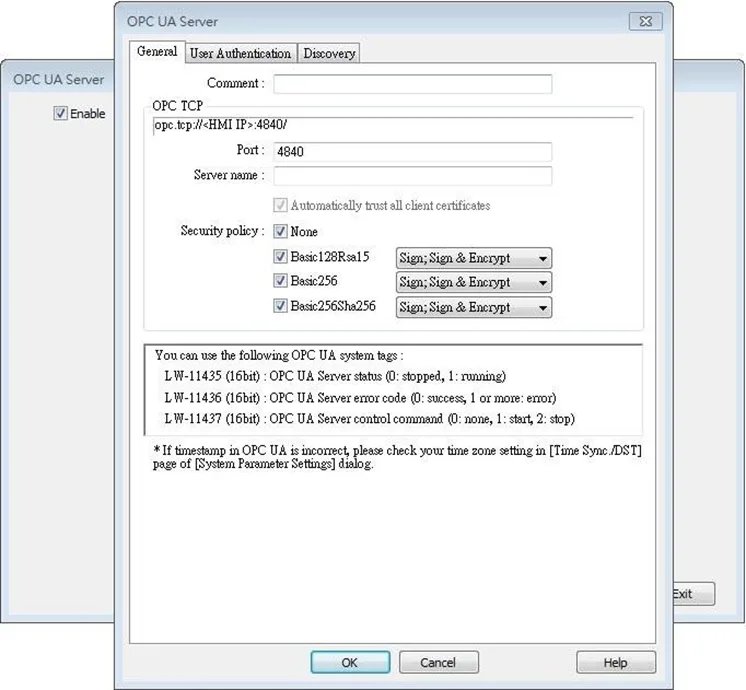
Click [Object] » [IIoT] » [OPC UA Server] in the menu to open the settings dialog box.
General Tab
| Setting | Description |
|---|---|
| Comment | The description about the OPC UA Server. |
| OPC TCP | The URL of the server. |
| Port | The port number for the clients to connect with OPC UA Server. The default port number is 4840. |
| Server name | The server name, this field is allowed to remain blank. [Automatically trust all client certificates] This option is enabled by default, but may be toggled for cMT Gateway series only. When this option is disabled, all OPC UA clients will be refused connection unless their corresponding client certificates have been trusted in the OPC UA web interface. Note: According to OPC UA specification, an OPC UA client, in making a connection, will use a client certificate which will be checked by the OPC UA server for its legitimacy. The exception is if the security policy allows for the “None” option. |
| Security Policy | Configure the security policy and available algorithms that can be used by clients. |
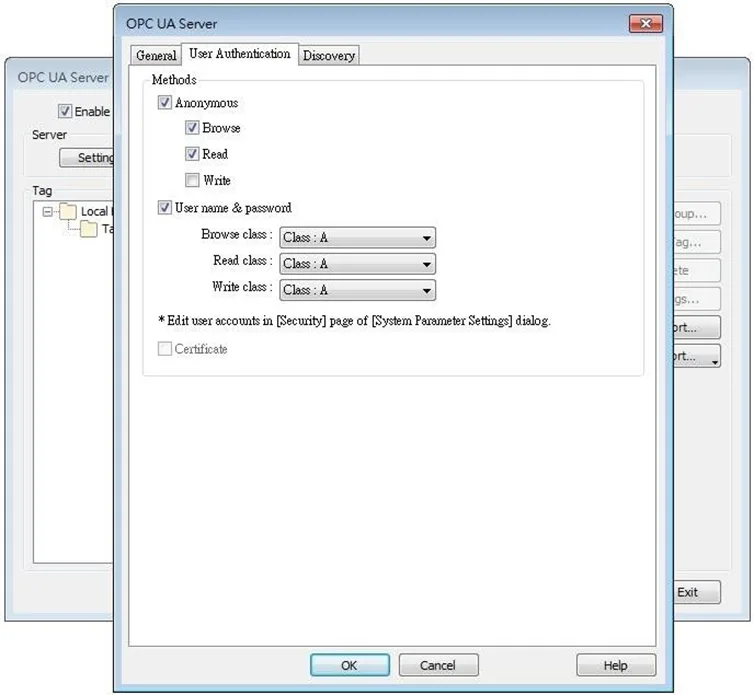
User Authentication Tab
| Setting | Description |
|---|---|
| Methods | Anonymous Grant Browse, Read, Write permissions to anonymous login by selecting the checkboxes. User name & password Use the same user name and password as HMI. The permissions are granted to the security classes specified in System Parameter Settings » Security. Certificate This option is available only for cMT Gateway series. OPC UA client may use certificates as authentication method instead of username-and-password method to login. Use web interface to configure trusted/untrusted user certificates. |
Notes:
- OPC UA security layers can be split into two layers:
- communication layer (e.g. SecurityPolicy)
- application layer, as shown in the image below:
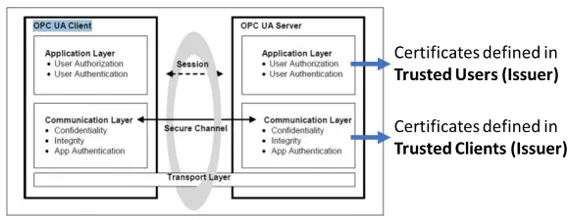
- Client certificate is at communication layer and its use is required when using SecurityPolicy other than None.
- User certificate is at application layer and using it is one of the ways for authentication.
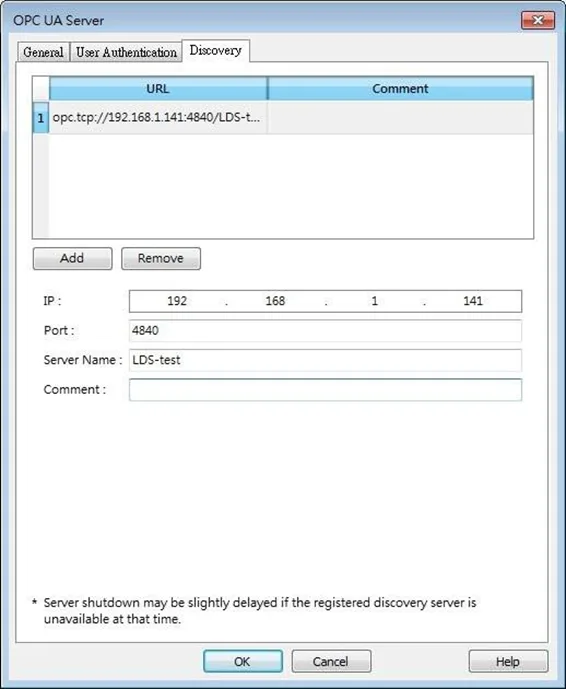
Discovery Tab
When configured, OPC UA server will register to the Local Discovery Server (LDS).
OPC UA Discovery service is used to simplify server location maintenance when there are many OPC UA servers in the network. An OPC UA client can access one LDS Server and obtain all registered OPC UA server.
| Setting | Description |
|---|---|
| IP | IP address of the OPC UA client. |
| Port | Port number used by the OPC UA client. |
| Server Name | Server name of the OPC UA client. |
| Comment | A memo on the server and will not influence communication. |
Example: Setting up Discovery Service
Install Local Discover Server (LDS) on a PC (for example, the PC name is DESKTOP-ABCD). Download the LDS provided by OPC Foundation from the link below:
If the DNS service of router cannot resolve the HMI name to IP address, the HMI name should be changed to the IP address of the HMI. For example: If HMI IP address is 192.168.1.100, then the HMI name should be 192.168.1.100 or 0.0.0.0.
On the PC with OPC UA LDS installed, please manually copy the certificate from folder “C:ProgramDataOPC FoundationUApkirejectedcerts” (Folder for rejected certificates) to folder “C:ProgramDataOPC FoundationUApkitrustedcerts” (Folder for trusted certificates).
Launch the software of OPC UA Client, enter the name of the PC with OPC UA LDS installed or its IP address to obtain all the registered OPC UA servers.
If Discovery does not work properly:
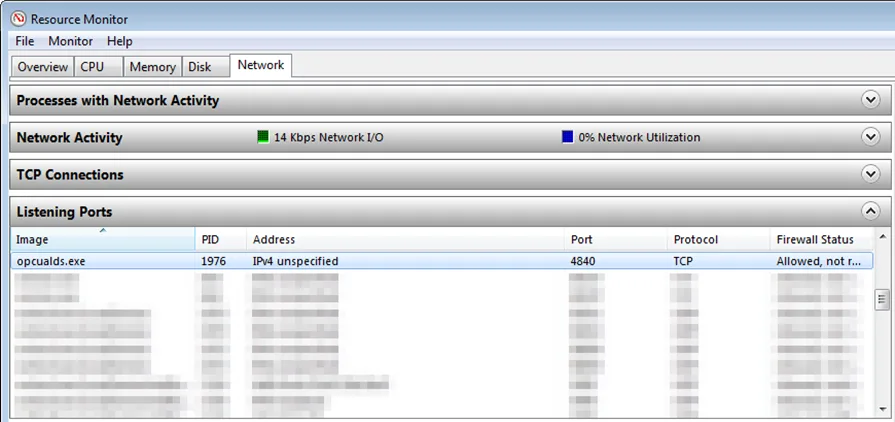
- Open Windows Task Manager » Performance » Resource Monitor » Network » Listening Ports, and find the port number used by opcualds.exe. As shown in the following screenshot, in this example the PC’s opcualds.exe uses port 4840.
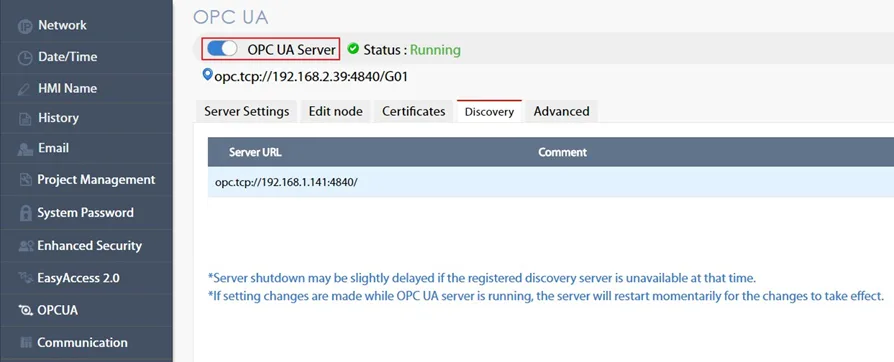
- Enter HMI’s IP address in the web browser, and enter the password to log in. Open OPC UA settings page and restart OPC UA Server. Please note that OPCUA settings tab is only supported on cMT Gateway Series models.
Tag Settings
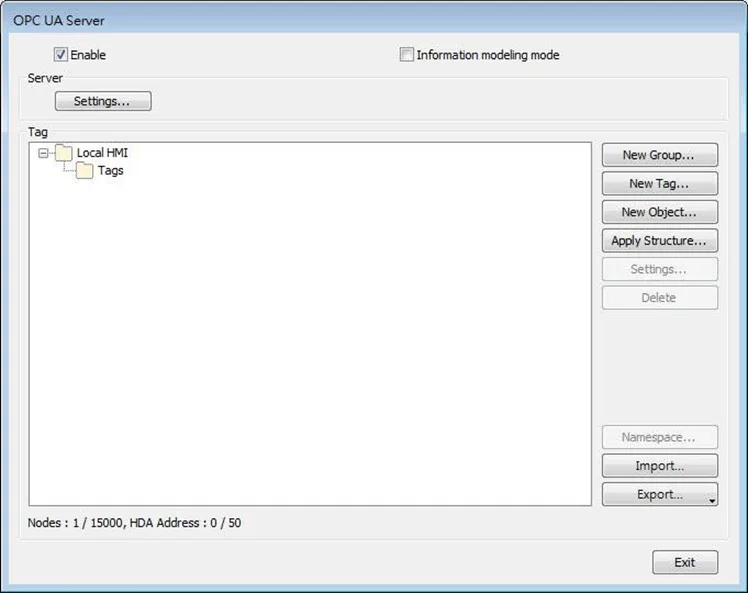
| Setting | Description |
|---|---|
| New Group | Add a new group for managing tags. |
| New Tag | Add a new tag for the client to monitor or control. The name must be specified, and the address can be Readable or Writeable. History(HDA) Enable OPC UA HDA. |
| Apply Structure | Structured node set under a device can be added, only if the device is a symbolic PLC and has structured data type defined. After clicking OK in the Apply Structure window, a prompt window shows asking whether to create nodes that do not exist in the OPC UA node tree. |
| Settings | Set an existing group or tag. |
| Delete | Delete an existing group or tag. |
| Import | Import a tag file. Applicable import formats include: *.xlsx, *.xls, *.csv, *.xml |
| Export | Export current tags. Applicable export formats include: Excel format or XML format. |
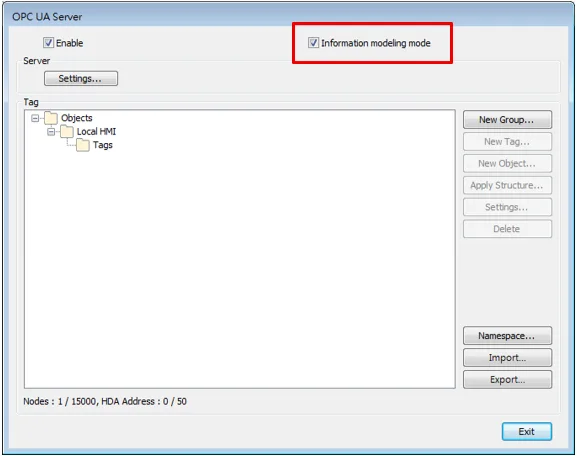
Tag – Information Modeling Mode
| Setting | Description |
|---|---|
| New Group | Add a new group for managing tags. A Node ID can be defined. |
| New Tag | Add a new tag for the client to monitor or control. Two types of tags can be added: Data Variable and Property. Data Variable: The data collected by the device. New tags, either data variable or property, can be added under a data variable. Property: The parameters of the device. No new tags can be added under a property.The name must be specified, the address can be Readable or Writeable, and a Node ID can be defined. History(HDA) Enable OPC UA HDA. |
| New Object | Add an object in the Object Types list. The name must be specified. |
| Apply Structure | Structured node set under a device can be added, only if the device is a symbolic PLC and has structured data type defined. After clicking OK in the Apply Structure window, a prompt window shows asking whether to create nodes that do not exist in the OPC UA node tree. |
| Settings | Set an existing group or tag. |
| Delete | Delete an existing group or tag. |
| Namespace | Object types of a device can be added to or deleted from this list. |
| Import | Import a tag file. Applicable import formats include: *.xlsx, *.xls, *.csv, *.xml |
| Export | Export current tags. Applicable export formats include: Excel format or XML format. |
Notes:
- When downloading the project file to HMI, please make sure that the HMI time and time-zone settings are correct. Otherwise, the client program may not be able to authenticate, and the communication may fail due to authentication error caused by incorrect certificate valid time.
- Changing from Information Modeling Mode back to general mode is possible but please note that the node definition will be lost by doing so.
Device Statistics
Device-specific statistical data can be found in “Statistics” node, as shown below:
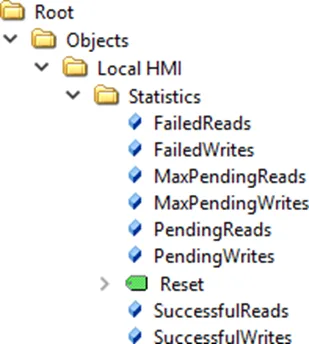
| Node Name | Description |
|---|---|
| FailedReads | No. of failed read commands. If it is not zero, there may be communication errors. |
| FailedWrites | No. of failed write commands. If it is not zero, there may be communication errors. |
| MaxPendingReads | Max. no. of pending read commands. |
| MaxPendingWrties | Max. no. of pending write commands. |
| PendingReads | No. of pending read commands in the queue. If the number stays high for a long time, it means the communication module is not able to process all commands in time. OPC UA nodes may update slower. Under extreme circumstances (e.g. >30), OPC UA node may not update in a long time. |
| PendingWrites | No. of pending write commands. Write commands have higher priority than read commands. If PendingWrites stays high, it will affect read commands. |
| Reset | Reset all statistical data. |
| SuccessfulReads | No. of successful read commands. |
| SuccessfulWrites | No. of successful write commands. |
Limitations
| Item | Description |
|---|---|
| OPC UA Profile | UA 1.02 Standard UA Server Profile, including but not limited to: * Core Server Facet * UA-TCP UA-SC UA-Binary * SecurityPolicy – None * Enhanced DataChange Subscription Server Facet * Standard DataChange Subscription Server Facet * Embedded DataChange Subscription Server Facet * User Token – X509 Certificate Server Facet * User Token – User Name Password Server Facet * Standard DataChange Subscription Server Facet * Embedded DataChange Subscription Server Facet See Profile Reporting Visualization Tool by OPC Foundation for more details. |
| Security Policies | None Basic128Rsa15 Basic256 Basic256Sha256 |
| Number of Nodes | 15 000 |
| Max. array size | 255 |
| Read Cache | 100ms (Cache will be used for 100ms from previous read) |
| Max. client sessions | 100 |
| Max. subscription per session | 64 |
| Min. publishing interval | 100ms |
| OPC UA HDA | Supports up to 50 node addresses with each node address can storing up to 10000 HDA data records. What constitutes a node address? Each HDA-enabled node is considered to take up the number of node addresses that is equal to the Element Count setting. If the data type is String, it is the No. of word setting instead. When the remaining space in HMI memory is less than 10%, the system will delete the earliest data and store the latest data. The system will stop deleting data when the remaining space increases exceeding 10%. |
| Max Read/Subscribe * | Built-in registers (e.g. LW): 27000 words/second (WPS) |
| Throughput * (Security: None) | MODBUS RTU@9600bps: 500 WPS MODBUS RTU@115200bps: 4000 WPS MODBUS TCP/IP: 10000 WPS Tested Environment EBPro version: V6.02.02.242 cMT-G02 OS version: 20180917 Test uses as many as words as possible in one node (using array) to optimize reading. |
* These performance values may vary depending on the EasyBuilderPro version and hardware version of the HMI
Note:
- Examples showing how to count OPC UA HDA node addresses:
- If there are 50 nodes (node1, node2…node50) and each node maps to one bit only(Element Count is 1), all the nodes altogether takes up 50 node addresses.
- If a node maps to a 16-bit unsigned array of size 50 (which is when Element Count is 50), every element in the array takes up a node address, so the number of node addresses taken by this node is 50.
- If a node maps to a string where No. of word is set to 50, the number of node addresses taken by this node is 50.