
Overview & Concepts
The Time Synchronization and Daylight Saving Time (DST) features in EasyBuilder Pro ensure that the HMI maintains accurate system time for use in alarms, logs, historical data, and other time-dependent functions. The HMI system clock can be synchronized with external time sources to maintain consistency across connected devices and records. Accurate timekeeping is important for maintaining reliable timestamps in Event Logs, Operation Logs, data sampling records, and other historical information generated by the HMI.
Time synchronization can be configured through system settings so that the HMI automatically aligns its internal clock with a designated reference source. Typical synchronization options include:
- Manual configuration of the HMI system clock
- Synchronization with a connected PLC or device
- Synchronization with a network time source
These synchronization methods help ensure that all time-based data recorded by the HMI remains consistent with the rest of the control system.
Daylight Saving Time (DST) settings allow the HMI to automatically adjust its system clock according to regional DST rules. When enabled, the system shifts the clock forward or backward at the configured start and end times of the DST period. This adjustment occurs automatically and helps maintain correct timestamps for alarms, events, and logged data without requiring manual intervention.
Implementation
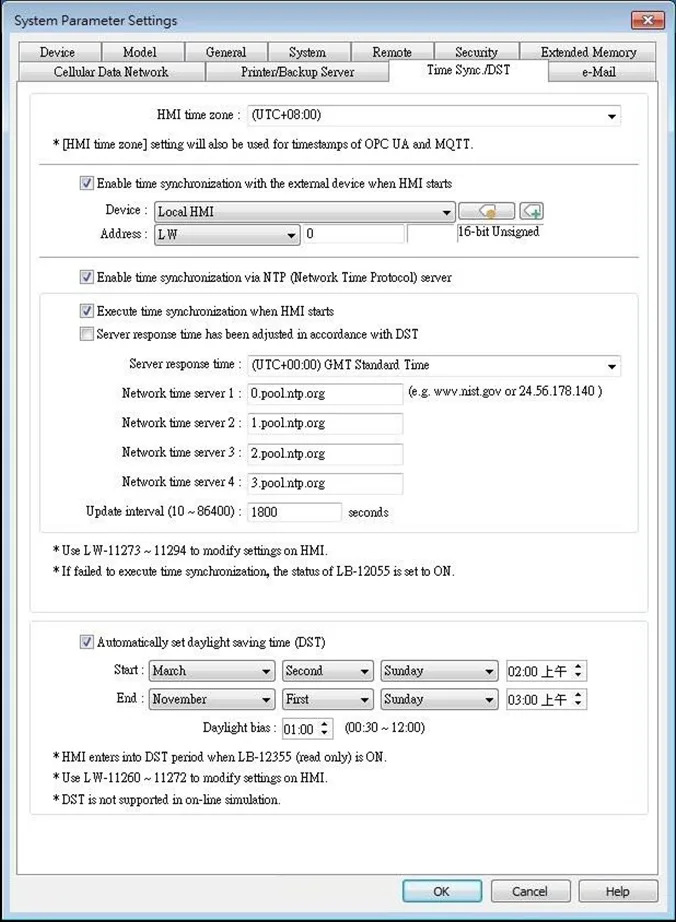
Within the EasyBuilder Pro System Parameters menu, navigate to the [Time Sync/DST] tab to configure this feature:
| Setting | Description |
|---|---|
| HMI time zone | Select HMI time zone. |
| Enable time synchronization with external device when HMI starts | Automatically synchronizes HMI time with the designated source address when HMI starts. As shown in the settings above, the time source is set to D address of the device Mitsubishi FX5U, so 6 consecutive word addresses starting from D-0 will be the source addresses and each of them should contain time information as follows: D-0 → Second (range: 0~59) D-1 → Minute (range: 0~59) D-2 → Hour (range: 0~23) D-3 → Day (range: 1~31) D-4 → Month (range: 1~12) D-5 → Year (range: 1970~2037) |
| Enable time synchronization via NTP (Network Time Protocol) server | Execute time synchronization when HMI starts Automatically synchronizes HMI time with the designated NTP server when HMI starts. Server response time Select NTP server time zone. Network time server Provides four fields to fill in Network Time Servers for user’s device. If the synchronization with server 1 fails, the system will try to synchronize with server 2, and so on. If HMI time cannot synchronize with any of the Network Time Servers, the system register LB-12055 will change to ON status. Update interval The frequency of synchronization, the range is from 10 to 86400 seconds. |
| Automatically set daylight saving time (DST) | Start / End Set the start/end of Daylight Saving Time. The option [Last] may refer to the 5th or 6th week depending on the selected month. Daylight bias Set the time zone’s offset during DST. |
Notes:
- When the Network Time Server is configured with a static IP address, write/control operations can be performed using addresses LW-11278 to LW-11293. However, if the Network Time Server is configured with a domain name, modifying the IP address of the Network Time Server via addresses LW-11278 to LW-11293 is not supported.
- When DST ends, and the time falls back, the Trend Display object in Real-time mode will stop refreshing for the overlapping hour(s) when it just going back to standard time. However, historical data will not be affected.
- When DST ends, adjusting HMI time (manually or by network) back to the DST period will not be effective to the system. The system register LB-12355 stays OFF.
- When DST ends, and the time falls back, the system will not start DST for the overlapping hour(s). The system register LB-12355 stays OFF.
- Before DST starts, adjusting HMI time (manually or by network) into the DST period will start DST. The system register LB-12355 will be set ON. The HMI time will be the specified time without adding the offset.
- During DST, adjusting HMI time (manually or by network) to a time that is not within DST period will end DST. The system Register LB-12355 will be set OFF. The HMI time will be the specified time without subtracting the offset.
- This feature does not yet support the DST in Southern Hemisphere