
Overview & Concepts
The PDF Reader function in EasyBuilder Pro allows PDF documents to be displayed directly on the HMI during runtime. Operators can open files stored on supported media such as local storage, USB drives, or SD cards. It is commonly used to provide access to manuals, drawings, or work instructions without requiring an external PC.
The PDF Reader is a display-focused object and does not process register data. It presents stored documents within the HMI interface and can be configured to open defined file paths as part of the project. Typical uses include viewing machine documentation, maintenance instructions, or reference materials directly from the HMI environment.

Implementation
Click the PDF Reader icon on the toolbar to create a PDF Reader object.
Or, click [Object] » [Media] » [PDF Reader] in the menu.
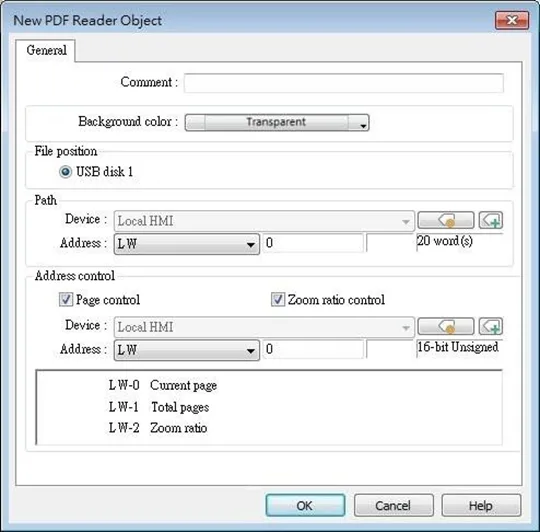
| Setting | Description |
|---|---|
| File position | Select the position where the PDF file is stored. |
| Path | The directory of the PDF file stored in the external device. |
| Page Control | Current page The page number of the current page. Set a value to change the current page. Total pages Total number of pages of the PDF file. |
| Zoom ratio | Current zoom ratio. Set a value to change the zoom ratio. Unit: %; i.e., the number 100 indicates 100% display (1:1). |
Notes:
- PDF Reader cannot be opened using simulation mode or cMT Viewer.
- The PDF files protected by passwords or restrictions cannot be read using PDF Reader.
- CPU loading may rise when multiple PDF Reader objects are opened simultaneously.
- When entering a page number in the Page Control register under multi-page view mode, the specified page will be opened in single-page view.
- Two-finger zoom in / out gestures are supported on capacitive touchscreens.