
Overview & Concepts
The Data Transfer object in EasyBuilder Pro is a configuration-based tool used to copy blocks of register data between devices, between an external device and internal HMI memory, or simply to rearrange data in a specific fashion inside of local device memory. It supports both Word (16-bit) and Bit-level transfers and operates by defining a source device and address range, a destination device and address range, a data length, and an execution condition. When the defined condition is met, the HMI copies a continuous range of registers from source to destination.
Data Transfers are block-based operations, not single-register moves. Each configuration includes:
- Source device and starting address
- Destination device and starting address
- Data type (Word or Bit)
- Transfer length (number of sequential registers)
- Execution mode
Typical block examples include:
- Maple Modular PLC D100–D109 → Local HMI LW-200–LW-209
- Local HMI LW-100–LW-109 → LW-300–LW-309
Because Local HMI memory (LW – Local Words/LB – Local Bits) can be selected as both source and destination, transfers can be performed entirely within the HMI. This allows:
- Testing execution modes without PLC hardware
- Verifying correct address ranges and transfer length
- Staging calculated values before logging or trending
- Reorganizing internal memory structures
Execution mode defines when the transfer occurs:
Per-Page Transfer
- Runs only while the associated window is active
Global Transfer
- Runs independently of screen visibility
- Can be configured as:
- Time-based (periodic interval execution)
- Bit-triggered (executes when a defined control bit turns ON)
Time-based transfers support periodic synchronization. Bit-triggered transfers support event-driven actions.

Implementation (Per-Page)
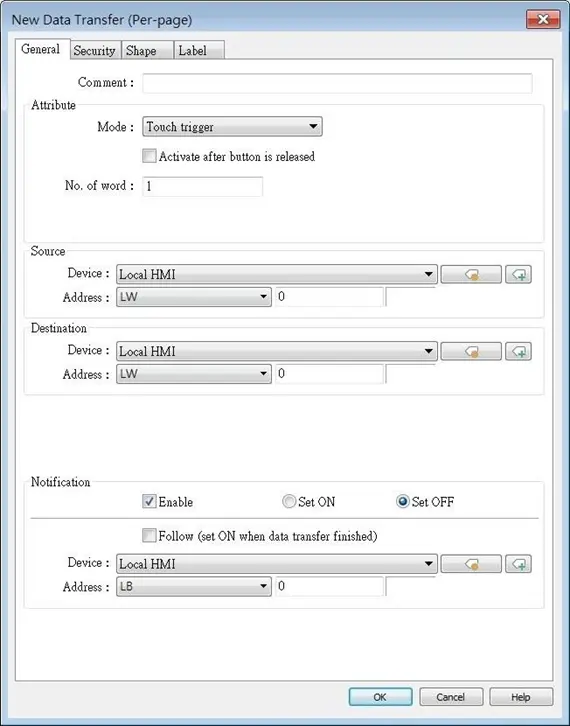
Click [Object] » [Data Transfer] » [Data Transfer (Per-page)] icon on the toolbar to open the property dialog box. Set up the properties, press OK button, and a new Data Transfer (Per-page) object will be created.
| Setting | Description |
|---|---|
| Source address | Data Transfer object reads the data from [Source Address]. |
| Destination address | Data Transfer object writes the data to [Destination Address]. |
| Attribute | No. of word Enter the number of words to be transferred. Unit: word. Mode Touch trigger Press the object to activate data transfer operation. External trigger The data transfer operation is activated when the state of the designated bit address changes.There is a further selection to make of whether the data transfer operation is activated after OFF to ON, ON to OFF transition, or at both of the changes of state. |
| Trigger address | Specify a bit address for [External trigger] mode. |
| Notification | When enabled, the system will set the designated address ON or OFF when it’s ready for data transfer. Follow The notification bit will reset to its original state once the system finishes data transfer. |

Implementation (Global – Time Based)
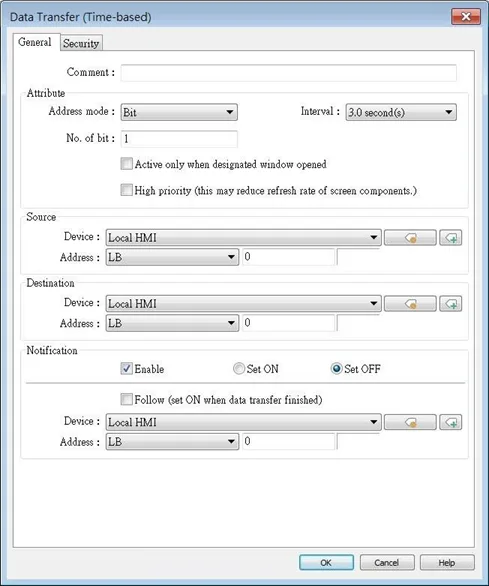
Click [Object] » [Data Transfer] » [Data Transfer (Global)] icon on the toolbar and open the Time-based tab. Click [New] and set up the properties, press OK button, and a new Data Transfer (Global) object will be created. Please note that the data should be imported / exported separately in Time-based mode and Bit Trigger mode of Data Transfer (Global).
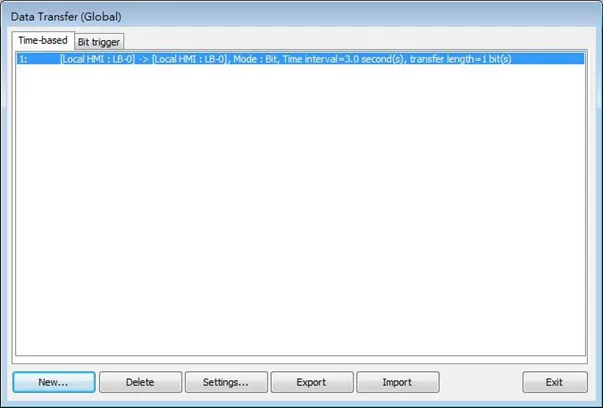
Click the [New] button in the Data Transfer management dialog box.
| Setting | Description |
|---|---|
| Attribute | Address mode Select the data type to be transferred from [Bit] or [Word]. No. of bit /No. of word When [Bit] is selected in [Address mode], set the number of bits transferred each time when data transfer is triggered.When [Word] is selected in [Address mode], set the number of words transferred each time when data transfer is triggered. Interval Select the time interval of data transfer; for example, when 3 seconds is set, the system will transfer data every 3 seconds. Specifying a shorter time interval or a greater amount of data to transfer may decrease overall system performance; therefore, a longer time interval or a smaller amount of data to transfer is recommended. When a short interval is inevitable, please at least set an interval longer than the time needed for data transfer operation; for example, when the data transfer operation takes 2 seconds, the interval must be longer than 2 seconds. Activate only when designated window opened Data Transfer object transfers data only when the designated window is opened. High priority Assign a higher priority level for this data transfer. Please note that this could result in a reduced screen refresh rate. |
| Source address | Data Transfer object reads the data from [Source Address]. |
| Destination address | Data Transfer object writes the data to [Destination Address]. |
| Notification | When enabled, the system will set the designated address ON or OFF when it’s ready for data transfer. Follow The notification bit will reset to its original state once the system finishes data transfer. |
Implementation (Global – Bit Triggered)
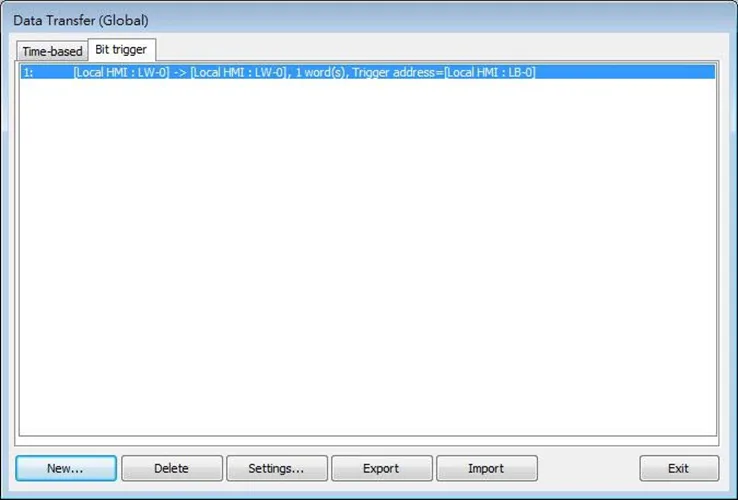
Data Transfer (Global) object in Bit Trigger mode transfers data from the source address to the destination address when HMI detects that the state of the designated bit address changes.
Click [Object] » [Data Transfer] » [Data Transfer (Global)] icon on the toolbar and open the Bit Trigger tab. Click [New] and set up the properties, press OK button, and a new Data Transfer (Global) object will be created. Please note that the data should be imported / exported separately in Time-based mode and Bit Trigger mode of Data Transfer (Global).
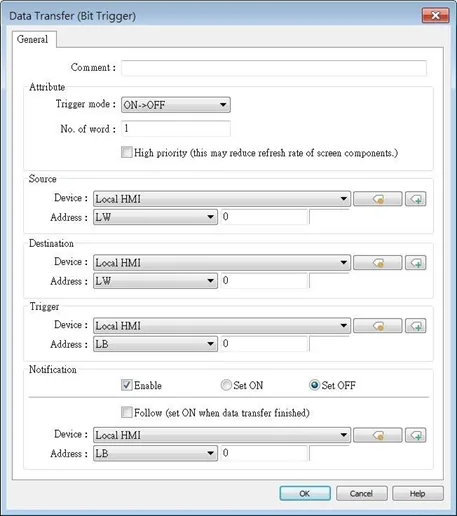
| Setting | Description |
|---|---|
| Attribute | Trigger mode Trigger data transfer when the state of the designated register changes from OFF to ON, ON to OFF, or at both changes of state. No. of word Set the number of words transferred each time when data transfer is triggered. High priority Assign a higher priority level for this data transfer. Please note that this could result in a reduced screen refresh rate. |
| Source address | Data Transfer object reads the data from [Source Address]. |
| Destination address | Data Transfer object writes the data to [Destination Address]. |
| Trigger address | Set the address used to control data transfer and select the trigger mode. |
| Notification | When enabled, the system will set the designated address ON or OFF when it’s ready for data transfer. Follow The notification bit will reset to its original state once the system finishes data transfer. |