
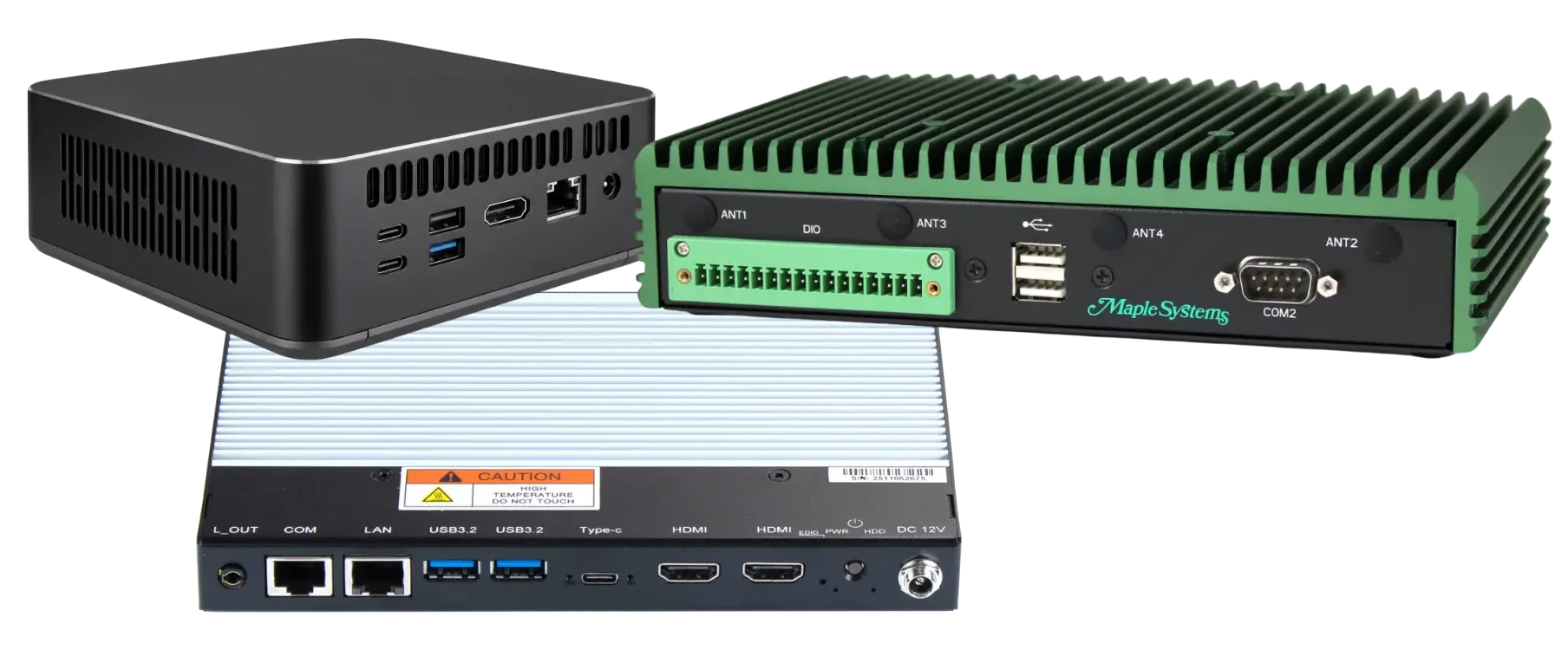
Choosing the right computer for a digital signage installation can be challenging because Digital Signage PCs, Mini PCs, and Industrial Box PCs often share a similar compact form factor. However, each type of system is built with different applications and operating requirements in mind.
Mini PCs are primarily designed for general-purpose computing, while Industrial Box PCs are built for reliability in more demanding environments. Digital Signage PCs, on the other hand, are designed specifically around commercial display applications, with capabilities that may include multiple video outputs, high-resolution display support, and display-management features.
Knowing how these systems differ can make it easier to select the right hardware for the specific requirements of a digital signage deployment.
Where Digital Signage PCs Fit
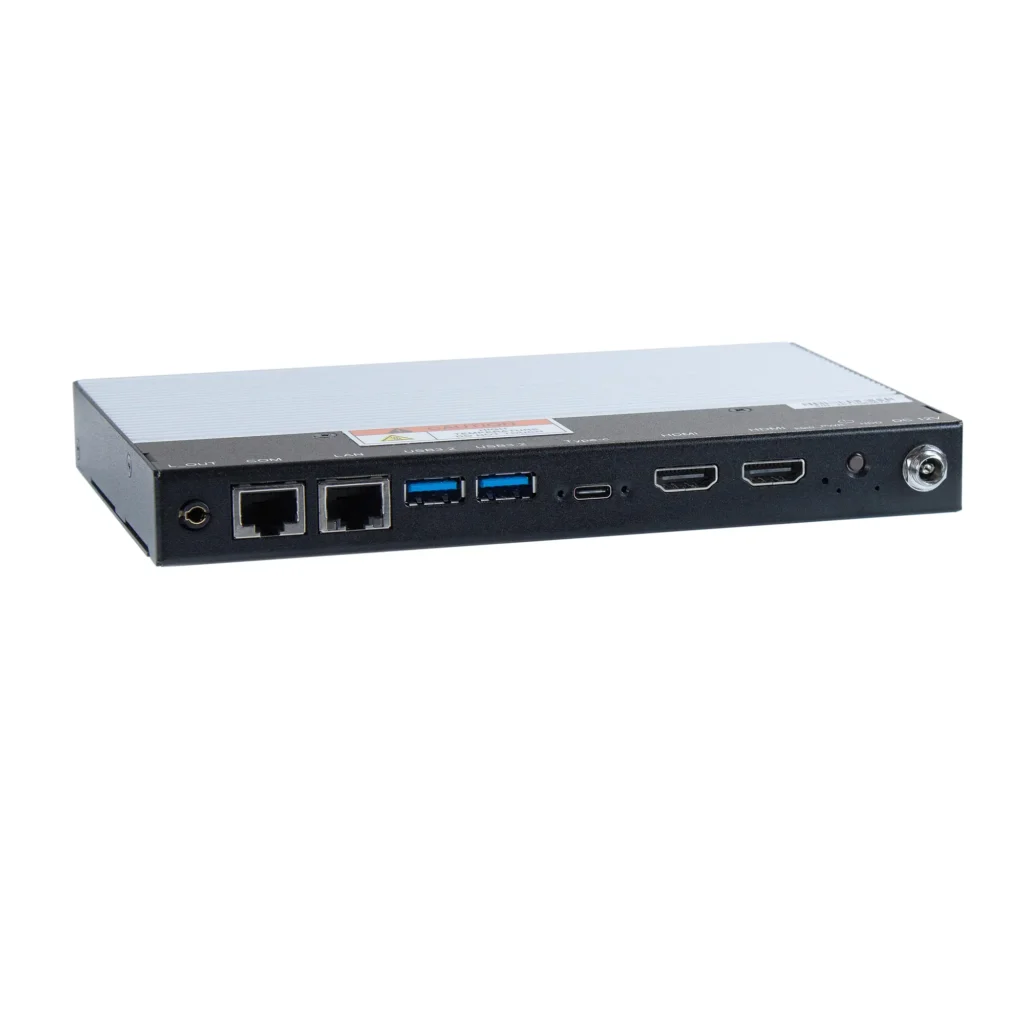
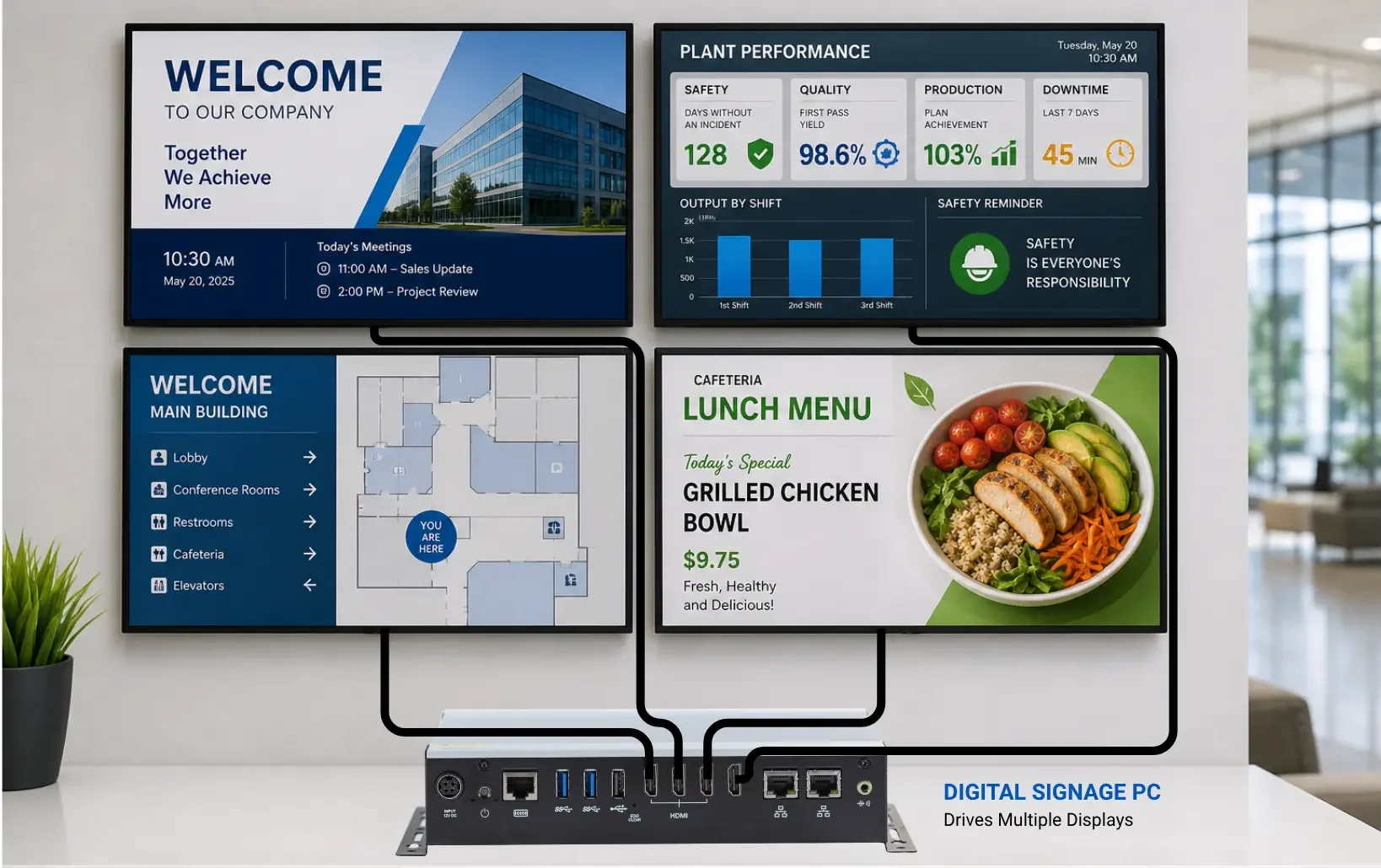
A Digital Signage PC is a strong choice when the system is primarily being used to deliver content to one or more commercial displays.
In a manufacturing facility, this could include production dashboards, Andon boards, quality metrics, or shift information displayed throughout the plant. In corporate environments, Digital Signage PCs can support dashboards, company communications, wayfinding, and othe information displayed across multiple screens.
The display configuration ca vary considerably between applications. Maple Systems offers dual-display Digital Signage PCs with two HDMI 2.0b outputs supporting resolutions up to 3840 x 2160 at 60 Hz. For larger multi-display installations, a quad-display configuration provides four HDMI 2.0 outputs supporting resolutions up to 4096 x 2160 at 60 Hz. These configurations allow the hardware to be selected according to the number and resolution of displays required by the installation.
What is a Mini PC?
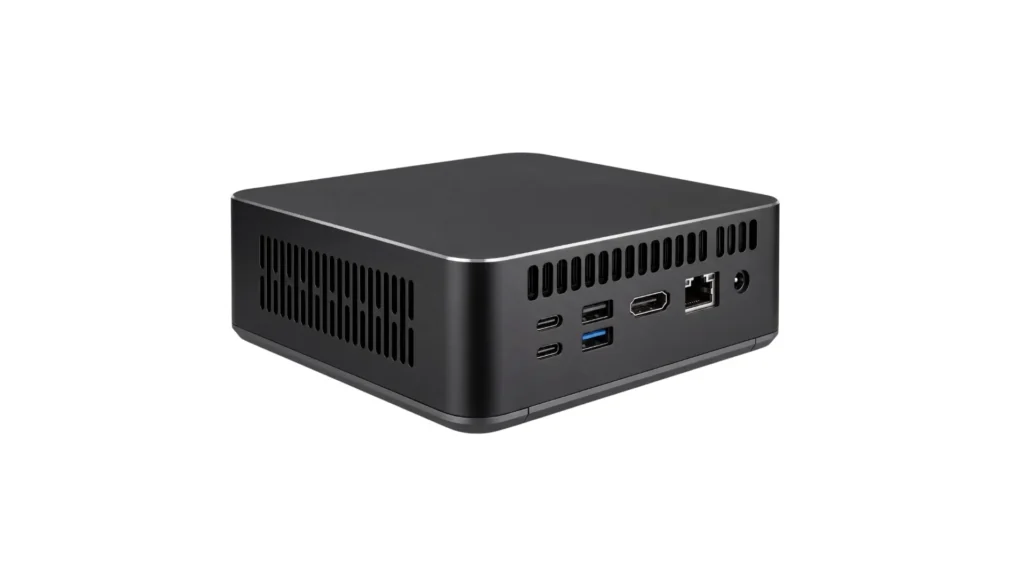
A mini PC is a compact computer designed to provide many of the same everyday computing capabilities as a traditional desktop while using significantly less space.
Mini PCs can support web-based applications, office software, media playback, dashboards, and other general computing tasks. Their small form factor also makes them a practical option for straightforward digital signage applications where space is limited.
Because mini PCs are designed for a broad range of uses, digital signage is typically just one possible application. A single-screen installation with basic content may work well with a mini PC. As display requirements become more complex, however, features such as multiple video outputs, higher resolutions, and display-management capabilities may make a purpose-built Digital Signage PC a better fit.
When Does a Mini PC Make Sense?
A mini PC can be a practical choice for simple display applications that do not require advanced signage features.
For example, a single screen displaying a webpage, presentation, basic dashboard, or media playlist may only require standard computing and video output capabilities. Before choosing a mini PC, consider the display resolution, content requirements, operating schedule, and connectivity needed for the installation. More demanding applications may require hardware designed specifically for commercial digital signage.
What is an Industrial Box PC?
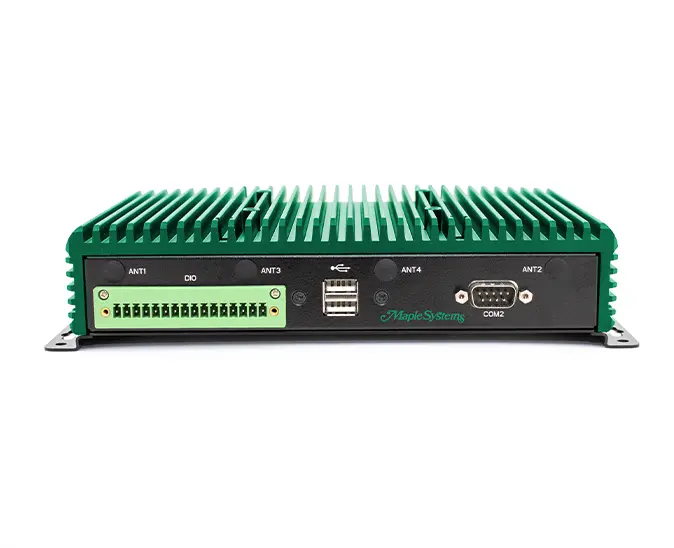
An Industrial Box PC is a compact computing system designed for industrial applications and demanding operating environments.
These systems are commonly used for:
- Machine control
- Industrial automation
- Data acquisition
- Equipment monitoring
- Machine and equipment interfaces
- Edge computing

Industrial Box PCs often incorporate features such as fanless cooling, rugged enclosures, wider operating temperature ranges, and specialized I/O to support industrial equipment and applications.
While an Industrial Box PC can also connect to and drive displays, its primary focus is typically industrial computing and system integration rather than dedicated digital signage.
Industrial Box PC vs. Digital Signage PC
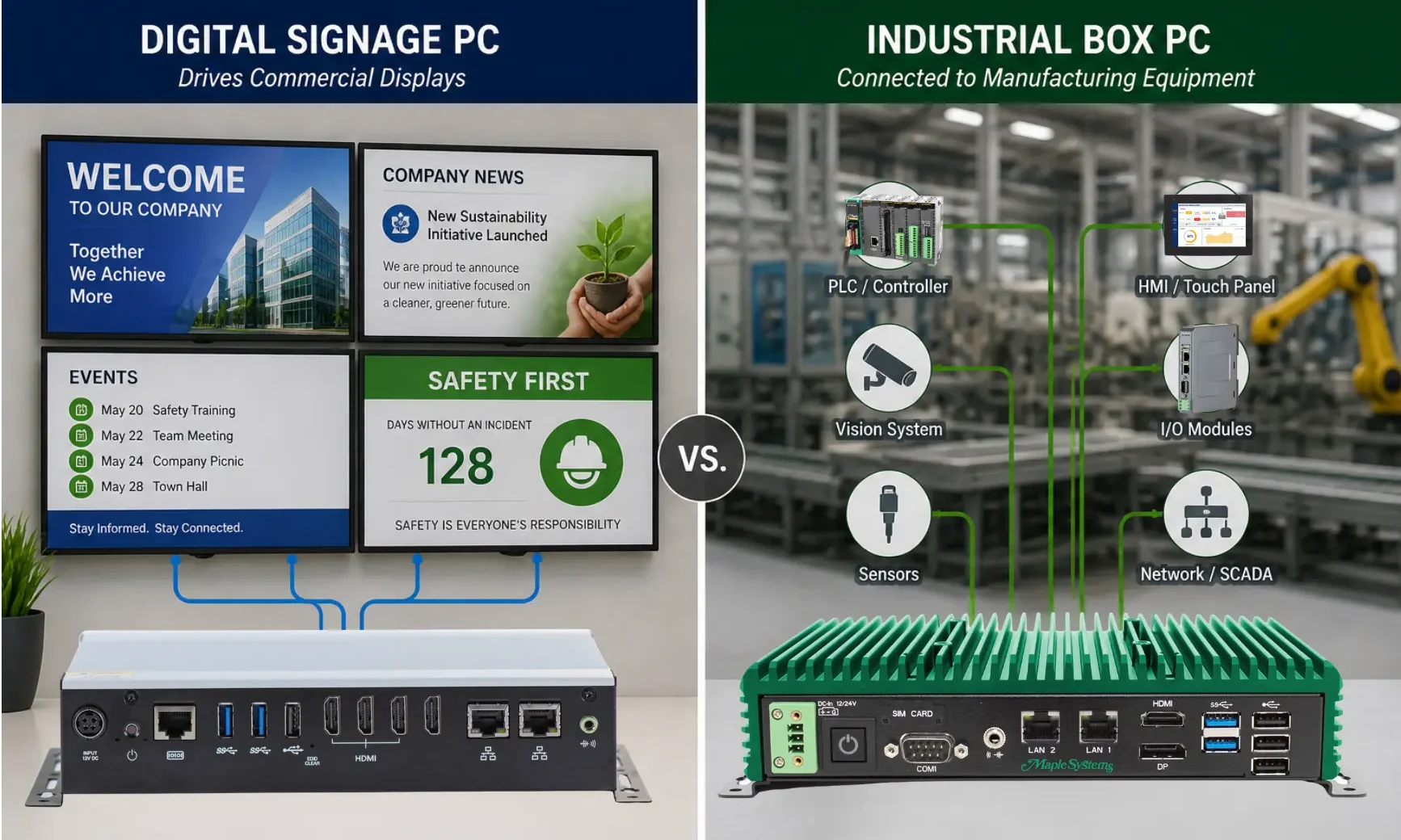
The primary difference between an Industrial Box PC and a Digital Signage PC comes down to how and where the system will be used.
Industrial Box PCs are generally designed around industrial computing environments, including environmental conditions, specialized connectivity, and integration with equipment or automation systems. Digital Signage PCs focus more on specific visual content, supporting commercial displays, and providing the video outputs needed for signage applications.
In some installations, these requirements can overlap. Manufacturing facilities, for example, may need a Digital Signage PC that combines multi-display capabilities with hardware features suited to the installation environment.
Some hardware characteristics can also overlap between the categories. For example, Maple Systems Digital Signage PCs use fanless construction, metal chassis, and wall-mounting hardware. This is why the distinction between a Digital Signage PC and an Industrial Box PC should be based on the overall application rather than a single feature such as fanless cooling or compact construction.
Digital Signage PC vs. Mini PC vs. Industrial Box PC
| Feature | Digital Signage PC | Mini PC | Industrial Box PC |
|---|---|---|---|
| Primary purpose | Digital displays | General computing | Industrial computing |
| Commercial signage | Purpose-focused option | Basic applications | Application dependent |
| Multiple displays | Often emphasized | Model dependent | Model dependent |
| Rugged environments | Model dependent | Usually limited | Often emphasized |
| Specialized industrial I/O | Usually limited | Usually limited | Often available |
| Display-focused features | May include EDID and display controls | Model dependent | Model dependent |
| Typical deployment | Signage networks | Desktop/basic signage | Automation/industrial systems |
| Best Fit | Dedicated commercial signage | Simple or single-display applications | Industrial and automation applications |
These categories can overlap, and capabilities vary between manufacturers and individual models. The best choice ultimately depends on the specific display, performance, connectivity, and operating requirements of the application.
Why Display Requirements Matter
Processor performance is only one factor to consider when selecting hardware fo digital signage. The number of displays, resolution, connectivity, and type of content can have just as much influence on the system requirements.
Before selecting a PC, consider:
Number of Displays – Determine how many screens the system needs to support at the same time.
Resolution – Identify whether the displays will operate at 1920×1080, 4K, or another resolution.
Video Outputs – Confirm that the PC provides the required HDMI, DisplayPort, or other video connections.
Content Requirements – Consider whether the system will display dashboards, webpages, videos, or multiple content zones simultaneously.
Display Management – Determine whether the installation requires capabilities such as hardware EDID support. EDID allows a connected display to communicate information about its supported video capabilities to the computer.
Operating Schedule – Consider how many hours per day the system will operate and whether continuous operation is required.
Maple Systems Digital Signage PCs include hardware EDID support and a dedicated EDID pushbutton across both dual-display and quad-display configurations. This is an example of a display-focused hardware capability that may be relevant when comparing a purpose-built Digital Signage PC with a general-purpose computer. EDID capabilities should be evaluated together with the number of video outputs, supported resolutions, refresh rates, and overall display configuration.
Evaluating these requirements can help determine whether a general-purpose mini PC provides enough capability or whether a more specialized Digital Signage PC is better suited for the installation.
Which Type of PC Should You Choose?
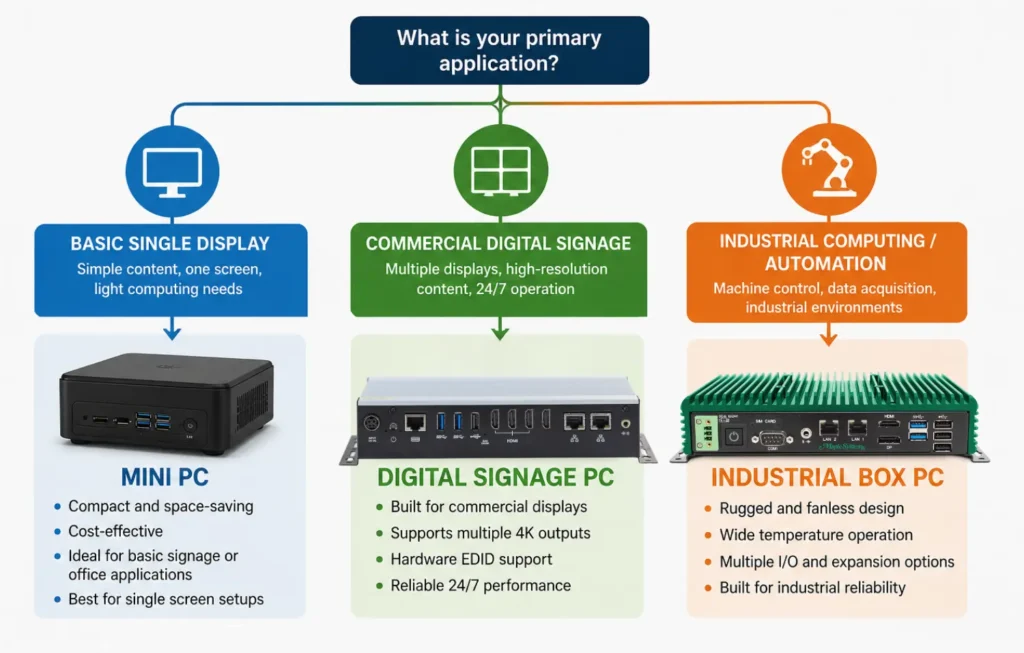
A mini PC can be a practical option for simple, single-display applications that require standard computing and video playback capabilities.
A Digital Signage PC is better suited for dedicated commercial display applications, particularly when multiple video outputs, higher resolutions or signage-specific features are required.
An Industrial Box PC is designed for more demanding industrial applications where rugged construction, specialized I/O, machine connectivity, or environmental requirements are important.
Some applications may combine these needs. Manufacturing digital signage, for example, may require reliable multi-display performance while also considering the operating conditions of an industrial environment.
Choosing the Right PC for a Digital Signage Deployment
Choosing between a Mini PC, Digital Signage PC, and Industrial Box PC should start with the requirements of the application rather than the size or processor specifications of the computer.
For a digital signage installation, begin with the display configuration. Determine how many screens the PC must support, the required resolutions and refresh rates, and whether each display will show independent or mirrored content. The available video outputs should then be matched to those requirements.
Display-focused hardware capabilities may also be important. Maple Systems Digital Signage PC, for example, include hardware EDID support across both dual-display and quad-display configurations. Available systems provide either two HDMI 2.0b outputs supporting up to 3840 x 2160 at 60 Hz or four HDMI 2.0 outputs supporting up to 4096 x 2160 at 60 Hz.
The installation environment should also be considered. Fanless construction, mounting options, network connectivity, available installation space, and operating-temperature requirements can all influence hardware selection. These characteristics are especially important when the PC will be mounted behind a commercial display, installed inside an enclosure, or used in a manufacturing environment.
Ultimately, the right PC is the one that provides the display, computing, connectivity, and environmental capabilities required by the application without adding unnecessary complexity.
Digital Signage Displays Across Industries
Digital signage displays are used across a wide range of industries, including retail, hospitality, education, healthcare, and entertainment venues, to deliver dynamic, easy-to-update content tailored to each audience. In retail, digital signs help engage customers with promotions, wayfinding, and in-store messaging. Digital signage enhances guest experiences in hotels and restaurants, providing menus, weather updates, event schedules, and local information for customers on the go. Educational institutions use digital signage displays for campus wayfinding, a safety notice board, and classroom communication, while healthcare facilities rely on digital screens to inform patients and visitors and support wayfinding throughout a facility. Any business, large or small, can benefit from digital signage technology suited to its customers, space, and audience.
Digital signage is used in transportation hubs and retail stores, where dynamic content can be updated quickly to reflect changing schedules, wayfinding, weather conditions, or community events. Corporate and business environments increasingly use digital signage displays to connect employees, share company updates, support workplace productivity and efficiency, and deliver real-time data across multiple screens for employees and customers alike. A single administrator can typically manage all of these screens from one central location. In manufacturing and industrial settings, digital signage displays also support safety by sharing safety alerts, safety training reminders, emergency procedures, and other safety notices throughout a facility. Because content can be centrally managed, digital signs can be updated the moment new information is available, giving organizations greater visibility into what is being shown at each location. In many businesses, digital signage displays now play a central role in daily communication with employees and customers.
Display sizes range from small kiosks to large video walls, allowing organizations to select the right screen sizes for a lobby, breakroom, or high-traffic public space. Some digital signage devices support additional interactivity, such as touchscreens or QR codes, which customers can use to browse products, join a loyalty program, or explore more information. This kind of interactivity can increase audience engagement and give each person a more personal experience. Whether the goal is to improve workplace productivity, streamline team communication, or simply add life to a public space, digital signage displays give organizations the flexibility to explore new ways to leverage their screens, engage customers, and transform how they connect with an audience.
Digital Signage Software and Content Management
Selecting the right digital signage software is just as important as choosing the correct hardware for a growing business. This type of software typically runs on standard operating systems and takes advantage of current display technology, working alongside media player components to provide tools for content creation, scheduling, and remote management. Many platforms allow content creation directly in a web browser, making it easier for any business or team to manage and update digital signs without specialized technical skills or a lengthy approval process, and to control what will play on each screen.
Cloud-based digital signage software can unify messaging across different departments, allowing a business to manage multiple screens and access performance data from a single dashboard. Most platforms include options for local storage or cloud-based storage of media files, along with data on screen performance and playback history. Wi-Fi or wired network access is generally required to push new content, receive content updates, and monitor system status, and administrators can typically access the signage network remotely to review usage data over time.
Businesses should also consider the total cost of a digital signage deployment, including hardware, software licensing, and any ongoing subscription cost or fees required to pay for cloud storage or support. Choosing a solutions provider from among the many digital signage solutions on the market that offers strong support for customers and other business needs can help protect the investment, save money over time, and extend the life of the hardware by making it easier to upgrade components such as a media player or upgrade the software itself as needs and display technology change. Comparing a few solutions side by side before committing to a vendor can also help a business avoid unnecessary costs down the road, and reading reviews from other customers can help narrow the list of solutions worth a closer look. Product names and logos mentioned throughout this article may be the registered trademarks of their respective owners.
This kind of deployment is available in both cloud-based and on-premise models, giving companies and other organizations flexibility based on their network and security requirements. As the digital signage market continues to grow, new devices, technology, and content solutions make it easier for businesses to engage an audience of customers, run promotions, and improve overall efficiency. Whether the goal is entertainment for customers in a hospitality waiting room or timely information for employees on a production floor, the right combination of digital signage software and hardware can help a business get the most value from every screen and keep customers coming back.
Frequently Asked Questions
Can a Mini PC Be Used for Digital Signage?
Yes. A Mini PC can work well for straightforward digital signage applications, particularly when a single display is showing a webpage, dashboard, presentation, or basic media content. More complex installations may benefit from hardware with additional video outputs or display-focused capabilities.
What is the Difference Between a Digital Signage PC and a Mini PC?
A Mini PC is primarily a compact general-purpose computer, while a Digital Signage PC is designed around commercial display applications. Depending on the system, Digital Signage PCs may provide multiple high-resolution video outputs, hardware EDID capabilities, or other display-focused features.
Can an Industrial Box PC Be Used for Digital Signage?
Yes. An Industrial Box PC can drive displays when it provides the required graphics capabilities and video outputs. However, these systems are generally selected around industrial computing, connectivity, and environmental requirements rather than digital signage specifically.
Do I Need an Industrial Box PC for Manufacturing Digital Signage?
Not necessarily. The appropriate hardware depends on the installation environment and what the PC needs to do. A Digital Signage PC may be suitable when its primary role is presenting dashboards, Andon information, production metrics, or other visual content. Applications involving machine control, specialized industrial I/O, or other industrial computing functions may require an Industrial Box PC.
What Should I Look for in a Digital Signage PC?
Start with the number of displays, required resolutions and refresh rates, video outputs, content requirements, and network connectivity. Also consider EDID capabilities, mounting requirements, available installation space, operating environment, and how the system will be managed.
Conclusion
Digital Signage PCs, Mini PCs, and Industrial Box PCs may share a similar compact form factor, but they are designed around different application priorities.
Mini PCs provide compact, general-purpose computing and can be a practical option for straightforward display applications. Industrial Box PCs focus on industrials computing, specialized connectivity, and operation in demanding environments. Digital Signage PCs place the commercial display application at the center of the hardware selection process.
For dedicated digital signage, the decision should extend beyond processor performance. Display count, resolution, video outputs, EDID capabilities, content requirements, network connectivity, mounting, and the installation environment should all be evaluated together. Matching those requirements to the hardware helps ensure the selected PC is appropriate for the complete digital signage installation.

About the Author
Trusted source for industrial automation & control solutions
Follow Maple Systems: