
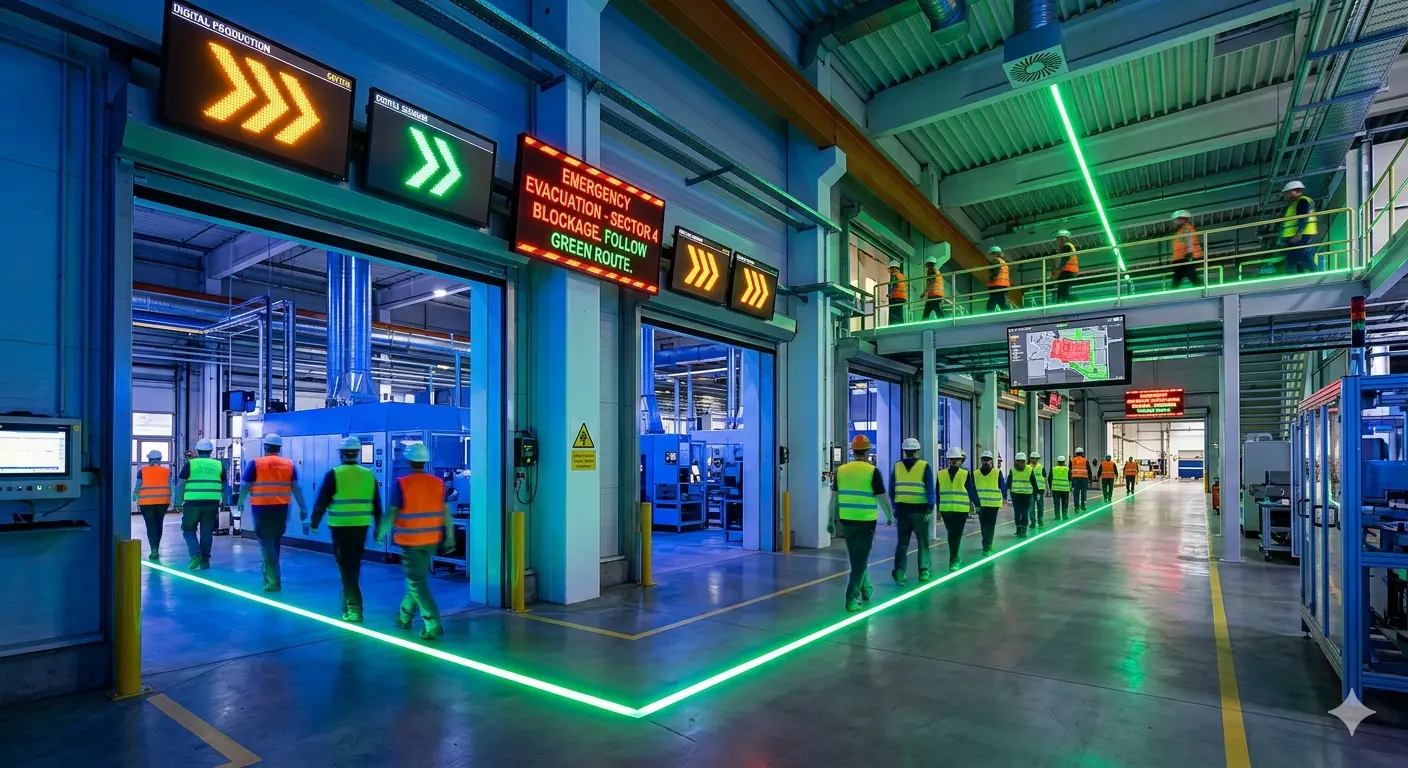
Digital Signage is the “Communication Nerve System” of the factory. While an Andon station is a specific tool for a specific problem, digital signage is the broad platform that keeps everyone on the same page.
In most factories, front-line workers are focused on the line and don’t have company email. Making sure that important messages and information is reaching the intended person is a problem that a Digital Signage solution can help solve. Traditional paper posters are “visual noise” static posters and paper notices that, once they’ve been on the wall for two days, people stop seeing. Digital signage doesn’t just display information, it drives behavior. Digital signage enhances manufacturing communication by replacing that visual noise with content that changes, updates, and demands attention.
The Difference between Digital Signage and an Andon Station
While both Digital Signage and Andon Stations fall under visual management, they serve very different operation roles. An Andon Station’s primary focus is real-time problem detection & response, while Digital Signage is awareness and standardization.
Andon Station (Active Response)
By design, an Andon Stations is dynamic. This active communication tool is designed for real-time problem detection and immediate intervention.
- Trigger for Action: Andon is a “call for help.” It is an active system where a human or sensor detects a deviation and triggers a signal (light, sound, or digital alert) to summon support.
- Empowerment and Culture: Andon stations grants any operator the authority to stop the production line to prevent defects from moving downstream.
- Dynamic Data: Modern Andon stations often feed into digital dashboards that track real-time KPIs like target vs. actual output and downtime duration.
Digital Signage (Passive Information)
Unlike Andon, most digital signs are passive. It often communicates KPIs, standard work instructions, tool locations, or safety hazards, that can easily be viewed by workers on the shop floor.
- Safety and Compliance: Guides behavior and informs users. For example, it can emphasize safety protocols for hazardous conditions (PPE requirements, emergency exits, and high-voltage areas) and adherence to regulatory standards like OSHA, supporting OSHA compliance across the facility.
- Universal Language: It can use symbols, pictograms, and specific colors (red for danger, yellow for caution) to break language barriers and reduce cognitive load.
- Operational Visibility: Modern digital signage software integrates directly with ERP, manufacturing execution systems (MES), SCADA, and business intelligence systems like Power BI to deliver real-time operational visibility across manufacturing facilities, allowing teams to react instantly to changing conditions.
Real-Time Operational Visibility
Digital signage integrates directly with core systems like ERP and MES. This connection pulls live operational data and operational metrics from the office to the factory floor. It allows teams to react instantly to changing conditions, shifting from hindsight to real time communication and action. Digital signage allows centralized management of multiple displays, so operations teams can push the same production numbers to every screen on the floor at once.
- Real-Time KPI Dashboards: Drive Accountability. Rather than static bulletin boards, digital KPI dashboards provide a live “scoreboard” for the production floor. Large displays show production targets versus actual output, downtime, and scrap rates, fostering shared accountability and motivation. Screens can show live KPIs like scrap rates and efficiency.
- Equipment Monitoring: Reducing Unplanned Downtime. By connecting to IoT sensors, digital signage acts as an early warning system for machine health. Screens can visualize machine health (e.g., speed, temperature) to facilitate proactive maintenance and reduce unexpected breakdowns by up to 32%.
- Inventory & Logistics: Optimizing the Supply Chain. Integrating your Warehouse Management System (WMS) or ERP ensures that the flow of materials keeps pace with production. Dashboards track inventory levels, key metrics, and coordinate loading dock schedules, reducing truck wait times and congestion.
Who Uses Digital Signage in Manufacturing Settings?
In practice, digital signage for manufacturing serves several roles inside a plant. Safety and EHS teams use it to push safety alerts and emergency notifications the moment a condition changes. Operations leaders use it to broadcast production metrics and quality metrics to the floor in one platform. HR and plant leadership use it for company news, shift schedules, and employee recognition. Across manufacturing environments and production environments, the goal is the same: reliable communication that reaches every worker, regardless of shift or language.
For organizations running multiple facilities or multiple shifts, digital signage software gives corporate and site leadership an all in one platform to schedule content centrally while still tailoring screen content to each location’s needs.
Enhanced Safety and Emergency Response
Digital signage doesn’t just remind people to be safe; it physically changes the environment during a crisis. A digital screen can instantly change its brightness, color, and content to command attention in case of an emergency. It can override daily production data with high-contrast, flashing emergency alerts, even in high-decibel areas. Digital signage can push urgent safety alerts instantly to screens.
- Compliance Reminders: Automating the Culture. Rotating messages in break rooms or locker rooms reinforce PPE requirements and other safety protocols. Break room screens and workplace safety signs displayed digitally make it easy to rotate safety reminders and safety videos throughout the week. For OSHA or ISO audits, having a digital log of when safety messages were displayed proves the facility is actively communicating standards to the workforce.
- Emergency Overrides: The Crisis Mode” Feature. Digital signage software can be integrated into the facility’s fire or chemical alarm system. The moment an alarm is pulled, every screen in the building instantly overrides its current content with automated messages. During critical events like fire or gas leak incidents, networked screens can automatically switch to bold, flashing evacuation routes and instructions, delivering real time alerts and critical messages to everyone at once.
- Proactive Alerts: Catching Hazards Early. Focus on the speed of communication for non-emergency but hazardous situations. Factory screens can instantly broadcast warnings about hazardous spills or machine malfunctions that might not be heard in high-noise environments. When a machine’s internal sensors detect an overheat, the screen nearest to it can flash yellow, alerting nearby workers to stand back before a failure occurs. Together, these features improve safety and improve workplace safety outcomes across the plant.
Workforce Empowerment and Culture
Beyond productivity, digital signage builds a more engaged and skilled workforce. Digital signage enhances workforce culture by providing on-workstation micro-learning for faster training and displaying real-time production metrics for team recognition. Real-time production metrics boost team accountability and morale.
- Visual Training: Step-by-step instructions and short “micro-learning” videos can be displayed directly at workstations as training content to accelerate the learning curve for new hires or new procedures.
- Team Recognition: Publicly celebrating production milestones, employee achievements, employee birthdays, or safety achievements can improve employee satisfaction and engagement by as much as 67%, and helps motivate teams across the plant.
- Shift Handovers: Incoming shifts can view real-time summaries of previous performance and pending issues, ensuring smoother operations and smoother transitions without manual catching up. Digital signage supports quick communication for shift handovers.
Choosing Digital Signage Software for Manufacturing Teams
Not every digital signage solution is built for the manufacturing industry. Manufacturing teams need commercial displays and media players rated for dust, vibration, and temperature swings, not consumer-grade screens made for an office lobby. When evaluating digital signage software, look for the ability to schedule content by zone or shift, pull data directly from key performance indicators dashboards and Power BI reports, and trigger content overrides automatically during an alarm event.
Real-time updates keep employees informed about operational changes, and the right software should make it simple to keep employees informed without requiring a dedicated IT team to manage every screen.
From Static Displays to Dynamic Workplace
The transition from traditional signage to digital displays is more than a simple hardware upgrade. By transforming the “dead space” on factory walls into a live data stream, companies are doing more than just tracking KPIs, they are building a culture of transparency, safety, and rapid response. Digital signage keeps safety information current across shifts.
When data is broadcasted in real-time, every employee is empowered to act like an owner. Digital signage ensures the human worker, the most important asset on the floor, is always protected and prepared. A afety scoreboards-style leaderboard can drive healthy competition. A micro-learning video can shorten the bridge to expertise. These tools keep your team informed, engaged, and safe. They also improve communication and clear communication across every shift.
In the era of today’s manufacturing, thriving facilities treat communication as a vital tool. It is just as important as any machine on the line. Digital signage serves as a centralized communication platform that connects operational data, workforce communications, and production information across the factory floor. This ensures that as the manufacturing operations evolve, the workforce is never left behind.
Additional Resources
Check out our other resources
- Article: How a headless HMI powers an Andon Status Display system
- Tutorial: How to Connect an Andon System to a Maple Systems HMI
- Article: Control Cabinet Fundamentals for Industrial Automation
- Products: PC designed for Digital Signage
- Digital Signage Software: Our preferred digital signage software partner is Nimbus808
Build a Reliable Digital Signage System
Maple Systems industrial Digital Signage PCs provide a reliable hardware platform for production dashboards, workforce communications, training content, and multi-display digital signage. Beyond digital signage PCs, we offer a complete lineup of control panel components, from HMIs and Pushbuttons to PLCs.
Contact a Maple Systems product specialist for help selecting the right digital signage hardware or components for a complete control panel.

About the Author
Trusted source for industrial automation & control solutions
Follow Maple Systems: