Introduction
All Maple Systems HMI touch screens programmed with EBPro (EasyBuilder Pro), including every cMT X Series and cMT Series model, are compatible with XINJE XD Series (Ethernet). Configure your Controller and HMI/cMT with the following parameters to establish reliable communication.
Supported Series: XINJE XD Series
Website: www.xinje.com
HMI Settings
| Parameters | Recommended | Options | Notes |
|---|---|---|---|
| PLC type | XINJE XD Series (Ethernet) | ||
| PLC I/F | Ethernet | Use UDP | |
| Port no. | 531 |
Device Address
| Bit/Word | Device type | Format | Range | Memo |
|---|---|---|---|---|
| B | M | DDDDD | 0 ~ 74999 | |
| B | X | OOOOO | 0 ~ 72575 | |
| B | Y | OOOOO | 0 ~ 72575 | |
| B | S | DDDD | 0 ~ 7999 | |
| B | SM | DDDD | 0 ~ 4999 | |
| B | T | DDDD | 0 ~ 4999 | |
| B | C | DDDD | 0 ~ 4999 | |
| B | ET | DD | 0 ~ 39 | |
| B | SEM | DDD | 0 ~ 127 | |
| B | HM | DDDDD | 0 ~ 11999 | |
| B | HS | DDD | 0 ~ 999 | |
| B | HT | DDDD | 0 ~ 1999 | |
| B | HC | DDDD | 0 ~ 1999 | |
| B | HSC | DD | 0 ~ 39 | |
| W | D | DDDDD | 0 ~ 69999 | |
| W | ID | DDDDD | 0 ~ 30099 | |
| W | QD | DDDDD | 0 ~ 30099 | |
| W | SD | DDDD | 0 ~ 4999 | |
| W | TD | DDDD | 0 ~ 4999 | |
| W | CD | DDDD | 0 ~ 4999 | |
| W | ETD | DD | 0 ~ 39 | |
| W | HD | DDDDD | 0 ~ 24999 | |
| W | HSD | DDDD | 0 ~ 1999 | |
| W | HTD | DDDD | 0 ~ 1999 | |
| W | HCD | DDDD | 0 ~ 1999 | |
| W | HSCD | DD | 0 ~ 39 | |
| W | FD | DDDD | 0 ~ 8191 | |
| W | SFD | DDDD | 0 ~ 5999 | |
| W | FS | DD | 0 ~ 47 |
Wiring Diagram
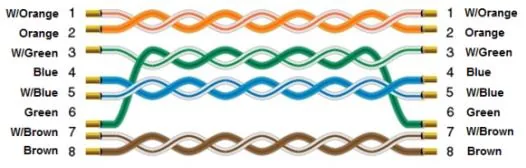
NOTE: Connect the HMI to the XINJE XD Series PLC using a standard straight-through Ethernet cable.
The diagram below shows the Ethernet cable wiring.