
Introduction
All Maple Systems HMIs programmed with EBPro (EasyBuilder Pro), including every cMT X Series and cMT Series model, are compatible with Panasonic Eco-Power Meters. Configure your Controller and HMI/cMT with the following parameters to establish reliable communication.
Supported Series: KW1M , KW1M-A , KW9M , KW9M-A
HMI Settings
| Parameters | Recommended | Options | Notes |
|---|---|---|---|
| PLC type | Panasonic Eco-Power Meters | ||
| PLC I/F | RS485 2W | ||
| Baud rate | 9600 | 9600 ~ 115200 | |
| Data bits | 8 | ||
| Parity | Odd | ||
| Stop bits | 1 | ||
| PLC sta. no. | 1 |
Supported Device Types
| Data type | EBPro (EasyBuilder) data format | Memo |
|---|---|---|
| Bool | bit | |
| Byte | 16-bit BCD, Hex, Binary, Unsigned | 8-bit |
| SInt | 16-bit BCD, Hex, Binary, Signed | 8-bit |
| USInt | 16-bit BCD, Hex, Binary, Unsigned | 8-bit |
| Word | 16-bit BCD, Hex, Binary, Unsigned | 16-bit |
| Int | 16-bit BCD, Hex, Binary, Signed | 16-bit |
| UInt | 16-bit BCD, Hex, Binary, Unsigned | 16-bit |
| DWord | 32-bit BCD, Hex, Binary, Unsigned | 32-bit |
| DInt | 32-bit BCD, Hex, Binary, Signed | 32-bit |
| Real | 32-bit Float | 32-bit |
| UDInt | 32-bit BCD, Hex, Binary, Unsigned | 32-bit |
Import Tags
The file for import must be built in Easy Build Pro\Data Type\PanasonicPowerMeter folder. The user can build the file according to the device types in advance, as shown below.
✭Name : User-defined tag name.
✭Data :Type: Define according to the data length and range.
✭Address : The address of the device.
✭Description : The description about the address.
Select the Driver and Open Station Settings
In EBPro (EasyBuilder Pro), select [Panasonic Eco-Power Meters] as the driver, then click [Station No. and Device Model].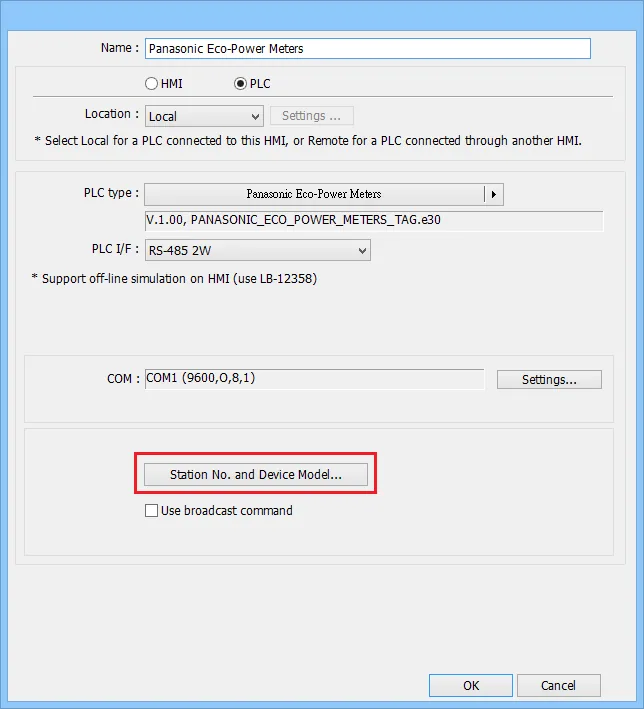
Configure Station Number and Device Model
In the Configure Station No. and Device Model dialog:nn- [Station no.]: Set the station number according to the device. Range is 1–99.n- [Name]: The name of the device.n- [Model]: Models with address tag files saved inData Typeu005cPanasonicPowerMeterappear in the drop-down list.n- [Add]: Add a new model.n- [Delete]: Delete a model. (At least one model must remain in the list.)n- [Import]: Import the.datfile of the model.n- [Export]: Export the.datfile of the model.n- [OK]: Save and close.n- [Cancel]: Close without saving.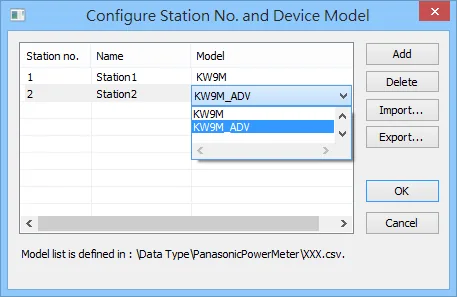
Select Tags in Object Settings
The imported address tags can be selected in the object settings window.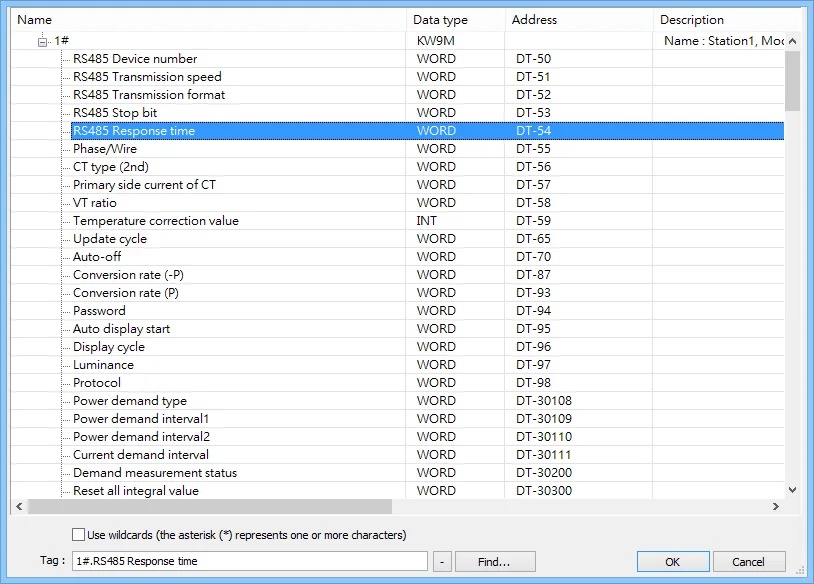
Wiring Diagram
NOTE: The serial port pin assignments may vary between HMI models.
RS-485 2W
| HMI | Direction | PLC |
|---|---|---|
| Pin assignments | PLC RS485 2W Terminal | |
| Data− | ↔ (bidirectional) | B− |
| Data+ | ↔ (bidirectional) | A+ |
| GND | ↔ (bidirectional) |