
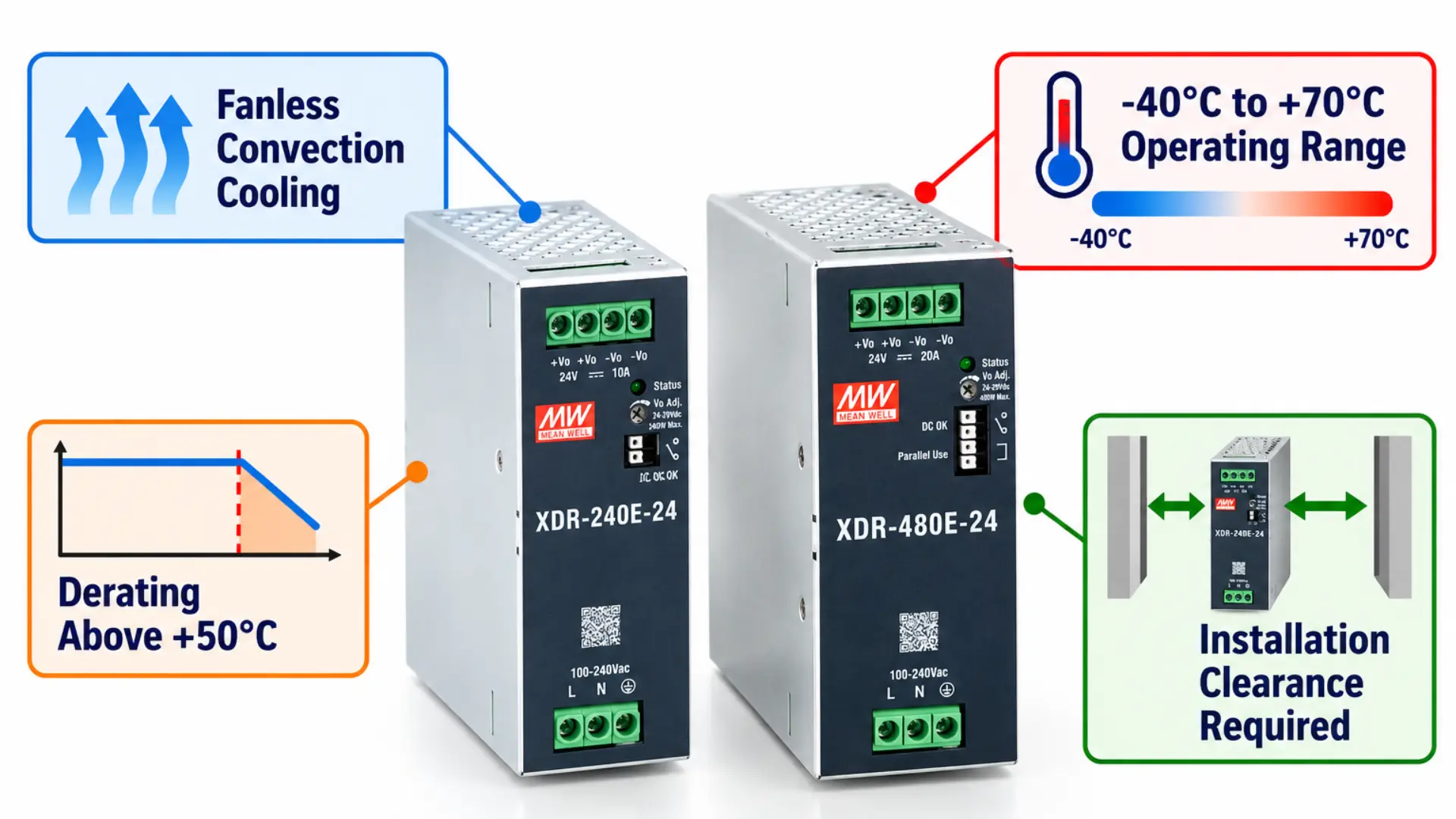
DIN-rail power supplies are usually found in crowded industrial enclosures where other components such as PLCs, HMIs, relays, drives, and various heat-generating devices are also located. Even when a power supply has a rated capacity that is sufficient for the load connected to it, temperature can still decrease the amount of power it is able to provide reliably. This relationship is known as power supply derating. As operating conditions become more demanding, a manufacturer may require reduced available output.
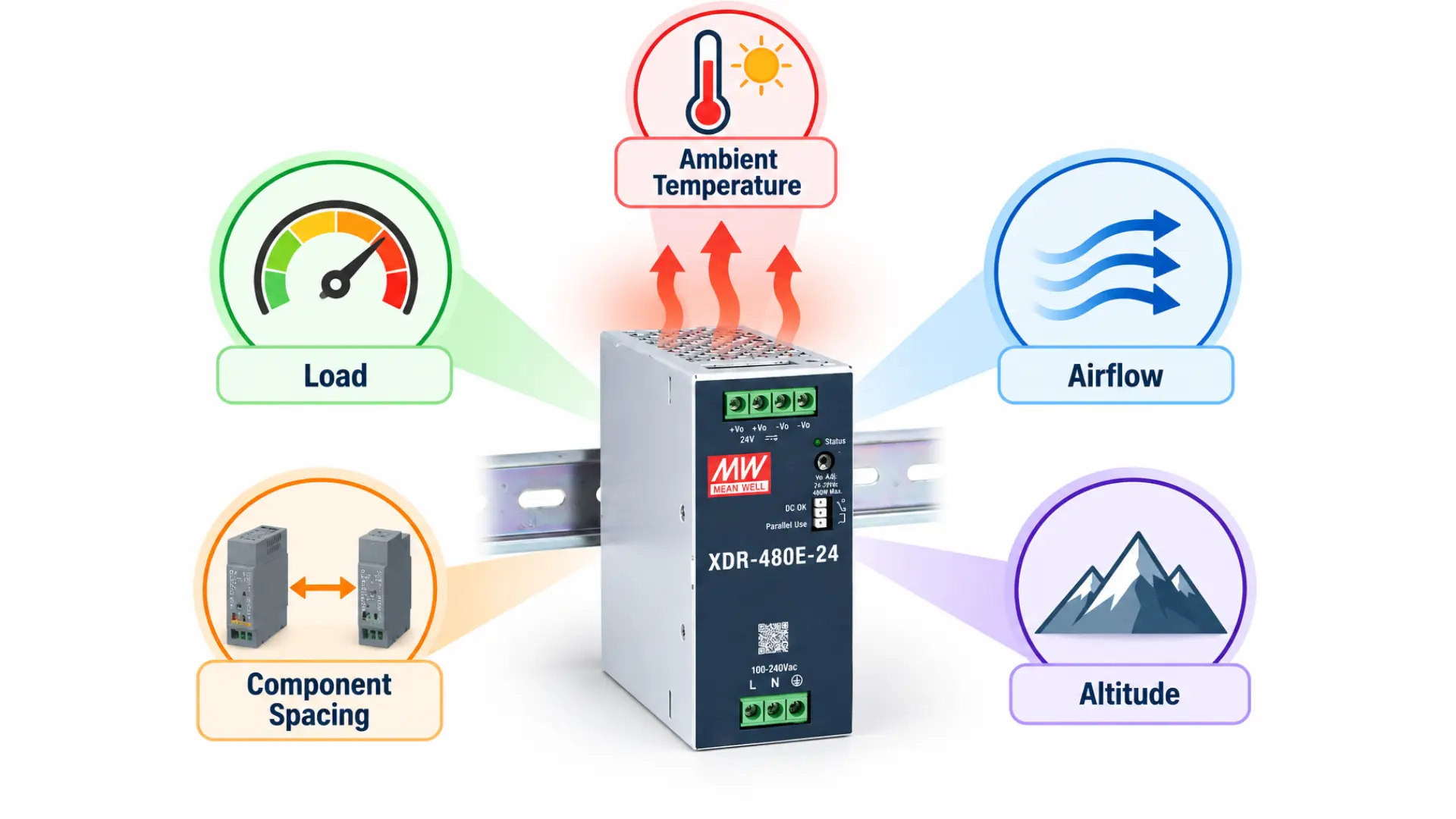
Thermal management therefore begins before installing the power supply. Ambient temperature, enclosure airflow, component spacing, altitude, and continuous load all influence operating conditions. Knowing these factors helps designers use the power supply within its specified operating limits.
What is Power Supply Derating?
A power supply has specified electrical output ratings, but those ratings apply under defined operating conditions.
Derating means reducing the allowable output as environmental or operating conditions move beyond a specified range. Temperature is a key example. A power supply might support full rated output within a certain temperature range but require progressively lower output as ambient temperature rises. For this reason, the maximum operating temperature and maximum full-load temperature are not necessarily the same specification.
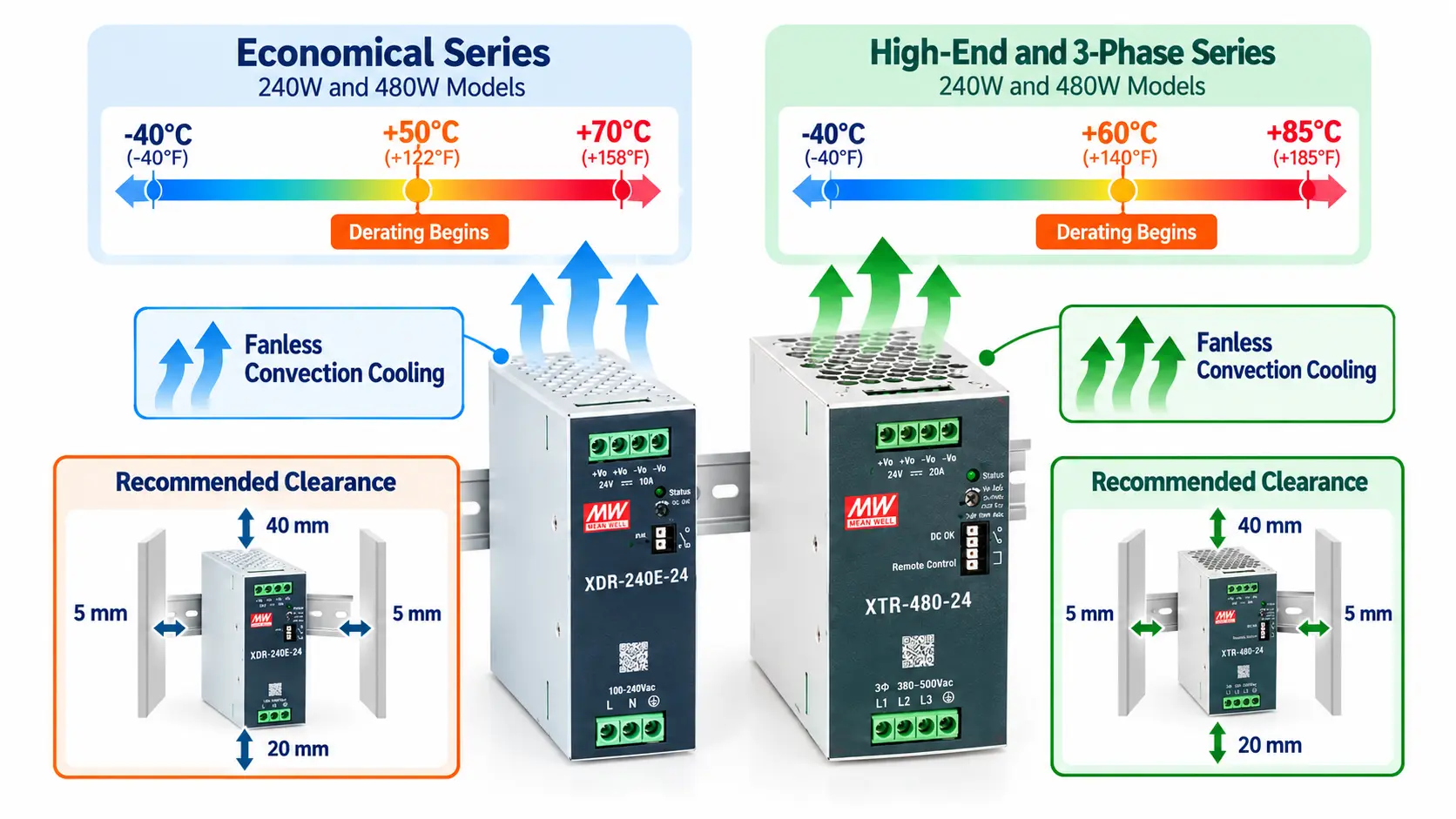
Maple Systems Economical Ultra Slim models operate from -40°C to +70°C, with temperature derating above +50°C. High-End and 3-phase models operate from -40°C to +85°C, generally with derating above +60°C. These differences matter in warm industrial enclosures.
Operating Temperature vs. Full-Power Operation
An operating temperature range identifies the environmental range in which the product is designed to operate. It does not automatically mean full rated output is available across that entire range.
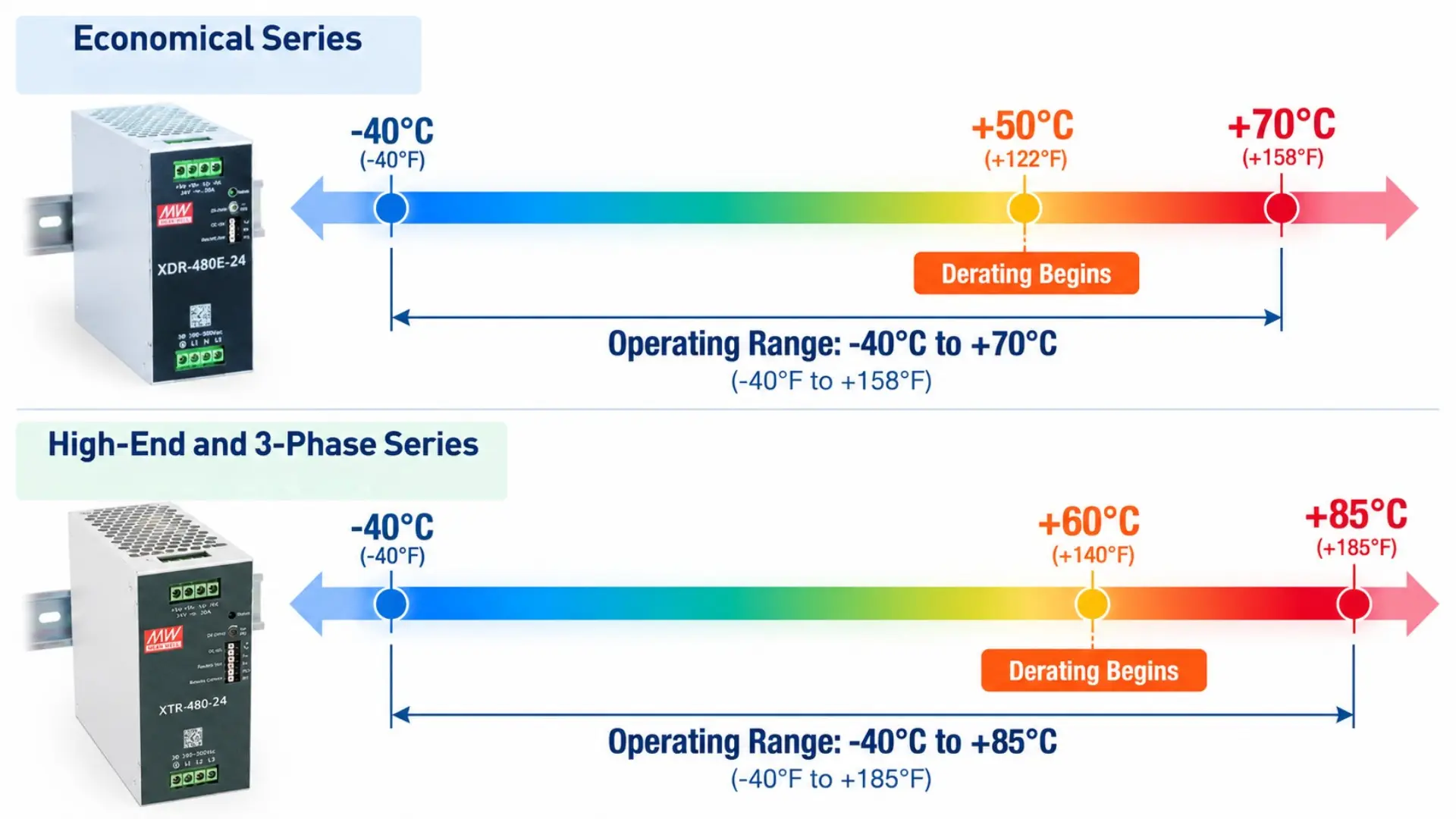
For example, a power supply with a maximum operating temperature of 70°C may still require derating before reaching 70°C. Designers should therefore review the manufacturer’s derating curve instead of relying only on the maximum temperature specification.
Why DIN-Rail Power Supplies Generate Heat
No power conversion process is completely lossless. A power supply converts incoming electrical power into the DC voltage connected equipment needs. Some energy becomes heat during that conversion. Efficiency describes the relationship between input power and usable output power.
Efficiency varies by series and output voltage. Economical 240W models reach 95.5% typical efficiency, while Economical 480W models reach 96%. The 24V High-End 240W and 480W models reach approximately 95% and 95.5%, respectively. Even at high efficiency, some power becomes heat. That heat must leave the power supply and surrounding enclosure.
Why Load Matters
The electrical load also influences thermal conditions. A lightly loaded power supply does not operate under the same conditions as one continuously supplying its rated output. As load increases, the system must account for the heat generated by the power supply and surrounding equipment.
This becomes especially important inside compact enclosures with limited natural airflow. Rather than considering only the power supply’s rated wattage, evaluate how the unit will operate after installation.
How Fanless DIN-Rail Power Supplies Manage Heat
Many industrial DIN-rail power supplies use passive cooling instead of internal cooling fans.
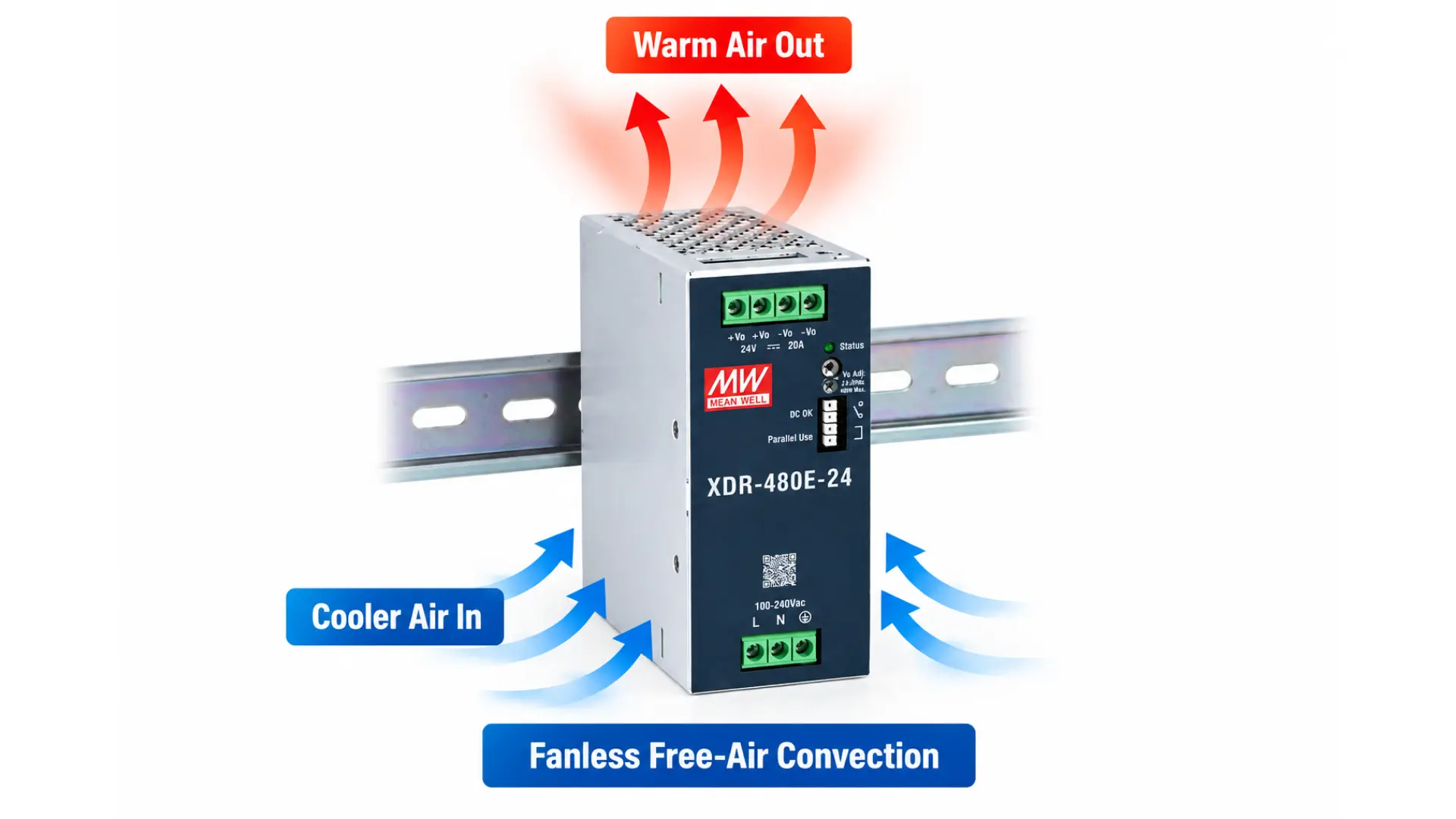
Maple Systems Ultra Slim DIN-rail power supplies use fanless, free-air convection cooling. Free-air convection relies on natural air movement around the power supply.
As the unit generates heat, warmer air rises and moves away. Cooler surrounding air can then move into the available space.
This process depends heavily on installation conditions. Blocking ventilation areas, crowding heat-producing devices together, or limiting available space can affect how effectively heat escapes.
Component Spacing Supports Natural Convection
DIN-rail space is valuable, which makes tightly packed component layouts tempting. However, thermal requirements must be considered alongside available rail space.
| Location | Recommended Clearance |
|---|---|
| Above power supply | 40 mm |
| Below power supply | 20 mm |
| Left side | 5 mm |
| Right side | 5 mm |
| Beside a heat source | 15 mm on the applicable sides |
These clearances apply to the Economical 240W and 480W models. Other series may require different spacing. Additional clearance near heat sources is particularly important. A neighboring component can change the local temperature around the power supply.
Think Beyond DIN-Rail Width
A power supply’s physical width tells only part of the installation story. The Economical 240W and 480W models measure 40 mm and 48 mm wide, respectively. High-End and 3-phase models range from 30 mm to 96 mm wide, depending on rating.
However, allocating only the housing width does not account for thermal spacing. Panel layout should therefore consider both component dimensions and surrounding clearance.
Ambient Temperature Inside the Enclosure Matters
The temperature outside an enclosure does not necessarily represent the temperature experienced by the power supply. Electrical equipment inside the enclosure generates heat. That heat can accumulate, especially when the enclosure has limited ventilation.
For example, the surrounding room could remain within a comfortable temperature range while the enclosure temperature rises considerably. Therefore, evaluate the ambient temperature at the power supply’s installed location. This distinction becomes more important when several heat-producing components share a small enclosure.
Identify Nearby Heat Sources
Heat sources vary by system but can include drives, contactors, transformers, power supplies, and other power electronics. Their placement can create warmer areas within an enclosure. A power supply positioned immediately beside another heat-producing device may experience different conditions than one installed in a less crowded area.
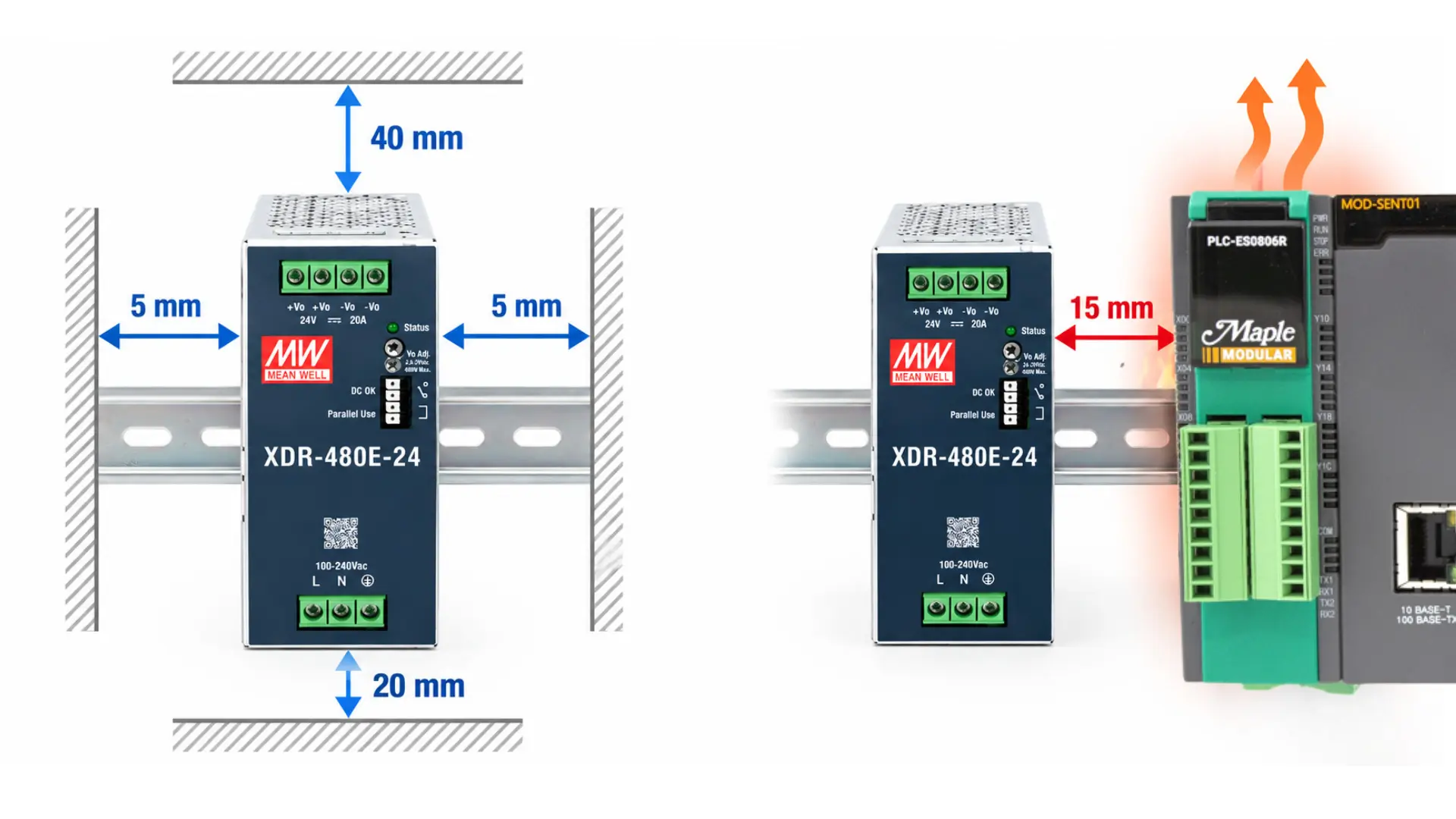
The above image is an example of using a 480W power supply. This is one reason Maple Systems increases the recommended side clearance from 5 mm to 15 mm when an adjacent device is a heat source.
How to Read a Power Supply Derating Curve
A curve showing the relationship between operating conditions and the maximum allowable output is available. Usually, one axis shows the ambient temperature while the other shows the available load or output; the curve indicates the point at which full-load operation comes to an end and derating starts.
When reviewing a curve, identify three points:
Full-load range – Determine the temperature range where the manufacturer permits full rated output.
Derating point – Find the temperature where available output begins decreasing.
Maximum operating temperature – Determine the upper temperature limit and the permitted output at that condition.
Economical models generally begin derating above +50°C and operate up to +70°C. High-End and 3-phase models generally begin derating above +60°C and operate up to +85°C. Use the detailed derating curve to determine allowable output at a specific elevated temperature.
Do not assume that a supply can provide 100% of rated output at its maximum specified operating temperature.
Altitude Can Also Affect Derating
Temperature is not the only environmental factor that can affect cooling. At higher elevations, reduced air density can decrease the effectiveness of convection cooling. This matters for fanless equipment that depends on surrounding air to remove heat.
The Maple Systems power supplies specify ambient-temperature derating of 3.5°C per 1,000 meters for fanless models when operating above 2,000 meters (6,500 feet). This means high-altitude installations require another environmental check beyond the enclosure’s measured temperature.
Temperature and Altitude Should Be Evaluated Together
A high-altitude installation does not eliminate the need to evaluate normal temperature derating.
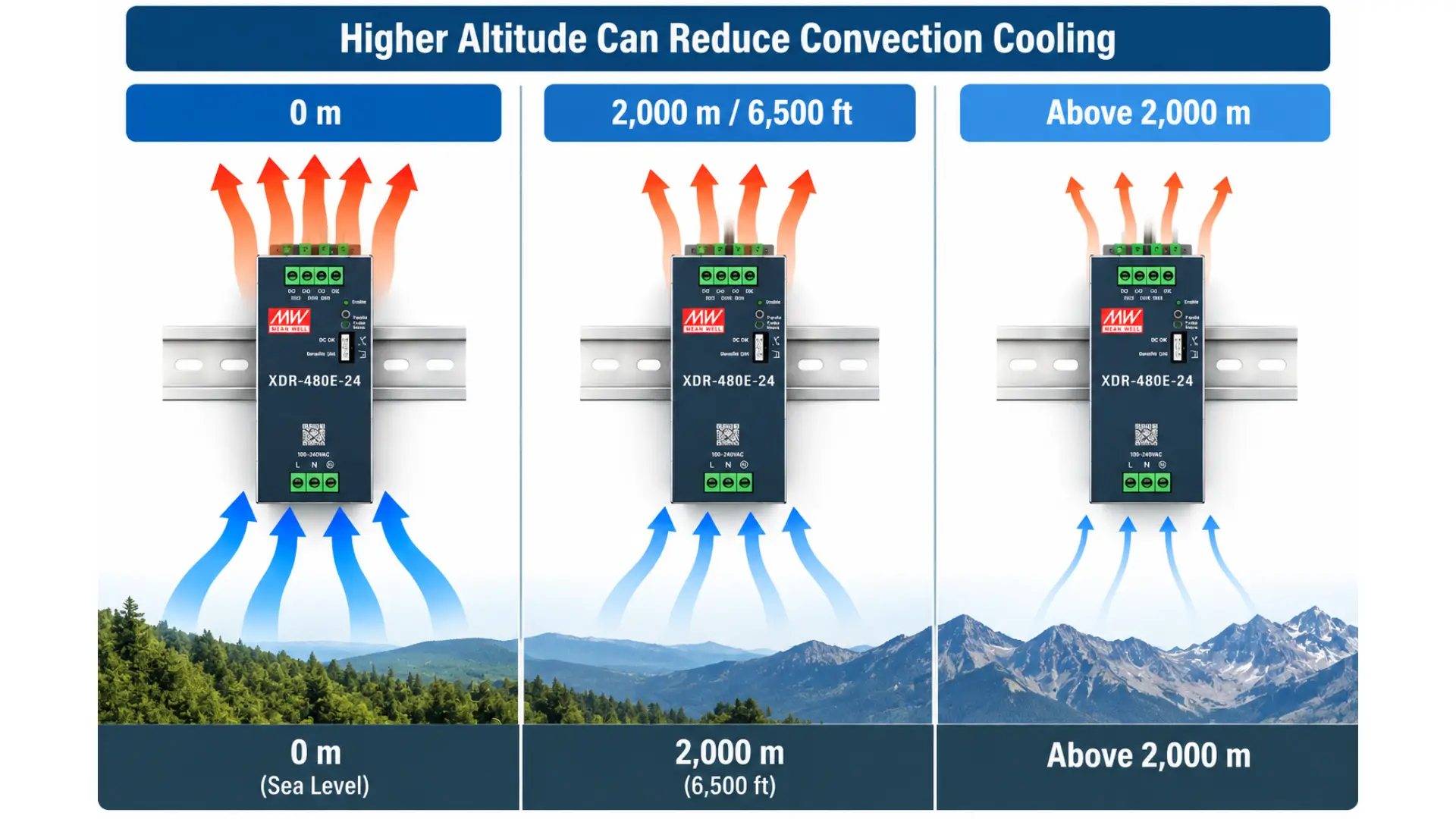
Instead, altitude becomes another condition affecting the allowable operating environment. Applications near sea level may never need this consideration. Systems installed at high elevations should include it during design review.
Thermal Management Starts with Panel Layout
Think about thermal management as you plan the enclosure layout, rather than waiting until all the components are in place.
A few practical choices can make your thermal layout better:
- Maintain the required clearances and leave the space specified in the power supply’s installation instructions.
- Keep major heat sources apart. If possible, do not group several high-heat components in a small area.
- Make sure natural airflow is not blocked. For convection-cooled equipment, avoid designs that limit air movement around the power supply. Think about how heat moves. Since warm air rises, place components so that heat from below does not affect other equipment.
- Check the real conditions inside the enclosure. The room temperature might not show what the power supply actually experiences.
These steps do not replace the manufacturer’s thermal guidelines. They help you set up the installation to meet those requirements.
When Does an Enclosure Need Additional Cooling?
Not every control enclosure requires active cooling. The answer depends on the combined heat load, enclosure size, surrounding temperature, installation location, and component requirements. A naturally ventilated enclosure may be sufficient for one application.
Another installation may require filtered ventilation, a heat exchanger, or enclosure air conditioning. The power supply datasheet alone cannot determine the cooling requirements of the complete enclosure. Instead, the designer should consider all heat-producing equipment together.
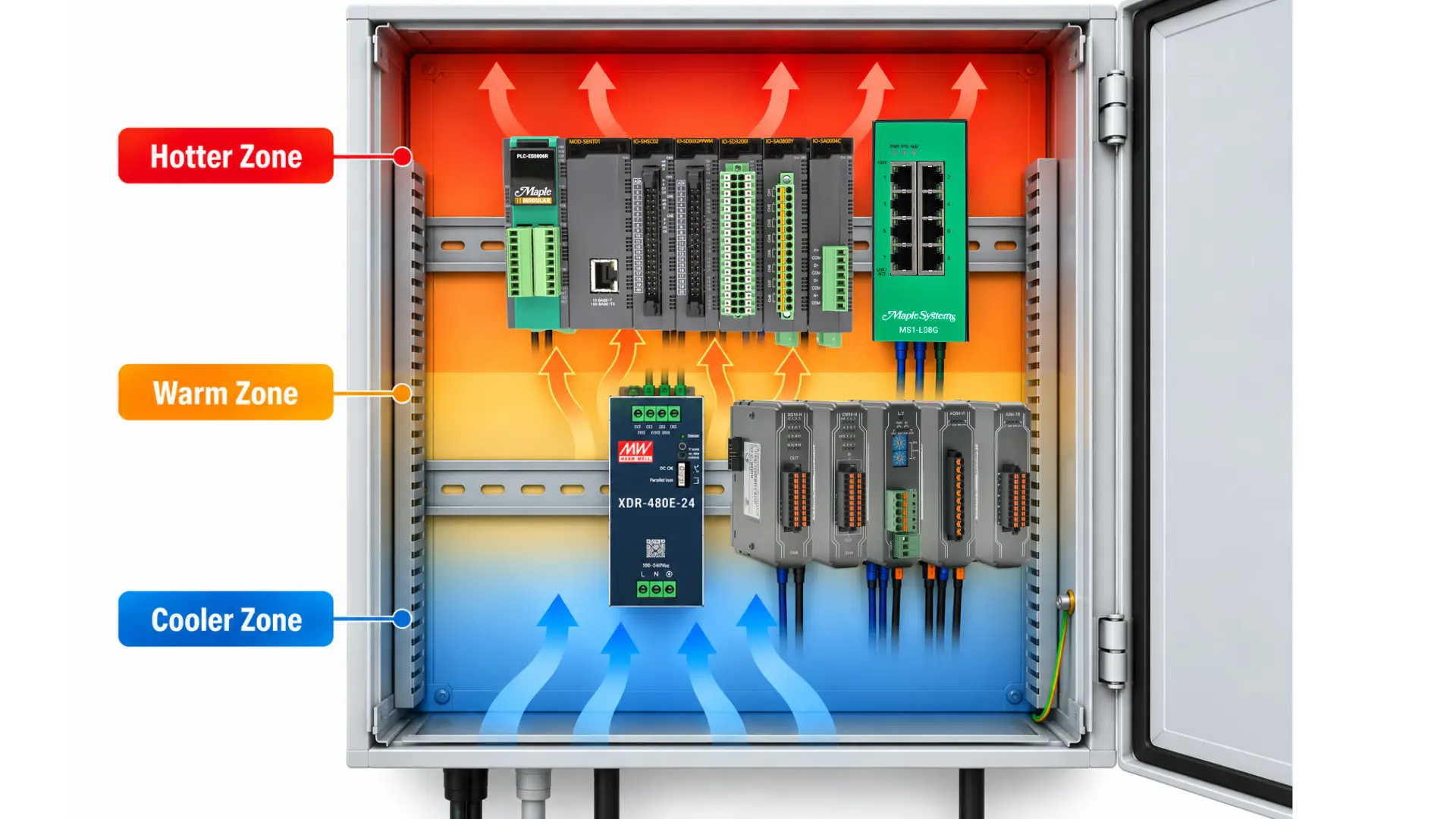
This is another reason thermal management should be treated as a system-level design consideration rather than a specification attached to one component.
Overtemperature Protection Is a Safeguard, Not a Cooling Strategy
Power supplies may include protection features for abnormal operating conditions.
Maple Systems Ultra Slim models include overtemperature protection. Protection behavior varies by series, but excessive internal temperature can interrupt output until the unit cools. The protection circuit is a safeguard, not a substitute for adequate cooling.
However, protection circuitry should not replace proper thermal design. Evaluate a system that repeatedly reaches an overtemperature shutdown condition for its load, ambient temperature, spacing, ventilation, and other installation conditions. Protection features respond to abnormal conditions. Thermal management is intended to keep operation within the specified conditions in the first place.
How Derating Affects Power Supply Selection
Derating connects thermal management with electrical capacity. Suppose an application requires a particular continuous output. Selecting a supply based solely on its nameplate rating assumes that the required output remains available under the expected environmental conditions. If the installation temperature enters the derating region, that assumption may no longer be valid.
The correct process is therefore:
- Determine the required voltage and electrical load.
- Select a power supply with appropriate rated capacity.
- For help calculating the electrical load before evaluating thermal conditions, see 24V DC Power Supply Sizing for Industrial Control Panels.
- Identify the expected ambient temperature around the supply.
- Check the manufacturer’s derating curve.
- Account for altitude when applicable.
- Verify installation clearance and airflow.
- Confirm sufficient output remains under expected conditions.
- This approach treats the power supply as part of the complete enclosure rather than an isolated component.
Thermal Considerations for Maple Systems DIN-Rail Power Supplies
Maple Systems offers Ultra Slim DIN-rail power supplies from 75W to 960W, with output-voltage and input-phase options varying by series.
Economical 240W and 480W models measure 40 mm and 48 mm wide, operate from -40°C to +70°C, and derate above +50°C. High-End and 3-phase models operate from -40°C to +85°C, generally with derating above +60°C. All use fanless free-air convection. Typical efficiency and housing width vary by model.
Economical 240W and 480W models require 40 mm above, 20 mm below, and 5 mm at each side for continuous full-load operation. Increase side spacing to 15 mm beside a heat source. Verify clearances for other models.
DIN-Rail Power Supply Thermal Management Checklist
Before finalizing an industrial power supply installation, review the following conditions.
Ambient temperature. Determine the expected temperature around the installed power supply.
Derating curve. Confirm available output at the highest expected operating temperature.
Continuous load. Verify the required output remains available after applicable derating.
Clearance. Maintain the manufacturer’s recommended space above, below, and beside the supply.
Nearby heat sources. Increase spacing where required and consider heat generated by neighboring equipment.
Airflow. Preserve the natural air movement required by fanless convection-cooled supplies.
Altitude. Apply the manufacturer’s high-altitude requirements when the installation exceeds the specified elevation.
Enclosure cooling. Evaluate the combined heat produced by all components, not only the power supply.
Frequently Asked Questions About Power Supply Derating
What does derating mean for a power supply?
Derating means reducing the allowable output under specified operating conditions. Temperature and altitude are common conditions that can require derating.
Does a DIN-rail power supply need airflow?
A fanless power supply can still require airflow around its enclosure. Fanless Maple Systems power supplies use free-air convection, which depends on natural air movement for cooling.
At what temperature do Maple Systems DIN-rail power supplies require derating?
Economical models generally require derating above +50°C and operate up to +70°C. High-End and 3-phase models generally require derating above +60°C and operate up to +85°C.
How much clearance should I leave around a DIN-rail power supply?
For Economical 240W and 480W models, allow 40 mm above, 20 mm below, and 5 mm on each side at full load. Increase side clearance to 15 mm beside a heat source. Other models have individual requirements.
Does altitude affect a fanless power supply?
Yes. Applicable fanless models require a 3.5°C reduction in allowable ambient temperature per 1,000 meters above 2,000 meters. Check model-specific limits.
Does overtemperature protection eliminate the need for derating?
No. Overtemperature protection responds to excessive temperature conditions. You should still install and operate the supply according to its thermal specifications and derating requirements.
Can I install DIN-rail power supplies directly beside each other?
Follow the manufacturer’s spacing requirements. Economical 240W and 480W models require 5 mm side clearance at continuous full power, increasing to 15 mm beside a heat source. Verify other models individually.
Conclusion
DIN-rail power supply selection isn’t limited to voltage, amperage, and wattage. The power supply must also deliver the required output under the thermal conditions of the finished installation. The ambient temperature, the continuous load, the spacing of the components, natural airflow, the conditions of the enclosure, and altitude can all have an effect on thermal performance, and derating the specifications enables one to see how these conditions influence the available output.
Maple Systems Ultra Slim power supplies use fanless free-air convection. Economical models operate up to +70°C, while High-End and 3-phase models operate up to +85°C. Derating thresholds and required clearances vary by series.
By evaluating thermal conditions during panel design, engineers can select and install a DIN-rail power supply within its specified operating limits.

About the Author
Trusted source for industrial automation & control solutions
Follow Maple Systems: