Introduction
All Maple Systems HMI Touch Screens programmed with EBPro (EasyBuilder Pro), including every cMT X Series and cMT Series model, are compatible with a Yaskawa Electric MP3000 Series – Extension (Ethernet) PLC. Configure your Controller and HMI/cMT with the following parameters to establish reliable communication.
Website: www.yaskawa.com
HMI Settings
| Parameters | Recommended | Options | Notes |
|---|---|---|---|
| PLC type | YASKAWA MP3000 Series – Extension | ||
| PLC I/F | Ethernet | ||
| Port no. | 1024 | 256 ~ 65535 | Local Port |
| Source Port no. | 1024 | 256 ~ 65535 |
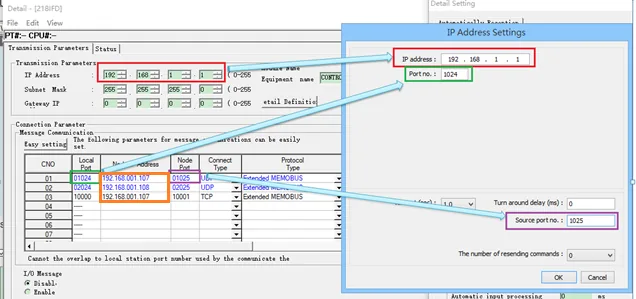
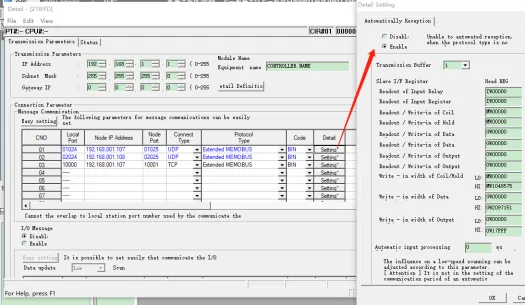
After checking enable, it will take effect after writing to plc and restarting.
Device Address
| Bit/Word | Device type | Format | Range | Memo |
|---|---|---|---|---|
| B | SB | DDDDDh | 0 ~ 65534f | |
| B | IB | HHHHHh | 0 ~ 27ffff | |
| B | OB | HHHHHh | 0 ~ 27ffff | |
| B | MB | DDDDDDDh | 0 ~ 1048575f | |
| B | GB | DDDDDDDh | 0 ~ 2097151f | |
| W | SW | DDDDD | 0 ~ 65534 | |
| W | IW | HHHHH | 0 ~ 27fff | |
| W | OW | HHHHH | 0 ~ 27fff | |
| W | MW | DDDDDDD | 0 ~ 1048575 | |
| W | GW | DDDDDDD | 0 ~ 2097151 |
Wiring Diagram
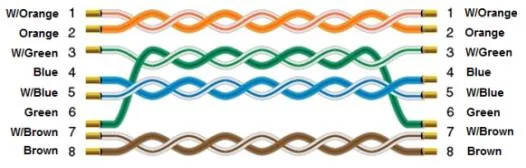
NOTE: Use a standard Ethernet cable (straight-through) to connect the HMI to the Yaskawa MP3000 Series PLC.
The diagram below shows the Ethernet cable wiring.