
Introduction
All Maple Systems HMIs programmed with EBPro (EasyBuilder Pro), including every cMT X Series and cMT Series model, are compatible with Toshiba Inverter VF. Configure your Controller and HMI/cMT with the following parameters to establish reliable communication.
Supported Series: Toshiba Invertor Protocol (ASCII code)
HMI Settings
| Parameters | Recommended | Options | Notes |
|---|---|---|---|
| PLC type | TOSHIBA INVERTER VF | ||
| PLC I/F | RS485 2W | RS422, RS485 | |
| Baud rate | 9600 | 9600, 19200 | |
| Data bits | 8 | 7 or 8 | |
| Parity | Even | Even, Odd, None | |
| Stop bits | 1 | 1 or 2 | |
| PLC sta. no. | 0 | 0–99 | |
| Online simulator | YES | ||
| Extend address mode | YES | ||
| Broadcast command | YES |
Device Address
| Bit/Word | Device Type | Format | Range | Memo |
|---|---|---|---|---|
| B | Cmd. No B | HHHHdd | 0 ~ 270f15 | |
| W | Cmd. No | HHHH | 0 ~ ffff | Parameters and data memory |
Wiring Diagram
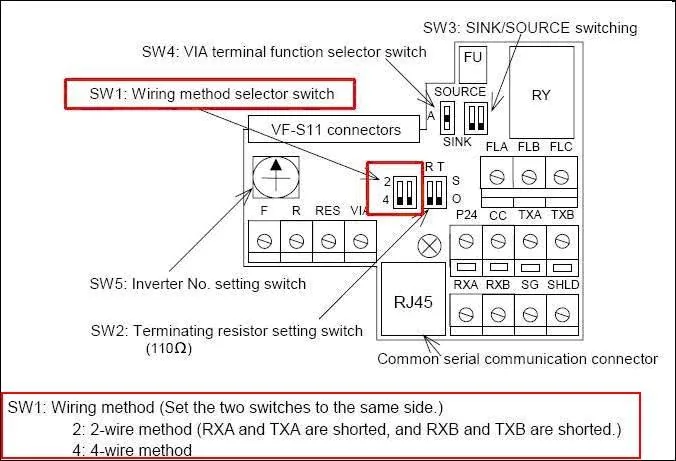
NOTE: Before connecting with TOSHIBA INVERTER VF, make sure the SW1 of both sides are in the correct position. (SW1: wiring method selector switch)
RS-485 2W
NOTE: The serial port pin assignments may vary between HMI models.
| HMI | Direction | PLC |
|---|---|---|
| Pin assignments | RS485 2W 8P RJ45 Male | |
| Data- | ↔ (bidirectional) | 5 Data- |
| Data+ | ↔ (bidirectional) | 4 Data+ |
| GND | — (passive) | 8 GND |