Introduction
All Maple Systems HMI touch screens programmed with EBPro (EasyBuilder Pro), including every cMT X Series and cMT Series model, are compatible with Panasonic FP2 (Ethernet). Configure your Controller and HMI/cMT with the following parameters to establish reliable communication.
Supported Series: NAIS (Matsushita) FP2 series include FP2, FP2SH, and FP10SH CPU
Website: https://na.industrial.panasonic.com/
HMI Setting
| Parameters | Recommended | Options | Notes |
|---|---|---|---|
| PLC type | Panasonic FP2 (Ethernet) | ||
| PLC I/F | Ethernet | ||
| Port no. | 8500 | ||
| PLC sta. no. | 2 | 0~255 |
Device Address
| Bit/Word | Device Type | Format | Range | Memo |
|---|---|---|---|---|
| B | X | DDDDh | 0 ~ 9999f | Input (X) |
| B | Y | DDDDh | 0 ~ 9999f | Output (Y) |
| B | R | DDDDh | 0 ~ 9999f | Internal Relay (R) |
| B | L | DDDD | 0 ~ 9999 | Link Relay (L) |
| B | L_Bit | DDDDh | 0 ~ 9999f | |
| B | T | DDDD | 0 ~ 9999 | Timer (T) |
| B | C | DDDD | 0 ~ 9999 | Counter (C) |
| W | SV | DDDD | 0 ~ 9999 | Timer/Counter Set Value (SV) |
| W | EV | DDDDD | 0 ~ 65535 | Timer/Counter Elapse Value (EV) |
| W | DT | DDDDD | 0 ~ 99999 | Data Register (DT) |
| W | LD | DDDD | 0 ~ 8447 | Link Register (LD) |
| W | WX | DDDD | 0 ~ 9999 | Input (WX) (read only) |
| W | WY | DDDD | 0 ~ 9999 | Output (WY) |
| W | WR | DDDD | 0 ~ 9999 | Internal Relay (WR) |
| W | WL | DDDD | 0 ~ 9999 | Link Relay (WL) |
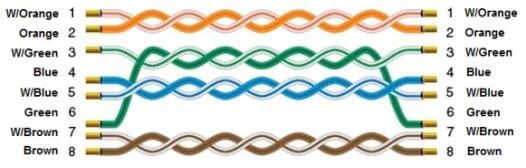
Wiring Diagram
The diagram below shows the Ethernet cable wiring.