
Introduction
All Maple Systems HMIs programmed with EBPro (EasyBuilder Pro), including every cMT X Series and cMT Series model, are compatible with XModem 1K. Configure your Controller and HMI/cMT with the following parameters to establish reliable communication.
Supported Series: 1K XModem Protocol
HMI Setting
| Parameters | Recommended | Options |
|---|---|---|
| PLC type | XModem -1K (download-only mode) | |
| PLC I/F | RS485 2W | |
| Baud rate | 9600 | |
| Data bits | 8 | |
| Parity | None | |
| Stop bits | 1 | |
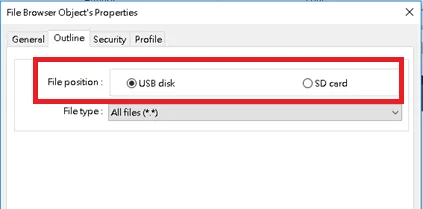
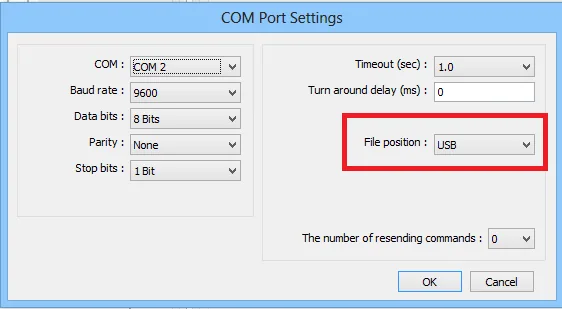
| File position | USB | USB / SD |
Device Address
| Bit/Word | Tag Name | Data Type | Memo |
|---|---|---|---|
| B | Start | BOOL | |
| W | TransmissionFileName | String[50] | *Note 1 |
| W | TransmissionProgress | WORD | 0 ~ 100 (%) |
| W | TransmissionStatus | WORD | *Note 2 |
Note 1: [TransmssionFileName] can be used with the File Browser object. Set the device to XModem -1K (download-only mode) and the tag to TransmissionFileName[0], as shown below.
![File Browser Object properties showing Device set to XModem -1K (download-only mode) and Tag set to TransmissionFileName[0] with 20 word(s).](https://media.maplesystems.com/wp-content/uploads/2026/06/01-file-browser-object-transmission-filename-tag.webp)
NOTE: The [File Position] setting must be consistent with the driver COM port settings.
Note 2: TransmissionStatus values:
| Value | Status |
|---|---|
| 0 | Ready |
| 1 | Transfer in progress |
| 2 | Transfer completed |
| 3 | Transfer canceled |
| 4 | Transfer failed |
Wiring Diagram
NOTE: The serial port pin assignments may vary between HMI models.
RS-485 2W
| HMI | Direction | PLC |
|---|---|---|
| Pin assignments | RS485 2W terminal | |
| Data- | ↔ (bidirectional) | Data- |
| Data+ | ↔ (bidirectional) | Data+ |
| GND | ↔ (bidirectional) | GND |