Introduction
All Maple Systems HMIs programmed with EBPro (EasyBuilder Pro), including every cMT X Series and cMT Series model, are compatible with Maple Systems Remote IO (MODBUS TCP/IP). Configure your Controller and HMI/cMT with the following parameters to establish reliable communication.
Supported Series: Maple Systems Remote IO (iR-ETN)
HMI Settings
| Parameters | Recommended | Options | Notes |
|---|---|---|---|
| PLC type | Maple Systems Remote IO (MODBUS TCP/IP) | ||
| PLC I/F | Ethernet | ||
| Port no. | 502 | ||
| PLC sta. no. | 1 | 0~255 |
Device Address
| Bit/Word | Device type | Format | Range | Memo |
|---|---|---|---|---|
| B | 0x | DDDDD | 0 ~ 65535 | Output bit |
| B | 0x_single_Bit | DDDDD | 0 ~ 65535 | |
| B | 0x_multi_coils | DDDDD | 0 ~ 65535 | Write multiple coils |
| B | 1x | DDDDD | 0 ~ 65535 | Input bit (read only) |
| B | 1x_single_Bit | DDDDD | 0 ~ 65535 | |
| B | 3x_bit | DDDDDdd | 0 ~ 6553515 | Input Register bit (read only) |
| B | 4x_bit | DDDDDdd | 0 ~ 6553515 | Output Register bit |
| B | 6x_bit | DDDDDdd | 0 ~ 6553515 | Output Register bit |
| W | 3x | DDDDD | 0 ~ 65535 | Input Register |
| DW | 3x_Double | DDDDD | 0 ~ 65535 | *Note1 |
| W | 4x | DDDDD | 0 ~ 65535 | Output Register |
| DW | 4X_Double | DDDDD | 0 ~ 65535 | *Note1 |
| DW | 5x | DDDDD | 0 ~ 65535 | 4x double word swap |
| W | 6x | DDDDD | 0 ~ 65535 | 4x single word write |
| W | 4x string central europe | DDDDD | 0 ~ 65535 | Convert the Central Europe ASCII to Unicode. |
| W | 4x string central europe (rev) | DDDDD | 0 ~ 65535 |
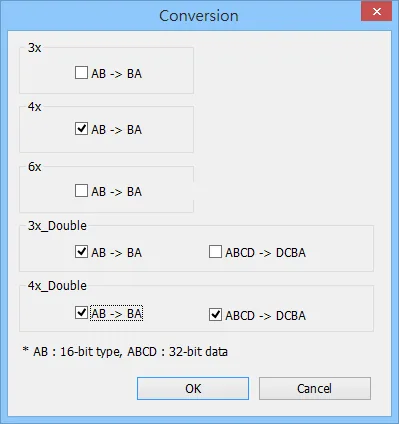
NOTE: *Note1 — Go to System Parameter Settings → Device Properties and click Conversion to set the data format of device types 3x, 4x, 6x, 3x_double, 4x_double.
How to Import Tags
Export Tags from EasyRemoteIO
Open EasyRemoteIO. From the menu bar, select File → Export Tag.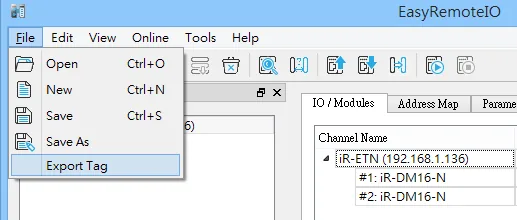
Import Tags in EBPro (EasyBuilder Pro)
In EBPro (EasyBuilder Pro), open System Parameter Settings → Device (Driver) → Import Tags. The Add Tags dialog opens, displaying all exported tag names with their address modes and addresses. Select the tags to import and click OK.
Wiring Diagram
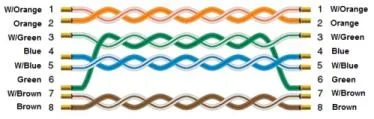
NOTE: Use a standard Ethernet cable to connect the HMI to the Maple Systems Remote IO (iR-ETN) module.
The diagram below shows the Ethernet cable wiring.