
Introduction
All Maple Systems HMIs programmed with EBPro (EasyBuilder Pro), including every cMT X Series and cMT Series model, are compatible with a Master-Slave Server. Configure your Controller and HMI/cMT with the following parameters to establish reliable communication.
Reference: User’s Manual CH28
HMI Setting
| Parameters | Recommended | Options | Notes |
|---|---|---|---|
| PLC type | Master-Slave Server | ||
| PLC I/F | RS232 | RS232/RS485 | |
| Baud rate | 115200 | 9600~115200 | |
| Data bits | 8 | 7, 8 | |
| Parity | Even | None, Even, Odd, Mark, Space | |
| Stop bits | 1 | 1, 2 | |
| HMI sta. no. | 0 | ||
| PLC sta. no. | 0 |
HMI Setting for MT500
| Parameters | Recommended | Options | Notes |
|---|---|---|---|
| PLC type | Master (Master-Slave Protocol) | ||
| PLC I/F | RS232 | ||
| Baud rate | 115200 | 38400, 115200 | |
| Data bits | 8 | ||
| Parity | Even | ||
| Stop bits | 1 | ||
| HMI sta. no. | 0 | ||
| PLC sta. no. | 0 | ||
| Parameter 1 | MT500 PLC ID | Use PLCAddressView.exe to find PLC ID. |
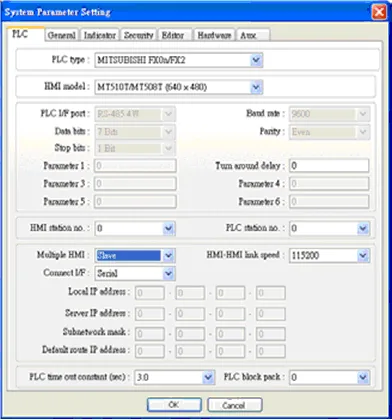
To connect an HMI with MT500, the MT500 must be set as Slave.
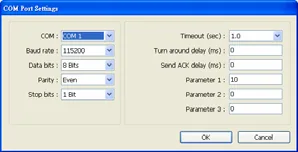
PLC Setting
In EBPro (EasyBuilder), open System Parameter Settings and set Multiple HMI to Slave.
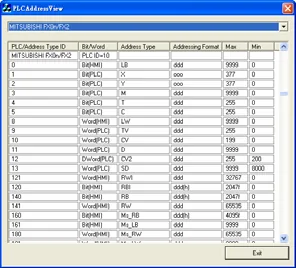
Device Address
| Bit/Word | MT500 | MT8000 | Range | Memo |
|---|---|---|---|---|
| B | Ms_RB | RW_Bit | dddd: 0 ~ 4095 (h): 0 ~ f | |
| B | Ms_LB | LB | dddd: 0 ~ 9999 | |
| W | Ms_RW | RW | ddddd: 0 ~ 65535 | |
| W | Ms_LW | LW | dddd: 0 ~ 9999 |