Introduction
All Maple Systems HMI Touch Screens programmed with EBPro (EasyBuilder Pro), including every cMT X Series and cMT Series model, are compatible with Delta Electronics DVPEN01-SL (Ethernet). Configure your Controller and HMI/cMT with the following parameters to establish reliable communication.
Supported Series: DELTA DVPEN01-SL, DVP32ES200RE
Website: www.deltaww.com
HMI Setting
| Parameters | Recommended | Options | Notes |
|---|---|---|---|
| PLC type | DELTA DVPEN01-SL (Ethernet) | ||
| PLC I/F | Ethernet | ||
| Port no. | 502 | ||
| PLC sta. no. | 0 |
Device Address
| Bit/Word | Device type | Format | Range | Memo |
|---|---|---|---|---|
| B | C_Bit | DDD | 0 ~ 255 | |
| B | M | DDDD | 0 ~ 4095 | |
| B | S | DDDD | 0 ~ 1023 | |
| B | T_Bit | DDD | 0 ~ 255 | |
| B | X | OOO | 0 ~ 571 | |
| B | Y | OOO | 0 ~ 571 | |
| W | C | DDD | 0 ~ 199 | |
| DW | C_32Bit | DDD | 200 ~ 255 | |
| W | D | DDDDD | 0 ~ 11999 | |
| W | T | DDD | 0 ~ 255 |
PLC Setting
Communication Setting
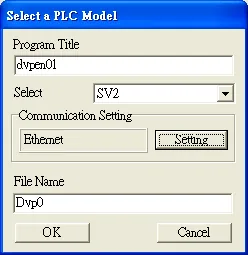
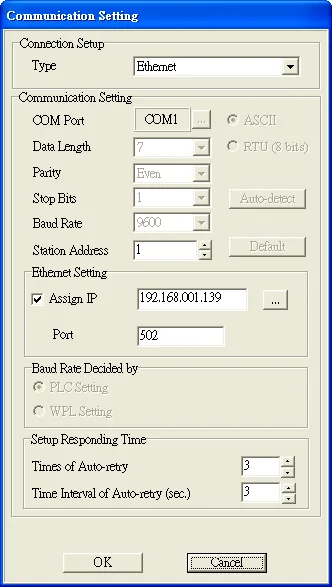
Add a new program, click File > New, enter the Program Title and File Name, and select the correct controller type. Click Setting to configure the communication parameters. Click OK to confirm the setting. The communication with PLC starts.
Transfer Setup
Click Communication and select PC<=>(PLC | HPP), on Transfer Setup dialog box, select the needed parameters for upload or download, and click OK to start the action.
Auto-Search Ethernet Module
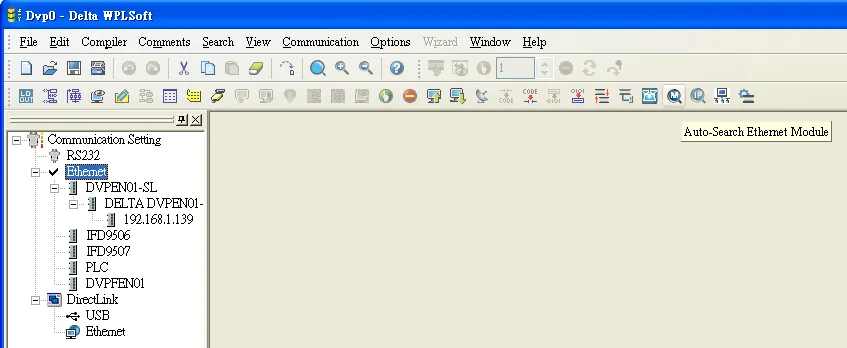
Click Auto-Search Ethernet Module to find the PLC modules on the same network. As shown in the following figure, DVPEN01-SL, IP address 192.168.1.139 is found.
Wiring Diagram
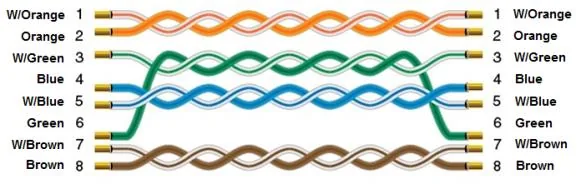
The diagram below shows the Ethernet cable wiring.