
Introduction
All Maple Systems HMIs programmed with EBPro (EasyBuilder Pro), including every cMT X Series and cMT Series model, are compatible with Schneider Electric PowerLogic Modbus RTU. Configure your Controller and HMI/cMT with the following parameters to establish reliable communication.
Supported Series: Schneider PowerLogic Modbus RTU
HMI Settings
| Parameters | Recommended | Options | Notes |
|---|---|---|---|
| PLC type | Schneider PowerLogic Modbus RTU | ||
| PLC I/F | RS485 | RS232/RS485 | |
| Baud rate | 9600 | 9600~115200 | |
| Data bits | 8 | 7, 8 | |
| Parity | Even | Even, Odd, None | |
| Stop bits | 1 | 1, 2 | |
| PLC sta. no. | 1 | 0-255 | |
| Online simulator | YES | ||
| Broadcast command | YES | ||
| Extend address mode | YES |
NOTE: Supports communications between HMI and PLC in pass-through mode.
Set LW-9903 to 2 to enhance the speed of download/upload PLC program in pass-through mode.
Device Address
| Bit/Word | Device Type | Format | Range | Memo |
|---|---|---|---|---|
| B | 0x | DDDDD | 1 ~ 65535 | Output bit |
| B | 1x | DDDDD | 1 ~ 65535 | Input bit (read only) |
| B | 3x_Bit | DDDDDdd | 100 ~ 6553515 | Input Register bit (read only) |
| B | 4x_Bit | DDDDDdd | 100 ~ 6553515 | Output Register bit |
| B | 0x_multi_coils | DDDDD | 1 ~ 65535 | Write multiple coils |
| W | 3x | DDDDD | 1 ~ 65535 | Input Register (read only) |
| W | 4x | DDDDD | 1 ~ 65535 | Output Register |
| DW | 5x | DDDDD | 1 ~ 65535 | 4x double word swap |
| W | 6x | DDDDD | 1 ~ 65535 | 4x single word write |
| W | UMod10_4_ASCII | DDDDDDD | 100 ~ 6553500 | Read 64 bits unsigned data |
| W | UMod10_3_ASCII | DDDDDDD | 100 ~ 6553500 | Read 48 bits unsigned data |
| W | Mod10_2 | DDDDD | 1 ~ 65535 | Read 32 bits data |
| W | UINT64_ASCII | DDDDDDD | 100 ~ 6553500 | Read 64 bits unsigned data |
| W | Mod10_4_ASCII | DDDDDDD | 100 ~ 6553500 | Read 64 bits signed data |
| W | Mod10_3_ASCII | DDDDDDD | 100 ~ 6553500 | Read 48 bits signed data |
| W | INT64_ASCII | DDDDDDD | 100 ~ 6553500 | Read 64 bits signed data |
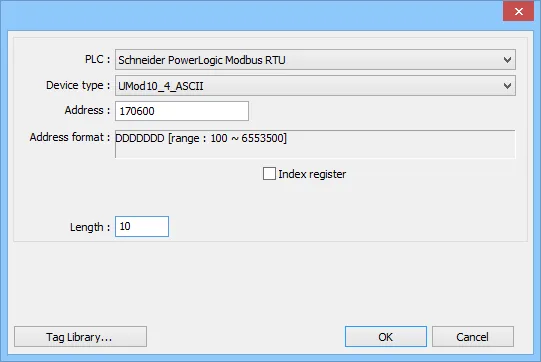
When using the Schneider PowerLogic Modbus RTU driver you will see extra device types beyond standard Modbus. Because 64-bit objects are not natively supported by numeric objects, ASCII objects are used to display them. The Mod10_2 type can be treated as any other normal address since it is 32-bit data.
When using ASCII types, be aware of the special addressing method and length of memory allocation:
Addressing Method
It is necessary to add a suffix of 00. For example, to read register 1716 (Energy, Real Total) in PM800, address it as 171600.
Length of Memory Allocation
When using ASCII types, specify the length — the number of word memory units. Each WORD holds two characters. For example, with a length of 10, a maximum of 20 characters can be stored for the object (including the negative sign). Adjust this parameter according to the expected data.
Wiring Diagrams
NOTE: The serial port pin assignments may vary between HMI models.
Diagram 1: RS-232
| HMI | Direction | PLC |
|---|---|---|
| Pin assignments | RS232 terminal | |
| Rx | ↔ (bidirectional) | TXD |
| Tx | ↔ (bidirectional) | RXD |
| GND | ↔ (bidirectional) | GND |
Diagram 2: RS-485 2W
| HMI | Direction | PLC |
|---|---|---|
| Pin assignments | RS485 2W terminal | |
| Data- | ↔ (bidirectional) | D- |
| Data+ | ↔ (bidirectional) | D+ |
| GND | ↔ (bidirectional) | GND |
Diagram 3: RS-485 4W
| HMI | Direction | PLC |
|---|---|---|
| Pin assignments | RS485 4W terminal | |
| Rx- | ↔ (bidirectional) | TX- |
| RX+ | ↔ (bidirectional) | TX+ |
| Tx- | ↔ (bidirectional) | RX- |
| Tx+ | ↔ (bidirectional) | RX+ |
| GND | ↔ (bidirectional) | GND |