Introduction
All Maple Systems HMI Touch Screens programmed with EBPro (EasyBuilder Pro), including every cMT X Series and cMT Series model, are compatible with SAIA S-BUS Ethernet. Configure your Controller and HMI/cMT with the following parameters to establish reliable communication.
Supported Series: SAIA PCD series Ethernet
Website: www.saia-pcd.com
HMI Settings
| Parameters | Recommended | Options | Notes |
|---|---|---|---|
| PLC type | SAIA S-BUS (Ethernet) | ||
| PLC I/F | Ethernet | Use UDP | |
| Port no. | 5050 | ||
| PLC sta. no. | 0 |
PLC Settings
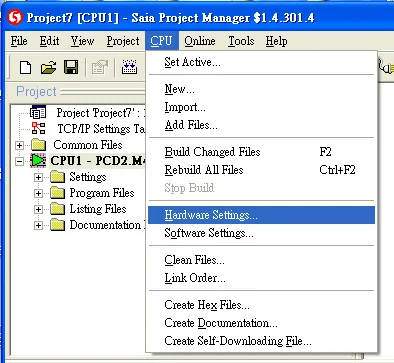
In Saia Project Manager, open the CPU menu and select Hardware Settings.
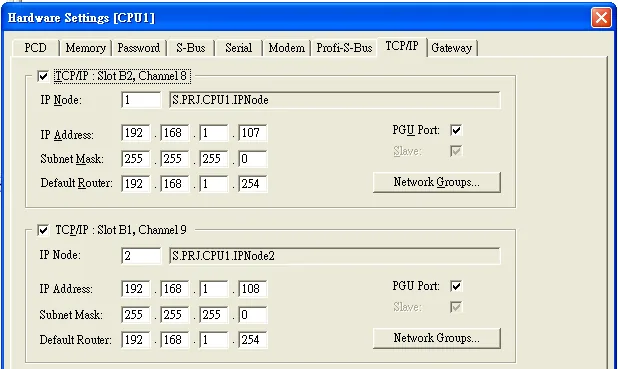
In the Hardware Settings dialog, select the TCP/IP tab and configure the IP address, subnet mask, and default router for each TCP/IP slot.
Device Address
| Bit/Word | Device type | Format | Range | Memo |
|---|---|---|---|---|
| B | Flag | DDDD | 0 ~ 8191 | |
| B | Output | DDDD | 0 ~ 1023 | |
| B | Input | DDDD | 0 ~ 1023 | |
| B | Reg_Bit | DDDDdd | 0 ~ 1638331 | dd: Bit no. (00 ~ 31) |
| B | DBn_Bit | DDDDDDDdd | 0 ~ 399938331 | |
| DW | Register | DDDDD | 0 ~ 16383 | |
| DW | Counter | DDDD | 0 ~ 1599 | |
| DW | Timer | DDDD | 0 ~ 1599 | |
| DW | Reg_Float | DDDDD | 0 ~ 16383 | Support single float point |
| DW | DBn | DDDDDDDDD | 0 ~ 536016383 | |
| DW | DB_String | DDDDDDDDD | 0 ~ 536016383 | |
| DW | R_String | DDDDD | 0 ~ 16383 | |
| DW | DB_Float | DDDDDDDDD | 0 ~ 536016383 | |
| DW | Text | DDDDDDD | 0 ~ 1638300 |
Wiring Diagram
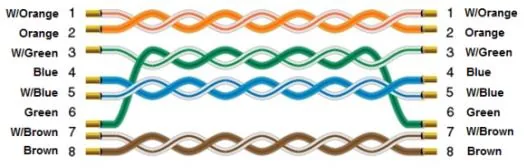
The diagram below shows the Ethernet cable wiring.