Introduction
All Maple Systems HMI Screens programmed with EBPro (EasyBuilder Pro), including every cMT X Series and cMT Series model, are compatible with a Koyo (Automation Direct) Do-more (Ethernet) PLC. Configure your Controller and HMI/cMT with the following parameters to establish reliable communication.
Supported Series: Do-more H2/BRX Series PLC Ethernet port
Website: www.automationdirect.com
HMI Setting
| Parameters | Recommended | Options | Notes |
|---|---|---|---|
| PLC type | KOYO Do-more (Ethernet) | ||
| PLC I/F | Ethernet | USE UDP | |
| Port no. | 28784 | ||
| PLC sta. no. | No need to set station no. | ||
| Device type | H2 | H2, BRX |
PLC Setting
Serial Port Mode: Do-more programming
Device Address
| Bit/Word | Device type | Format | Range | Memo |
|---|---|---|---|---|
| B | ST | DDDD | 0 ~ 1023 | |
| B | X | DDDDD | 0 ~ 65535 | |
| B | Y | DDDDD | 0 ~ 65535 | |
| B | C | DDDDD | 0 ~ 65535 | |
| B | MI | DDDDD | 0 ~ 65535 | |
| B | MC | DDDDD | 0 ~ 65535 | |
| B | T.Done | DDDDD | 0 ~ 32766 | Read only |
| B | CT.Done | DDDDD | 0 ~ 32766 | Read only |
| B | DLX | OOOOOO | 0 ~ 177777 | |
| B | DLY | OOOOOO | 0 ~ 177777 | |
| B | DLC | OOOOOO | 0 ~ 177777 | |
| W | DLV | OOOOOO | 0 ~ 177777 | |
| W | SDT | D.D | 0 ~ 7.6 | *Note 1 |
| W | WX | DDDDD | 0 ~ 65535 | |
| W | WY | DDDDD | 0 ~ 65535 | |
| W | V | DDDDD | 0 ~ 65535 | |
| W | N | DDDDD | 0 ~ 65535 | |
| W | SS | DDDD.DD | 0 ~ 3854.34 | Read only *Note 2 |
| W | SL | DDDD.DDD | 0 ~ 1007.130 | Read only *Note 2 |
| W | UDT | DDDDD.D | 0 ~ 32767.6 | *Note 1 |
| W | PL | DDD | 0 ~ 255 | |
| W | MIR | DDDDD | 0 ~ 65535 | |
| W | MHR | DDDDD | 0 ~ 65535 | |
| W | DST | DDD | 0 ~ 511 | |
| W | D | DDDDD | 0 ~ 65534 | |
| W | R | DDDDD | 0 ~ 65534 | Real Number (float) |
| W | T.ACC | DDDDD | 0 ~ 32766 | |
| W | CT.ACC | DDDDD | 0 ~ 32766 |
*Note 1: SDT, UDT: xxx.0 = Year, xxx.1 = Month, xxx.2 = Day, xxx.3 = DayOfWeek, xxx.4 = Hour, xxx.5 = Minute, xxx.6 = Second.
*Note 2: SS, SL: xxx.0 = MaxLen, xxx.1 = Length, xxx.2 ~ 34 = String (SS); xxx.2 ~ 130 = String (SL).
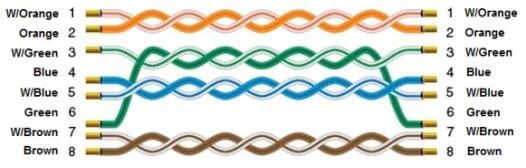
Wiring Diagram
The diagram below shows the Ethernet cable wiring.