Introduction
All Maple Systems HMI Screens programmed with EBPro (EasyBuilder Pro), including every cMT X Series and cMT Series model, are compatible with a Koyo (Automation Direct) DirectLogic Ethernet PLC. Configure your Controller and HMI/cMT with the following parameters to establish reliable communication.
Supported Series: KOYO DirectLogic series, model H0-ECOM100, H2-ECOM100
Website: www.automationdirect.com
HMI Settings
| Parameters | Recommended | Options | Notes |
|---|---|---|---|
| PLC type | KOYO Ethernet | ||
| PLC I/F | Ethernet | UDP/IP | |
| Port no. | 28784 | ||
| PLC sta. no. | No need to set station no. | 0 |
Device Address
| Bit/Word | Device Type | Format | Range | Memo |
|---|---|---|---|---|
| B | GX | OOOO | 0 ~ 3777 | Global I/O |
| B | X | OOOO | 0 ~ 1777 | Real Word Inputs |
| B | SP | OOOO | 0 ~ 1777 | Special Purpose Relays |
| B | GY | OOOO | 0 ~ 3777 | More Global I/O |
| B | Y | OOOO | 0 ~ 1777 | Real Word Outputs |
| B | C | OOOO | 0 ~ 3777 | Control Relays |
| B | S | OOOO | 0 ~ 1777 | Stage Status Bits |
| B | T | OOO | 0 ~ 377 | Timer Status Bits |
| B | CT | OOO | 0 ~ 377 | Counter Status Bits |
| W | V | OOOOO | 0 ~ 41237 | V-memory |
| W | CCM_32 | HHH | 1 ~ 200 | GX, X, SP |
| W | CCM_33 | HHH | 1 ~ 340 | GY, Y, C, S, T, CT |
| W | CCM_31 | HHHH | 1 ~ 42A0 | V |
ddd: Decimal, HHH: Hexadecimal, OOOO: Octal
CCM Address Mapping
The mapping of CCM_32, CCM_33, and CCM_31 with other addresses.
| CCM Device Type | CCM Range | Device Type | Device Range |
|---|---|---|---|
CCM_31 | 1~42A0 | V | 0~41237 |
CCM_32 | 1~FF | GX | 0~3777 |
CCM_32 | 101~17F | X | 0~1777 |
CCM_32 | 181~1FF | SP | 0~1777 |
CCM_33 | 1~FF | GY | 0~3777 |
CCM_33 | 101~17F | Y | 0~1777 |
CCM_33 | 181~27F | C | 0~3777 |
CCM_33 | 281~2FF | S | 0~1777 |
CCM_33 | 301~31F | T | 0~377 |
CCM_33 | 321~33F | CT | 0~377 |
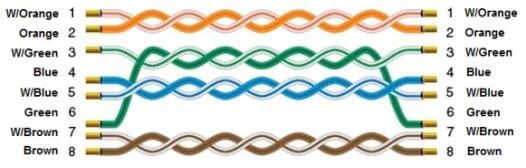
Wiring Diagram
NOTE: Connect the HMI to the KOYO DirectLogic controller using a standard straight-through Ethernet cable.
The diagram below shows the Ethernet cable wiring.