Introduction
All Maple Systems HMI Screens programmed with EBPro (EasyBuilder Pro), including every cMT X Series and cMT Series model, are compatible with a Koyo (Automation Direct) CLICK (Ethernet) PLC. Configure your Controller and HMI/cMT with the following parameters to establish reliable communication.
Supported Series: KOYO CLICK C0 series
Website: www.automationdirect.com
HMI Settings
| Parameters | Recommended | Options | Notes |
|---|---|---|---|
| PLC type | KOYO CLICK (Ethernet) | ||
| PLC I/F | Ethernet | USE UDP | |
| Port no. | 25425 | ||
| Turn around delay | 0 | 100~ | *Note |
| PLC sta. no. | No need to set station no. |
NOTE: When the communication is not stable, please adjust the parameter of Turn around delay until the communication is normal.
Device Address
| Bit/Word | Device Type | Format | Range | Memo |
|---|---|---|---|---|
| B | X | Ddd | 1 ~ 816 | |
| B | Y | Ddd | 1 ~ 816 | |
| B | C | DDDD | 1 ~ 2000 | |
| B | T | DDD | 1 ~ 500 | |
| B | CT | DDD | 1 ~ 250 | |
| B | SC | DDDD | 1 ~ 1000 | |
| W | DS | DDDD | 1 ~ 4500 | |
| DW | DD | DDDD | 1 ~ 1000 | |
| W | DH | DDD | 1 ~ 500 | |
| DW | DF | DDD | 1 ~ 500 | |
| W | XD | D | 0 ~ 8 | |
| W | YD | D | 0 ~ 8 | |
| W | TD | DDD | 1 ~ 500 | |
| DW | CTD | DDD | 1 ~ 250 | |
| W | SD | DDDD | 1 ~ 1000 | |
| W | TXT | DDDD | 1 ~ 1000 |
Wiring Diagram
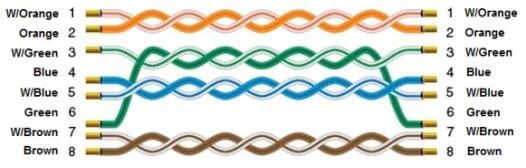
NOTE: Ethernet cable — straight-through (standard Cat5e/Cat6):
The diagram below shows the Ethernet cable wiring.