
Introduction
All Maple Systems HMI Touch Screens programmed with EBPro (EasyBuilder Pro), including every cMT X Series and cMT Series model, are compatible with Hitachi H/EH/EHV Series. Configure your Controller and HMI/cMT with the following parameters to establish reliable communication.
Supported Series: Hitachi H series, EH-150, Micro-EH, H20, H40, H64, H200, H250, H252, H300, H302, H700, H702, H1000, H1002, H2000, H4010
Website: www.hitachi-ies.com
HMI Settings
| Parameters | Recommended | Options | Notes |
|---|---|---|---|
| PLC type | Hitachi H/EH/EHV Series | ||
| PLC I/F | RS232 | RS232, RS485 | |
| Baud rate | 19200 | 9600, 19200, 38400 | |
| Data bits | 7 | 7 | |
| Parity | Even | Even | |
| Stop bits | 1 | 1 | |
| PLC sta. no. | 0 | 0–255 | Does not apply to this protocol. |
| Online simulator | YES | ||
| Broadcast command | NO | ||
| Extend address mode | NO |
Device Address
| Bit/Word | Device Type | Format | Range | Memo |
|---|---|---|---|---|
| B | X_Dec | HHHdd | 0 ~ 4ff95 | |
| B | Y_Dec | HHHdd | 0 ~ 4ff95 | |
| B | X | HHHHh | 0 ~ fffff | External input-bit (X) |
| B | Y | HHHHh | 0 ~ fffff | External output-bit (Y) |
| B | M | HHHHh | 0 ~ fffff | Data area-bit (M) |
| B | T | HHHHh | 0 ~ fffff | Timer (T) |
| B | R | HHHHh | 0 ~ fffff | Internal output (R) |
| B | L | HHHHh | 0 ~ fffff | Link area-bit (L) |
| W | TC | HH | 0 ~ ff | Timer/Counter current value |
| W | WM | HHHH | 0 ~ 270f | Data area-word (M) |
| W | WX | HHHH | 0 ~ 270f | External input-word (X) |
| W | WY | HHHH | 0 ~ 270f | External output-word (Y) |
| W | WR | HHHH | 0 ~ c3ff | Internal output-word (R) |
| W | WL | HHHH | 0 ~ 270f | Link area-word (L) |
Wiring Diagram
NOTE: The serial port pin assignments may vary between HMI models.
WARNING: If your communication cable is not wired exactly as shown in our cable assembly instructions, damage to the HMI or loss of communications can be caused.
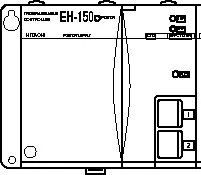
| CPU Type | Port 1 | Port 2 |
|---|---|---|
| EH-150/CPU 104A | RS-232 | RS-232 |
| EH-150/CPU 208A | RS-232 | RS-232 |
| EH-150/CPU 308A | RS-232/RS-485 | RS-232 |
| EH-150/CPU 316A | RS-232/RS-485 | RS-232 |
| EH-150/CPU 448A | RS-232/RS-485 | RS-232 |
| Switch Number | Setting | Function | Notes |
|---|---|---|---|
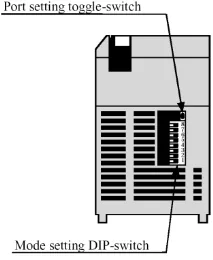
| 1 | OFF | Normal mode | |
| 2 | OFF | TRNS0 operation | |
| 3, 4 (Port 1 transmission speed) | ON / ON | 4,800 bps | Doesn’t support |
| 3, 4 (Port 1 transmission speed) | OFF / ON | 9,600 bps | |
| 3, 4 (Port 1 transmission speed) | ON / OFF | 19,200 bps | Default |
| 3, 4 (Port 1 transmission speed) | OFF / OFF | 38,400 bps | |
| 5 | ON | Dedicated port | |
| 6 PHL Low (Port 2 transmission speed) | ON | 9,600 bps | |
| 6 PHL High (Port 2 transmission speed) | ON | 38,400 bps | |
| 6 PHL Low (Port 2 transmission speed) | OFF | 4,800 bps | Doesn’t support |
| 6 PHL High (Port 2 transmission speed) | OFF | 19,200 bps | Default |
| 7 | OFF | (System mode) | Do not turn on. |
| 8 | OFF | (System mode) | Do not turn on. |
Diagram 1: RS-232 (EH-150 Port 1 / Port 2 / Micro-EH Port 1)
| HMI | Direction | PLC |
|---|---|---|
| Pin assignments | RS232 8P RJ45 Male | |
| Rx | ↔ (bidirectional) | 5 SD |
| Tx | ↔ (bidirectional) | 6 RD |
| GND | ↔ (bidirectional) | 1 SG |
| CTS | ↔ (bidirectional, optional) | 8 RS |
| ↕︎ (tie) | 4 PHL 7 DR |
Diagram 2: RS-485 4W (EH-150 Port 1)
| HMI | Direction | PLC |
|---|---|---|
| Pin assignments | RS-485 4W 8P RJ45 Male | |
| Rx- | ↔ (bidirectional) | 5 Tx- |
| RX+ | ↔ (bidirectional) | 4 Tx+ |
| Tx- | ↔ (bidirectional) | 6 Rx- |
| Tx+ | ↔ (bidirectional) | 7 Rx+ |
| GND | ↔ (bidirectional) | 1 GND |
Diagram 3: RS-485 2W (EH-150 Port 1)
| HMI | Direction | PLC |
|---|---|---|
| Pin assignments | RS-485 4W 8P RJ45 Male | |
| Data- | ↔ (bidirectional) | 4 |
| ↕︎ (tie) | 7 | |
| Data+ | ↔ (bidirectional) | 5 |
| ↕︎ (tie) | 6 | |
| GND | ↔ (bidirectional) | 1 |
Diagram 4: RS-232 (H Series CPU Port)
| HMI | Direction | PLC |
|---|---|---|
| Pin assignments | RS232 15P D-Sub Male | |
| Rx | ↔ (bidirectional) | 2 |
| Tx | ↔ (bidirectional) | 3 |
| GND | ↔ (bidirectional) | 9 |
| ↕︎ (tie) | 10 | |
| CTS | ↔ (bidirectional, optional) | 4 |
| ↕︎ (tie) | 5 7 8 14 |