Introduction
All Maple Systems HMI Touch Screens programmed with EBPro (EasyBuilder Pro), including every cMT X Series and cMT Series model, are compatible with Hitachi EHV Series (Ethernet). Configure your Controller and HMI/cMT with the following parameters to establish reliable communication.
Website: www.hitachi-ies.com
HMI Settings
| Parameter | Recommended | Options | Notes |
|---|---|---|---|
| PLC type | Hitachi EHV Series (Ethernet) | ||
| PLC I/F | Ethernet | ||
| Port no. | 3004 | 3004~3007 |
Device Addresses
| Bit/Word | Device Type | Format | Range | Memo |
|---|---|---|---|---|
| B | X_Dec | HHHdd | 0 ~ 4ff95 | External input-bit (X) |
| B | Y_Dec | HHHdd | 0 ~ 4ff95 | External output-bit (Y) |
| B | X | HHHHh | 0 ~ fffff | External input-bit (X) |
| B | Y | HHHHh | 0 ~ fffff | External output-bit (Y) |
| B | M | HHHHh | 0 ~ fffff | Data area-bit (M) |
| B | T | DDDDD | 0 ~ 65535 | Timer (T) |
| B | R | HHHHh | 0 ~ fffff | Internal output (R) |
| B | L | HHHHh | 0 ~ fffff | Link area-bit (L) |
| W | TC | DDDD | 0 ~ 2559 | Timer/Counter current value |
| W | WM | HHHH | 0 ~ 7fff | Data area-word (M) |
| W | WX | HHHH | 0 ~ ffff | External Input-word (X) |
| W | WY | HHHH | 0 ~ ffff | External output-word (Y) |
| W | WR | HHHH | 0 ~ ffff | Internal output-word (R) |
| W | WL | HHHH | 0 ~ 73ff | Link area-word (L) |
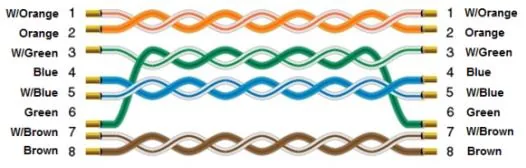
Wiring Diagram
The diagram below shows the Ethernet cable wiring.