Introduction
All Maple Systems HMI Touch Screens programmed with EBPro (EasyBuilder Pro), including every cMT X Series and cMT Series model, are compatible with GE Intelligent Platforms VersaMax (Ethernet). Configure your Controller and HMI/cMT with the following parameters to establish reliable communication.
Supported Series: GE VersaMax controllers
Website: www.ge.com
HMI Settings
| Parameters | Recommended | Options | Notes |
|---|---|---|---|
| PLC type | GE VersaMax (Ethernet) | ||
| PLC I/F | Ethernet | ||
| Port no. | 18245 |
Device Address
| Bit/Word | Device Type | Format | Range | Memo |
|---|---|---|---|---|
| B | I | DDDDD | 1 ~ 32768 | |
| B | Q | DDDDD | 1 ~ 32768 | |
| B | M | DDDDD | 1 ~ 32768 | |
| B | G | DDDDD | 1 ~ 7680 | |
| B | T | DDDDD | 1 ~ 1024 | |
| B | SA | DDDDD | 1 ~ 128 | |
| B | SB | DDDDD | 1 ~ 128 | |
| B | SC | DDDDD | 1 ~ 128 | |
| B | S | DDDDD | 1 ~ 128 | |
| W | AI | DDDDD | 1 ~ 32640 | |
| W | AQ | DDDDD | 1 ~ 32640 | |
| W | R | DDDDD | 1 ~ 32640 | |
| W | IW | DDDD | 1 ~ 2048 | |
| W | QW | DDDD | 1 ~ 2048 | |
| W | MW | DDDD | 1 ~ 2048 | |
| W | GW | DDD | 1 ~ 480 | |
| W | TW | DD | 1 ~ 64 | |
| W | SW | D | 1 ~ 8 |
Wiring Diagram
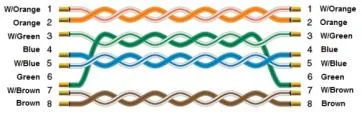
NOTE: Connect the HMI to the GE VersaMax controller using a standard Ethernet cable (straight-through, T568B).
The diagram below shows the Ethernet cable wiring.