Introduction
All Maple Systems HMI touch screens programmed with EBPro (EasyBuilder Pro), including every cMT X Series and cMT Series model, are compatible with Yokogawa FA-M3 (Ethernet). Configure your Controller and HMI/cMT with the following parameters to establish reliable communication.
Supported Series: FA-M3 CPU SP35-5N, SP55-5N with F3LE01-5T/F3LE11-0T Ethernet module
Website: www.yokogawa.com
HMI Settings
| Parameters | Recommended | Options | Notes |
|---|---|---|---|
| PLC type | YOKOGAWA FA-M3 (Ethernet) | ||
| PLC I/F | Ethernet | ||
| Port no. | 12289 | ||
| PLC sta. no. | 1 |
PLC Settings
Communication Mode
Set the IP address, and set all condition setup switches to OFF.
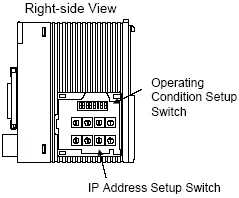
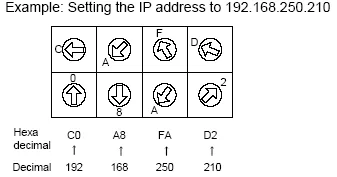
The IP address is set using rotary dial switches on the F3LE Ethernet module. Each dial represents one hex octet of the IP address.
Device Addresses
| Bit/Word | Device Type | Format | Range | Memo |
|---|---|---|---|---|
| B | X | DDDDD | 0 ~ 71664 | |
| B | Y | DDDDD | 0 ~ 71664 | |
| B | I | DDDDD | 1 ~ 65535 | |
| B | M | DDDD | 1 ~ 9984 | |
| B | L | DDDDD | 0 ~ 78192 | |
| W | D | DDDDD | 1 ~ 65535 | |
| W | B | DDDDDD | 1 ~ 262144 | |
| W | V | DD | 1 ~ 256 | |
| W | W | DDDDD | 1 ~ 78192 | |
| W | Z | DDDD | 1 ~ 1024 | |
| W | F | DDDDDD | 1 ~ 524288 |
Wiring Diagram
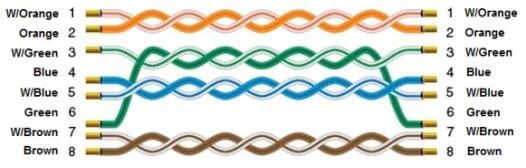
NOTE: Use a standard Ethernet straight-through cable (Cat5 or higher) to connect the HMI to the Yokogawa FA-M3 Ethernet module.
The diagram below shows the Ethernet cable wiring.