Introduction
All Maple Systems HMI touch screens programmed with EBPro (EasyBuilder Pro), including every cMT X Series and cMT Series model, are compatible with Schleicher XCX 300/800. Configure your Controller and HMI/cMT with the following parameters to establish reliable communication.
Website: www.schleicher.technology
HMI Setting
| Parameters | Recommended | Options | Notes |
|---|---|---|---|
| PLC type | Schleicher XCX 300/800 | ||
| PLC I/F | Ethernet | RS232, RS422, Ethernet | |
| Port no. | 20547 | ||
| Baud rate | 9600 | ||
| Data bits | 8 | ||
| Parity | Odd | ||
| Stop bits | 1 |
PLC Setting
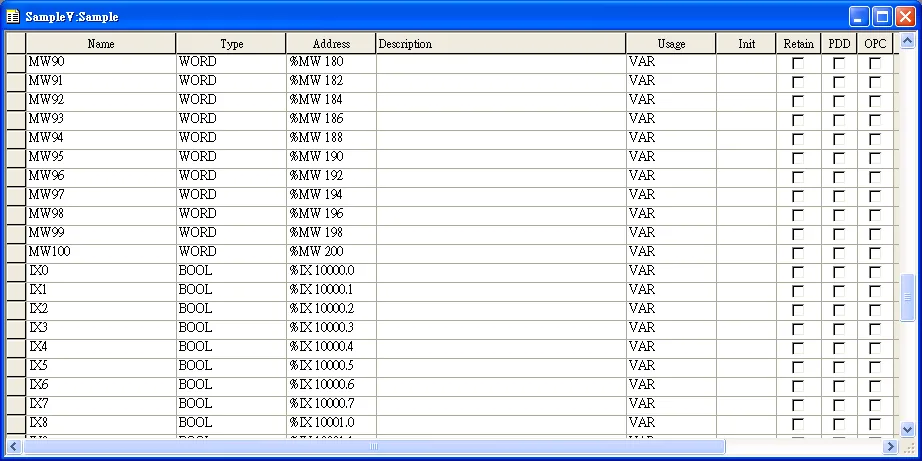
Create a Variable
A variable must be created for HMI access.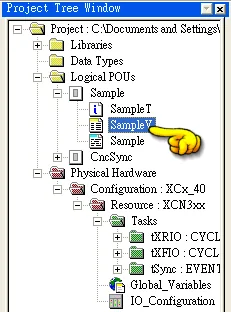
Export the Tag
Export tag (supports global variables and POU variables). In the programming software, open the File menu and select Export.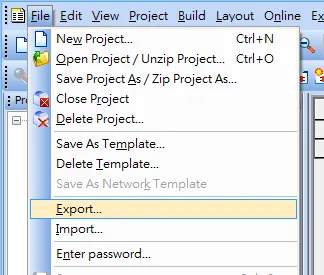
Export PLCopen XML File
In the Import/Export dialog, select Export PLCopen xml file and click OK.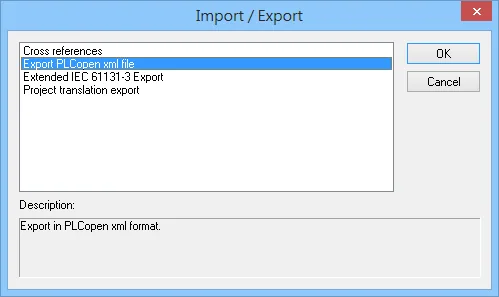
Import Tags in EBPro (EasyBuilder Pro)
In EBPro (EasyBuilder Pro), open System Parameter Settings, select the Schleicher XCX 300/800 device, and click Import Tags.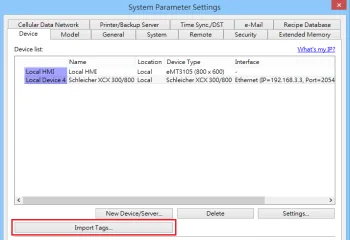
Device Address
| Bit/Word | Device type | Format | Range | Memo |
|---|---|---|---|---|
| B | IX | DDDDDo | 0 ~ 655357 | Input %IX |
| B | QX | DDDDDo | 0 ~ 655357 | Output %QX |
| B | MX | DDDDDDDDo | 0 ~ 518326727 | %MX |
| W | IW_EVEN | DDDDD | 0 ~ 65535 | %IW (must be even) |
| W | QW_EVEN | DDDDD | 0 ~ 65535 | %QW (must be even) |
| W | MW_EVEN | DDDDDDDD | 0 ~ 51832672 | %MW (must be even) |
| DW | ID_EVEN | DDDDD | 0 ~ 65535 | %ID (must be even) |
| DW | QD_EVEN | DDDDD | 0 ~ 65535 | %QD (must be even) |
| DW | MD_EVEN | DDDDDDDD | 0 ~ 51832672 | %WD (must be even) |
| Byte | IB | DDDDD | 0 ~ 65535 | |
| Byte | QB | DDDDD | 0 ~ 65535 | |
| Byte | MB | DDDDDDDD | 0 ~ 51832672 | |
| W | IW | DDDDD | 0 ~ 65535 | %IW |
| W | QW | DDDDD | 0 ~ 65535 | %QW |
| W | MW | DDDDDDDD | 0 ~ 51832672 | %MW |
| DW | ID | DDDDD | 0 ~ 65535 | %ID |
| DW | QD | DDDDD | 0 ~ 65535 | %QD |
| DW | MD | DDDDDDDD | 0 ~ 51832672 | %WD |
| W | STRING | DDDDDDDD | 0 ~ 51832672 | Word address must be even. |
Wiring Diagram
NOTE: The serial port pin assignments may vary between HMI models.
Diagram 1: RS-232 (Schleicher XCX300 RS232 Port)
| HMI | Direction | PLC |
|---|---|---|
| Pin assignments | RS232 9P D-Sub Female | |
| Rx | ↔ (bidirectional) | 3 |
| Tx | ↔ (bidirectional) | 2 |
| GND | ↔ (bidirectional) | 5 |
Diagram 2: RS-485 4W (Schleicher XCX300 RS485 4W Terminal)
| HMI | Direction | PLC |
|---|---|---|
| Pin assignments | RS485 4W Terminal | |
| Rx- | ↔ (bidirectional) | TX- |
| RX+ | ↔ (bidirectional) | TX+ |
| Tx- | ↔ (bidirectional) | RX- |
| Tx+ | ↔ (bidirectional) | RX+ |
| GND | ↔ (bidirectional) | GND |
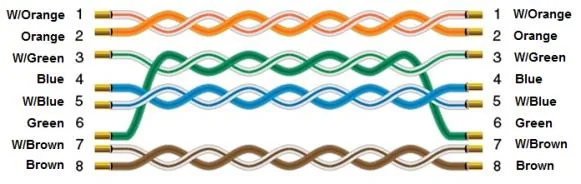
Diagram 3: Ethernet Cable