
Introduction
All Maple Systems HMI Screens programmed with EBPro (EasyBuilder Pro), including every cMT X Series and cMT Series model, are compatible with an Omron CJ/CS/CP Series. Configure your Controller and HMI/cMT with the following parameters to establish reliable communication.
Supported Series: OMRON CP1E, CP2E, CP1L, CP1H, CJ1M, CJ2M, CJ1H, CJM1G, CS1H and CS1G. (Host Link Protocol FINS command), this driver supports Extend Addressing Mode.
Website: www.omron.com
HMI Settings
| Parameters | Recommended | Options | Notes |
|---|---|---|---|
| PLC type | OMRON CJ/CS/CP | ||
| PLC I/F | RS232 | RS232, RS422, RS485 | |
| Baud rate | 9600 | 9600~115200 | |
| Data bits | 7 | 7 or 8 | |
| Parity | Even | Even, Odd, None | |
| Stop bits | 2 | 1 or 2 | |
| PLC sta. no. | 0 | 0-31 | Host Link Station No. |
| Protocol | Multi-read | Multi-read / Single read | |
| Online simulator | YES | ||
| Extend address mode | YES | ||
| Broadcast | NO |
NOTE: Support communications between HMI and PLC in pass-through mode.
NOTE: Set LW-9903 to 2 to enhance the speed of download/upload PLC program in pass-through mode.
PLC Settings
Communication: Host Link Protocol
Device Address
| Bit/Word | Device type | Format | Range | Memo |
|---|---|---|---|---|
| B | CIO_Bit | DDDDDdd | 0 ~ 3276715 | Channel I/O (CIO) |
| B | W_Bit | DDDDDdd | 0 ~ 3276715 | Work Area (WR) |
| B | H_Bit | DDDDDdd | 0 ~ 3276715 | Holding Area (HR) |
| B | D_Bit | DDDDDdd | 0 ~ 3276715 | Data Memory (DM) |
| B | A_Bit | DDDDDdd | 0 ~ 3276715 | Auxiliary Relay (AR) |
| B | T_Bit | DDDDDdd | 0 ~ 3276715 | Timer (TIM) |
| B | C_Bit | DDDDDdd | 0 ~ 3276715 | Counter (CNT) |
| B | C_flag | DDDD | 0 ~ 4095 | |
| B | T_flag | DDDD | 0 ~ 4095 | |
| B | LR_Bit | DDDdd | 0 ~ 19915 | |
| B | EM0_Bit ~ EM18_Bit | DDDDDdd | 0 ~ 3276715 | Extend Memory |
| W | T | DDDDD | 0 ~ 32767 | Timer (TIM) |
| W | H | DDDDD | 0 ~ 32767 | Holding Area (HR) |
| W | D | DDDDD | 0 ~ 32767 | Data Memory (DM) |
| W | A | DDDDD | 0 ~ 32767 | Auxiliary Relay (AR) |
| W | W | DDDDD | 0 ~ 32767 | Work Area (WR) |
| W | C | DDDDD | 0 ~ 32767 | Counter (CNT) |
| W | CIO | DDDDD | 0 ~ 32767 | Channel I/O (CIO) |
| W | EM0 ~ EM18 | DDDDD | 0 ~ 32767 | Extend Memory |
| W | LR | DDD | 0 ~ 199 |
Import Tags
Export CXR file from CX-Programmer
In CX-Programmer, go to Variables and export the*.cxrfile.Only addresses with a tag name can be imported, and address type is required.
Open System Parameters and Import Tags
Open EBPro (EasyBuilder Pro) and set the driver parameters in System Parameter Settings, then click Import Tags.
Select the CXR file
Browse to and select the*.cxrfile exported from CX-Programmer.Select tags to import
In the Add Tags dialog, check the tags the project needs to use, then click OK.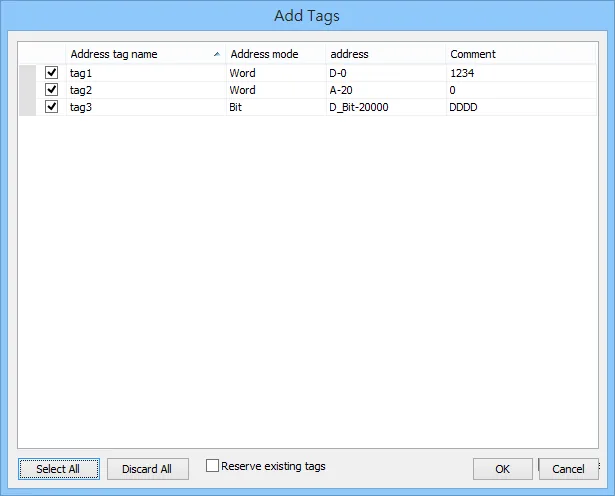
Confirm successful import
A confirmation dialog appears indicating the tag information was imported successfully.
Wiring Diagrams
NOTE: The serial port pin assignments may vary between HMI models.
RS-232
| HMI | Direction | PLC |
|---|---|---|
| Pin assignments | RS232 9P D-Sub Male | |
| Rx | ↔ (bidirectional) | 2 SD |
| Tx | ↔ (bidirectional) | 3 RD |
| GND | ↔ (bidirectional) | 9 GND |
| ↕︎ (tie) | 4 RS 5 CS |
RS-485 4W (CP1H/CP1L CP1W-CIF11)
| HMI | Direction | PLC |
|---|---|---|
| Pin assignments | CP1W-CIF11 RS485 4W Terminal | |
| Rx- | ↔ (bidirectional) | SDA |
| RX+ | ↔ (bidirectional) | SDB |
| Tx- | ↔ (bidirectional) | RDA |
| Tx+ | ↔ (bidirectional) | RDB |
| GND | ↔ (bidirectional) | FG |
NOTE: CP1W-CIF11: SW1 ON, others OFF.