Introduction
All Maple Systems HMIs programmed with EBPro (EasyBuilder Pro), including every cMT X Series and cMT Series model, are compatible with ODVA EtherNet/IP Server (Explicit Messaging). Configure your Controller and HMI/cMT with the following parameters to establish reliable communication.
HMI Settings
| Parameters | Recommended | Options | Notes |
|---|---|---|---|
| PLC type | ODVA EtherNet/IP Server (Explicit Messaging) | ||
| PLC I/F | Ethernet | ||
| Port no. | 44818 |
NOTE: Supports cMT Series only.
NOTE: Only supports unconnected explicit messaging (via TCP) connection.
Tag Manager
Open System Parameter Settings
Navigate to System Parameter Settings → Device → Tag Manager.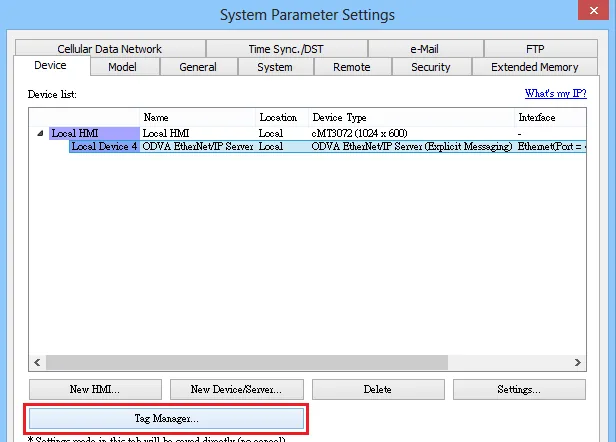
Add a Tag in EIP Tag Manager
In the EIP Tag Manager dialog, click Add.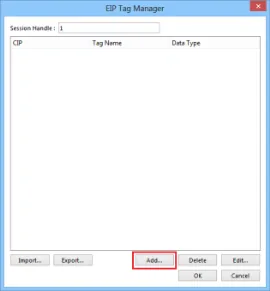
Configure Address Setting
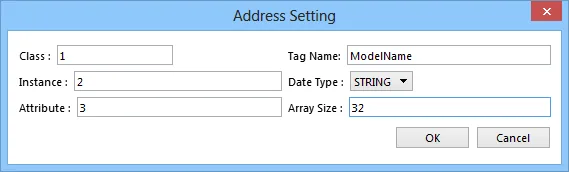
In the Address Setting dialog, enter the Class, Instance, Attribute, Tag Name, and Data Type, then click OK.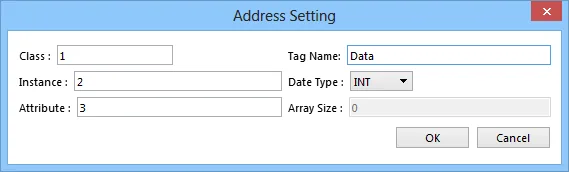
Save the Settings
The new tag appears in the EIP Tag Manager tree under its Class, Instance, and Attribute. Click OK to save the settings.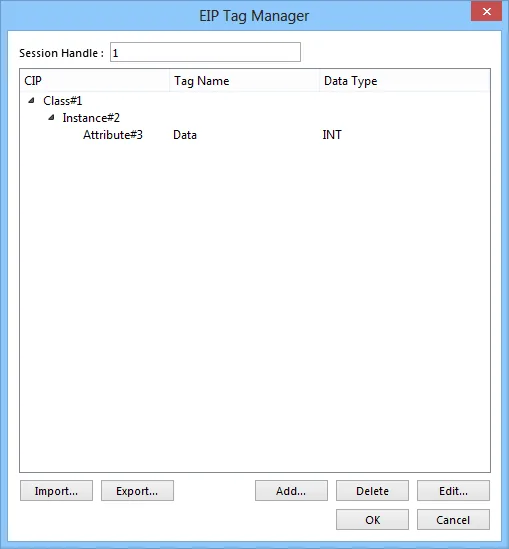
Session Handle
The session handle is generated by the target device and returned to the initiator of the session. This handle will be used for subsequent communication with the target device.
Set a different session handle value (range: 1–65535) for each individual connection when an EIP client is connected to more than one EIP explicit server on the network.
For the STRING data type, the Array Size field specifies the maximum string length.
Supported Data Types
| Data Type | EBPro (EasyBuilder) Data Format | Memo |
|---|---|---|
BOOL | Bit | |
SINT | 16-bit BCD, Hex, Binary, Signed | 8-bit |
USINT | 16-bit BCD, Hex, Binary, Unsigned | 8-bit |
INT | 16-bit BCD, Hex, Binary, Signed | 16-bit |
UINT | 16-bit BCD, Hex, Binary, Unsigned | 16-bit |
DINT | 32-bit BCD, Hex, Binary, Signed | 32-bit |
UDINT | 32-bit BCD, Hex, Binary, Unsigned | 32-bit |
STRING | Word array for ASCII input and display | Array size configurable |
NOTE: Only the STRING data type supports the array size setting.
Wiring Diagram
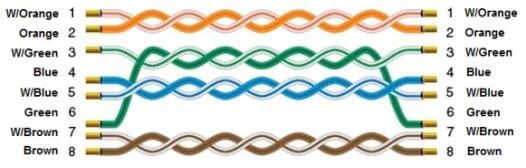
NOTE: Use a standard straight-through Ethernet cable (CAT5e or higher) for all connections.
The diagram below shows the Ethernet cable wiring.