Introduction
All Maple Systems HMI Touch Screens programmed with EBPro (EasyBuilder Pro), including every cMT X Series and cMT Series model, are compatible with ODVA EtherNet/IP Extension (Explicit Messaging). Configure your Controller and HMI/cMT with the following parameters to establish reliable communication.
Supported Series: Crevis EtherNet/IP NA-9188
Website: www.crevis.co.kr
HMI Settings
| Parameters | Recommended | Options | Notes |
|---|---|---|---|
| PLC type | ODVA EtherNet/IP Extension (Explicit Messaging) | ||
| PLC I/F | Ethernet | ||
| Port no. | 44818 |
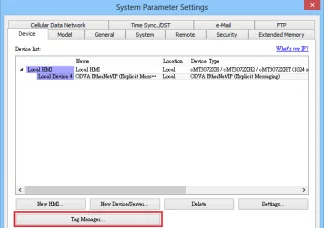
Tag Manager
Open Tag Manager and Browse
Click the Tag Manager button, then click the Browse button. The found objects will be displayed on the list.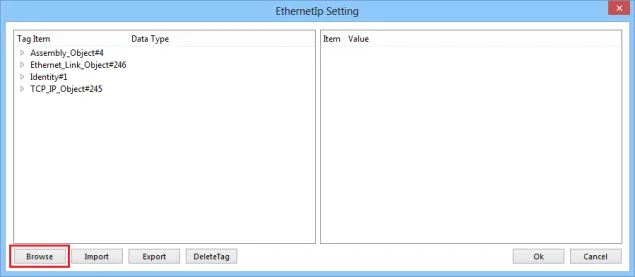
Browse Assembly Object Instances
ExpandAssembly_Object#4in the Tag Item tree to view its instances and attributes. Use Add Instance to add new instances as needed.![EthernetIp Setting dialog with Assembly_Object#4 expanded showing instance#0 with attribute#3 set to BYTE[2], and the Add Instance button visible alongside Item/Value panel.](https://media.maplesystems.com/wp-content/uploads/2026/06/03-ethernetip-setting-assembly-object-add-instance.webp "EtherNet/IP Setting Assembly Object Add Instance")
Edit Address Tag
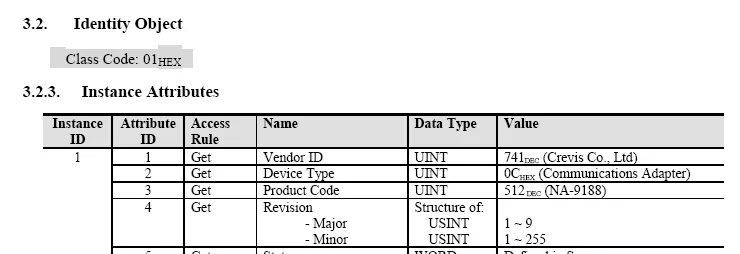
To edit an address tag, refer to the factory manual. The following is an example of how to add Vendor ID in Tag Editor. See 3.2.3 Identity Object in the factory manual for details on this ID.nnUnder Struct-Defined, selectIdentityto addVendor_ID.{1,1,1}represents{Class code, Instance ID, Attribute ID}. EnterUINTin the Data Type field according to the factory manual. When finished, this data member can be found in Identity Object.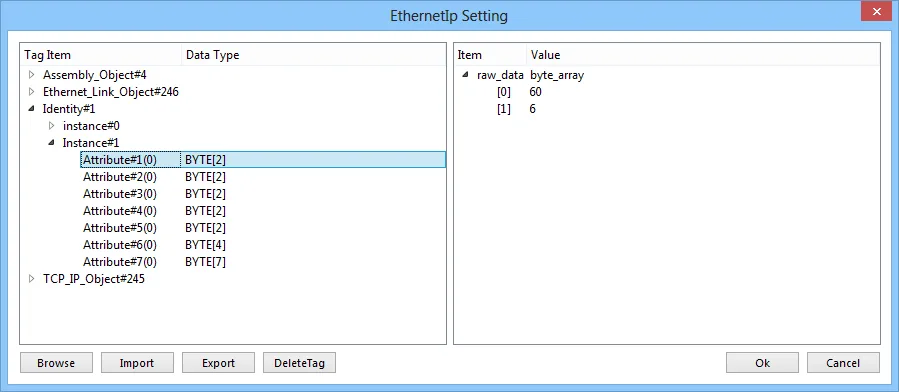
Limitations
- If offset is set for a user-defined tag, data cannot be written.
- If the user-defined tag length is inconsistent with the server, data cannot be written.
- [Binary Access] Not suitable for fast writing in HMI — for example: momentary objects, which will conflict with PLC control and cause abnormal reading and writing status.
![EthernetIp Setting dialog showing Class#4 with Instance#100 and Attribute#3(0) set to BYTE[7], alongside the EipAddClassInstanceAttrib dialog with Name 'Attribute', Attribute 3, Offset 1 highlighted in red, Data type WORD, and IsArray 4.](https://media.maplesystems.com/wp-content/uploads/2026/06/06-ethernetip-add-class-instance-attribute-dialog.webp)
Support Device Type
| Data type | EasyBuilder data format | Memo |
|---|---|---|
| Bool | bit | |
| Byte | 16-bit BCD, Hex, Binary, Unsigned | 8-bit |
| SInt | 16-bit BCD, Hex, Binary, Signed | 8-bit |
| USInt | 16-bit BCD, Hex, Binary, Unsigned | 8-bit |
| Word | 16-bit BCD, Hex, Binary, Unsigned | 16-bit |
| Int | 16-bit BCD, Hex, Binary, Signed | 16-bit |
| UInt | 16-bit BCD, Hex, Binary, Unsigned | 16-bit |
| DWord | 32-bit BCD, Hex, Binary, Unsigned | 32-bit |
| DInt | 32-bit BCD, Hex, Binary, Signed | 32-bit |
| Real | 32-bit Float | 32-bit |
| UDInt | 32-bit BCD, Hex, Binary, Unsigned | 32-bit |
| Array | Word array for ASCII input and display | Length=word |
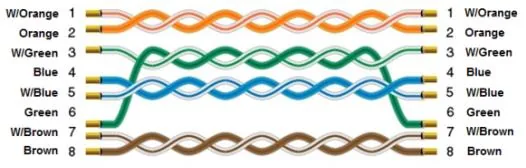
Wiring Diagram
The diagram below shows the Ethernet cable wiring.