
Introduction
All Maple Systems HMIs programmed with EBPro (EasyBuilder Pro), including every cMT X Series and cMT Series model, are compatible with a Mitsubishi Q00U/Q01U/Q02U/QnUD/QnUDH. Configure your Controller and HMI/cMT with the following parameters to establish reliable communication.
Supported Series: Mitsubishi Q00U, Q01U, Q02U, Q03UD, Q04UDH, Q06UDH, Q10UDH, Q13UDH, Q20UDH, Q26UDH, Q00UJ CPU.
HMI Setting
| Parameters | Recommended | Options | Notes |
|---|---|---|---|
| PLC type | Mitsubishi Q00U/Q01U/Q02U/QnUD/QnUDH | ||
| PLC I/F | RS232 | RS485 4W, RS232 | CPU port direct connect |
| Baud rate | 115200 | 9600~115200 | For Q00UJ, only 9600 is available |
| Data bits | 8 | ||
| Parity | Odd | ||
| Stop bits | 1 | ||
| PLC sta. no. | No | ||
| Online simulator | NO | ||
| Extend address mode | NO |
PLC Setting
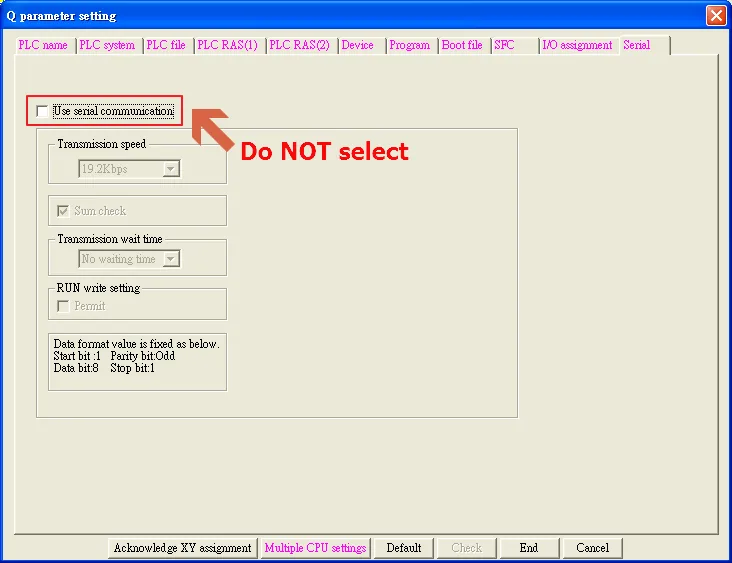
Please do not select Use Serial Communication. If this is selected the communication method will be the same as QJ71, please refer to Mitsubishi Q00/Q00UJ/Q01/QJ71 driver.
Device Address
| Bit/Word | Device Type | Format | Range | Memo |
|---|---|---|---|---|
| B | SM | DDDD | 0 ~ 2047 | |
| B | X | HHHH | 0 ~ 1fff | Input Relay |
| B | Y | HHHH | 0 ~ 1fff | Output Relay |
| B | M | DDDDD | 0 ~ 61439 | Internal Relay |
| B | L | DDDDD | 0 ~ 32767 | Latch Relay |
| B | F | DDDDD | 0 ~ 32767 | Annunciator |
| B | V | DDDDD | 0 ~ 32767 | Edge Relay |
| B | B | HHHH | 0 ~ efff | Link Relay |
| B | SB | HHHH | 0 ~ 7fff | Special Link Relay |
| B | TC | DDDDD | 0 ~ 2047 | Timer Coil |
| B | CC | DDDDD | 0 ~ 1023 | Counter Coil |
| B | D_Bit | DDDDDDDh | 0 ~ 4212735f | |
| B | W_Bit | HHHHHHh | 0 ~ 4047fff | |
| B | ZR_Bit | HHHHHh | 0 ~ fe7fff | |
| B | ZR_Dec_Bit | DDDDDDDh | 0 ~ 1042431f | |
| W | SD | DDDD | 0 ~ 2047 | |
| W | D | DDDDDDD | 0 ~ 4212735 | Data Register |
| W | W | HHHHHH | 0 ~ 4047ff | Link Register |
| W | SW | HHHH | 0 ~ 6dff | Special Link Register |
| W | Z | DD | 0 ~ 19 | Index Register |
| W | R | FFDDDDD | 0 ~ 3132767 | File Register (FF: File No. 0~31) (DDDDD: 0~32767) |
| W | ZR | HHHHHH | 0 ~ fe7ff | File Register |
| W | ZR_decimal_addr | DDDDDDD | 0 ~ 1042341 | |
| W | C | DDDDD | 0 ~ 25471 | Counter Current Value |
| W | T | DDDDD | 0 ~ 25471 | Timer Current Value |
NOTE: EBPro (EasyBuilder) does not support Mitsubishi Q02U CPU for online simulation on PC. When using the Q02U driver, the HMI needs 10 seconds to initiate the PLC Q02U driver. Before initiation is complete, it is recommended not to write data to PLC — this could cause “PLC no response.” Incorrect wiring or data could cause the PLC to be locked. If the PLC is locked, please restart the PLC or reinstall the PLC module.
Wiring Diagram
NOTE: The serial port pin assignments may vary between HMI models.
6P Mini-DIN: Q02 CPU Port RS-232
The following is the view from the soldering point of a connector.

Diagram 1: RS-232
| HMI | Direction | PLC |
|---|---|---|
| Pin assignments | RS232 6P Mini-DIN Male | |
| Rx | ↔ (bidirectional) | 1 |
| Tx | ↔ (bidirectional) | 2 |
| GND | ↔ (bidirectional) | 4 |
| ↕︎ (tie) | 5 6 |