Introduction
All Maple Systems HMIs programmed with EBPro (EasyBuilder Pro), including every cMT X Series and cMT Series model, are compatible with Fuji SPH2000/3000 IEC Mode (Ethernet). Configure your Controller and HMI/cMT with the following parameters to establish reliable communication.
Supported Series: Fuji SPH2000/3000 series PLC, NP1L-ET1 Ethernet module
HMI Setting
| Parameters | Recommended | Options | Notes |
|---|---|---|---|
| PLC type | Fuji SPH2000/3000 IEC Mode (Ethernet) | ||
| PLC I/F | Ethernet | ||
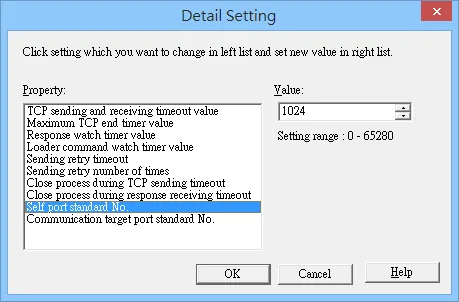
| Port no. | 507 | 251 ~ 65531 |
When setting port number, please add the offset 251. As shown below, the value in the software is 1024, and then the port number should be: 1024+251=1275.
Device Address
| Bit/Word | Device | Format | Range | Memo |
|---|---|---|---|---|
| B | IX | DDDDDDh | 10 ~ 238511f | DDD(Slot) / DDD(word) / h(bit) |
| B | QX | DDDDDDh | 10 ~ 238511f | DDD(Slot) / DDD(word) / h(bit) |
| B | MX1 | DDDDh | 0 ~ 8191f | |
| B | MX3 | DDDDh | 0 ~ 4095f | |
| B | MX10 | DDDh | 0 ~ 511f | |
| B | S | DD.DD | 0 ~ 99.99 | |
| W | IW | DDDDDD | 1 ~ 238511 | DDD(Slot) / DDD(word) |
| W | QW | DDDDDD | 1 ~ 238511 | DDD(Slot) / DDD(word) |
| W | MW1 | DDDDD | 0 ~ 20000 | |
| DW | MD1 | DDDDD | 0 ~ 20000 | |
| W | MW3 | DDDDD | 0 ~ 20000 | |
| DW | MD3 | DDDDD | 0 ~ 20000 | |
| W | MW10 | DDD | 0 ~ 511 | |
| DW | MD10 | DDD | 0 ~ 510 | |
| W | WS | DD | 0 ~ 99 | |
| DW | ID | DDDDDD | 1000 ~ 238511 | DDD(Slot) / DDD(word) |
| DW | QD | DDDDDD | 1000 ~ 238511 | DDD(Slot) / DDD(word) |
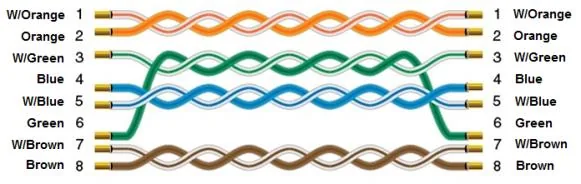
Wiring Diagram
The diagram below shows the Ethernet cable wiring.