Introduction
All Maple Systems HMI Touch Screens programmed with EBPro (EasyBuilder Pro), including every cMT X Series and cMT Series model, are compatible with Fanuc 0i/30i/31i/32i/35i Series (Ethernet). Configure your Controller and HMI/cMT with the following parameters to establish reliable communication.
Supported Series: Fanuc 0i/30i/31i/32i/35i Series
Website: www.fanuc.co.jp
HMI Settings
| Parameters | Recommended | Options | Notes |
|---|---|---|---|
| PLC type | Fanuc 0i/30i/31i/32i/35i Series (Ethernet) | ||
| PLC I/F | Ethernet | ||
| Port no. | 8193 | ||
| PLC sta. no. | 1 |
Device Address
| Bit/Word | Device type | Format | Range | Memo |
|---|---|---|---|---|
| B | G_Bit | DDDDo | 0 ~ 99997 | |
| B | F_Bit | DDDDo | 0 ~ 99997 | |
| B | Y_Bit | DDDDo | 0 ~ 99997 | |
| B | X_Bit | DDDDo | 0 ~ 99997 | |
| B | A_Bit | DDDDo | 0 ~ 99997 | |
| B | R_Bit | DDDDo | 0 ~ 99997 | |
| B | T_Bit | DDDDo | 0 ~ 99997 | |
| B | K_Bit | DDDDo | 0 ~ 99997 | |
| B | C_Bit | DDDDo | 0 ~ 99997 | |
| B | D_Bit | DDDDo | 0 ~ 99997 | |
| B | M_Bit | DDDDo | 0 ~ 99997 | |
| B | N_Bit | DDDDo | 0 ~ 99997 | |
| B | E_Bit | DDDDo | 0 ~ 99997 | |
| W | G_String | DDDD | 0 ~ 9999 | |
| W | F_String | DDDD | 0 ~ 9999 | |
| W | Y_String | DDDD | 0 ~ 9999 | |
| W | X_String | DDDD | 0 ~ 9999 | |
| W | A_String | DDDD | 0 ~ 9999 | |
| W | R_String | DDDD | 0 ~ 9999 | |
| W | T_String | DDDD | 0 ~ 9999 | |
| W | K_String | DDDD | 0 ~ 9999 | |
| W | C_String | DDDD | 0 ~ 9999 | |
| W | D_String | DDDD | 0 ~ 9999 | |
| W | M_String | DDDD | 0 ~ 9999 | |
| W | N_String | DDDD | 0 ~ 9999 | |
| W | E_String | DDDD | 0 ~ 9999 | |
| W | G | DDDD | 0 ~ 9999 | |
| W | F | DDDD | 0 ~ 9999 | |
| W | Y | DDDD | 0 ~ 9999 | |
| W | X | DDDD | 0 ~ 9999 | |
| W | A | DDDD | 0 ~ 9999 | |
| W | R | DDDD | 0 ~ 9999 | |
| W | T | DDDD | 0 ~ 9999 | |
| W | K | DDDD | 0 ~ 9999 | |
| W | C | DDDD | 0 ~ 9999 | |
| W | D | DDDD | 0 ~ 9999 | |
| W | M | DDDD | 0 ~ 9999 | |
| W | N | DDDD | 0 ~ 9999 | |
| W | E | DDDD | 0 ~ 9999 | |
| Byte | GB | DDDD | 0 ~ 9999 | |
| Byte | FB | DDDD | 0 ~ 9999 | |
| Byte | YB | DDDD | 0 ~ 9999 | |
| Byte | XB | DDDD | 0 ~ 9999 | |
| Byte | AB | DDDD | 0 ~ 9999 | |
| Byte | RB | DDDD | 0 ~ 9999 | |
| Byte | TB | DDDD | 0 ~ 9999 | |
| Byte | KB | DDDD | 0 ~ 9999 | |
| Byte | CB | DDDD | 0 ~ 9999 | |
| Byte | DB | DDDD | 0 ~ 9999 | |
| Byte | MB | DDDD | 0 ~ 9999 | |
| Byte | NB | DDDD | 0 ~ 9999 | |
| Byte | EB | DDDD | 0 ~ 9999 | |
| W | G_Odd | DDDD | 0 ~ 9999 | |
| W | F_Odd | DDDD | 0 ~ 9999 | |
| W | Y_Odd | DDDD | 0 ~ 9999 | |
| W | X_Odd | DDDD | 0 ~ 9999 | |
| W | A_Odd | DDDD | 0 ~ 9999 | |
| W | R_Odd | DDDD | 0 ~ 9999 | |
| W | T_Odd | DDDD | 0 ~ 9999 | |
| W | K_Odd | DDDD | 0 ~ 9999 | |
| W | C_Odd | DDDD | 0 ~ 9999 | |
| W | D_Odd | DDDD | 0 ~ 9999 | |
| W | M_Odd | DDDD | 0 ~ 9999 | |
| W | N_Odd | DDDD | 0 ~ 9999 | |
| W | E_Odd | DDDD | 0 ~ 9999 | |
| W | ABSOLUTE_POSITION | D | 1 ~ 8 | |
| W | MACHINE_POSITION | D | 1 ~ 8 | |
| W | RELATIVE_POSITION | D | 1 ~ 8 | |
| W | DISTANCE_TO_GO | D | 1 ~ 8 | |
| W | SERVO_LOAD | D | 1 ~ 8 | |
| W | SPINDLE | D | 0 ~ 1 | |
| W | FEED_RATE | D | 0 | |
| W | ALARM | D | 0 ~ 9 | |
| W | TOOL_OFFSET | DDDD.DDDD | 0 ~ 9999.9999 | *Note1 |
| W | WORK_ZERO_OFFSET | DDD.DDD | 0 ~ 999.999 | *Note1 |
| W | PMC_TIMER_TYPE | DDD | 1 ~ 250 | |
| W | MACRO_VALUE | DDDD | 1 ~ 40000 | |
| W | DIAGNOSIS | DDDD.DDDD | 0 ~ 9999.9999 | Read only *Note1 |
NOTE: *Note1: DDDD(Axis).DDDD — the address format uses the axis number as the first component.
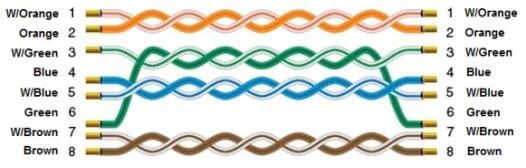
Wiring Diagram
The diagram below shows the Ethernet cable wiring.