
To export .CSV files through logic we require the following tags:
| Sr No. | Tag | Tag Address | Data Type | Attribute |
| 1 | CSV_Error_Bit | S00064 | BOOL | Read Only |
| 2 | CSV_Done_Bit | S00065 | BOOL | Read Only |
| 3 | Datalog_CSV_Group | SW0269 | WORD | Read/Write |
| 4 | Datalog_CSV_trigger | S00063 | BOOL | Read/Write |
Tags mentioned in the table are system defined (built-in) tags in MAPware-7000 software.
Within a logic block, a user can then develop the logic shown below:
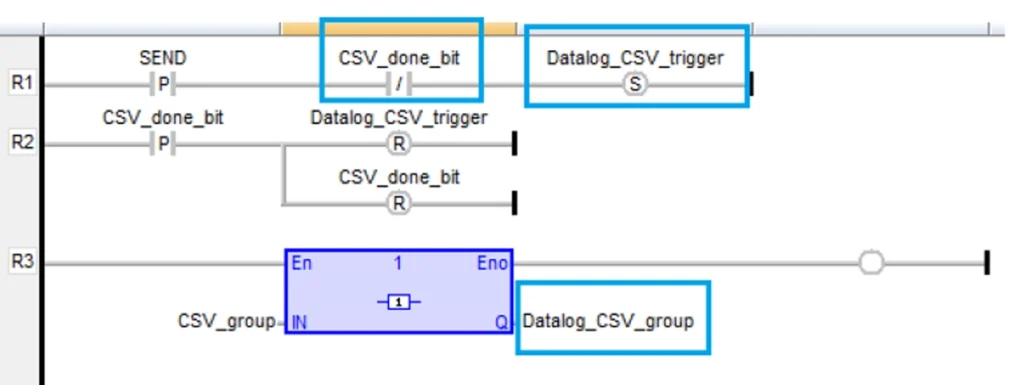
- In the above logic, the SEND (user defined tag with Boolean data type) bit will set the ‘Datalog_CSV_Trigger“
- Then CSV conversion starts (if file is large this make take some time)
- Once CSV is converted completely then the ‘CSV_done_bit‘ gets set ON
- Using the ‘CSV_done_bit‘ we can then reset the ‘Datalog_CSV_trigger‘ and ‘CSV_done_bit‘ bits for future exporting
- If user needs a specific group to convert into CSV, then they can put that group number in ‘Datalog_CSV_group‘
- If user wants all group to be converted, simply send the value 0 to ‘Datalog_CSV_Group‘
In this above example the SEND (Boolean data type) & CSV_group (Word data type) are user defined tags.
CSV_Error_Bit (Boolean data type), CSV_Done_Bit (Boolean data type), Datalog_CSV_Group (Word data type_, Datalog_CSV_trigger (Boolean data type) are system defined (Inbuilt) tags in MAPware software.
When user triggers the SEND bit the logged data in CSV format gets created and saved in selected external device (USB stick) and once data logging has completed the ‘File transferred successfully’ message will appear.
Note:
- It’s applicable to both internal and external data logging.
- Data logging Group can be defined first – then by triggering ‘Datalog_CSV_trigger‘ the same data log should be converted into CSV.
- If data logging is internal, then the SEND bit exports internal CSV to USB stick.
- If data logging is external, then SEND bit convert data log (DB format) into CSV.
- In both cases, internal and external data logging, same tags are used.
- For multiple groups, the group number should be given in ‘Datalog_CSV_group’ so specific group gets converted into CSV.
- If user wants all data to be converted into CSV then the value sent to ‘Datalog_CSV_group’ should be 0.
- ‘CSV_done_bit’ gets turned ON when CSV conversion was successfully completed.
- ‘CSV_error_bit‘ gets turned ON when an error has occurred (this is a read only bit)
- If user never resets the ‘Datalog_CSV_trigger‘ bit after it has been turned on, this may cause performance issues on the HMC unit.
- This FAQ provided an example of logic. Users can also create their own.