Introduction
All Maple Systems HMIs programmed with EBPro (EasyBuilder Pro), including every cMT X Series and cMT Series model, are compatible with Opto22 CONT Protocol (Ethernet). Configure your Controller and HMI/cMT with the following parameters to establish reliable communication.
Supported Series: OPTO22 SNAP PAC System
HMI Settings
| Parameters | Recommended | Options | Notes |
|---|---|---|---|
| PLC type | OPTO22 CONT Protocol (Ethernet) | ||
| PLC I/F | Ethernet | ||
| Port no. | 22001 | ||
| On-line simulator | Yes | ||
| Multi-HMI connect | Yes |
Import Tags
Select tags for export
Open Browser Configurator, double click on [Source for Items to Add to the Browser Database], and then select the PLC project containing the tags for export.Select controller
Select a controller and then click [OK]Drag the file
Drag the items from the right pane to the lower pane.Name the file
Name the tag file and then click [File] » [Save]Select driver
Launch EBPro (EasyBuilder Pro), add “OPTO22 CONT Protocol (Ethernet)” driver into the device list, set the communication parameters, and then click [Import Tags].Import tags
Tag Manager opens after selecting a tag file. Click [Select all] to select all tags or select certain tags by clicking their checkboxes. Click [OK] to import the selected tags. “Import tag information successfully.” message shows when the tags are imported successfully.
Supported Device Types
| Data type | EBPro (EasyBuilder) data format | Memo |
|---|---|---|
| Bool | bit | |
| DInt | 32-bit BCD, Hex, Binary, Signed | 32-bit |
| Real | 32-bit Float | 32-bit |
| LInt | 64-bit Signed | 64-bit |
| String | ASCII input and ASCII display | Length=word |
NOTE: EBPro V6.03.02 or later supports 64-bit data types (cMT Series only). The address limit range is 48 bits maximum.
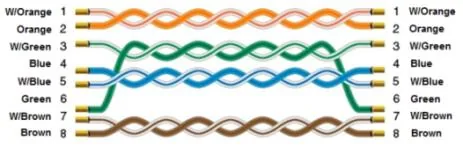
Wiring Diagram
The diagram below shows the Ethernet cable wiring.