Introduction
All Maple Systems HMI Touch Screens programmed with EBPro (EasyBuilder Pro), including every cMT X Series and cMT Series model, are compatible with a Mitsubishi M80 CNC (Ethernet). Configure your Controller and HMI/cMT with the following parameters to establish reliable communication.
Supported Series: Mitsubishi M80 CNC (Ethernet)
Website: us.mitsubishielectric.com
HMI Settings
| Parameters | Recommended | Options | Notes |
|---|---|---|---|
| PLC type | Mitsubishi M80 CNC (Ethernet) | ||
| PLC I/F | Ethernet | ||
| Port no. | 683 |
PLC Settings
Set TCP/IP Protocol
In the EZSocket Test Application, navigate toIEZNoCommunication-u0026gt;IEZNoCOmmunication3-u0026gt;SetTCPIPProtocol. Enter the IP address and NC port number, then click RUN.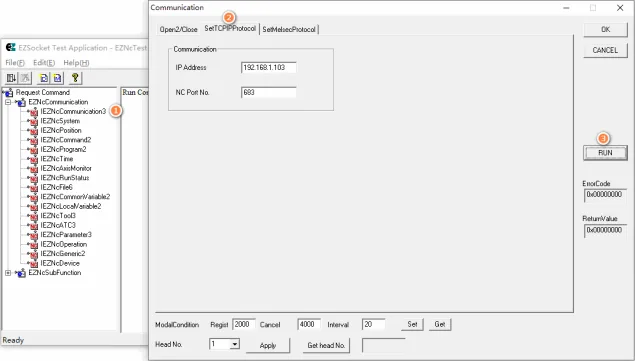
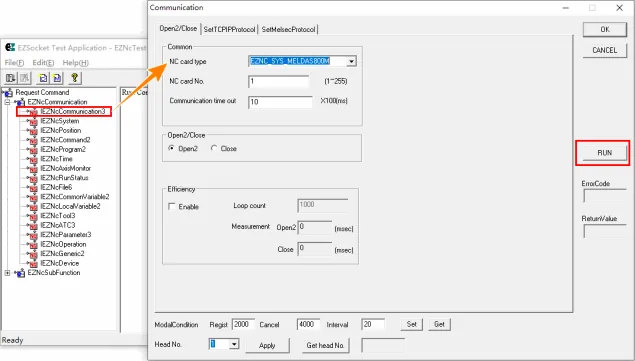
Open Communication Channel
Navigate toIEZNoCommunication-u0026gt;IEZNoCOmmunication3-u0026gt;Open2/Close, then click RUN.
Device Address
| Bit/Word | Device Type | Format | Range | Memo |
|---|---|---|---|---|
| W | Position_Distance | D | 1 ~ 8 | |
| W | Position_FeedSpeed | D | 0 ~ 4 | |
| W | Position_ProgramPosition | D | 1 ~ 8 | |
| W | Position_WorkPosition | D | 1 ~ 8 | |
| W | Position_MachinePosition | D | 1 ~ 8 | |
| W | Position_CurrentPosition | D | 1 ~ 8 | |
| W | CommonVariable2_CommonV | DDDDDDDD | 10000 ~ 90739901 | |
| W | CommonVariable2_Name | DDD | 500 ~ 599 | |
| W | LocalVariable2_Local | DDDD | 100 ~ 3305 | |
| W | RunStatus_InvalidStatus | D | 0 | |
| W | RunStatus_CommandStatus | D | 0 | |
| W | RunStatus_CuttingMode | D | 0 | |
| W | RunStatus_AxisStatus | DDD | 100 ~ 806 | |
| W | RunStatus_RunStatus | D | 0 ~ 3 | |
| W | Time_ClockData | D | 0 ~ 5 | |
| W | Time_AliveTime | D | 0 | |
| W | Time_RunTime | D | 0 | |
| W | Time_StartTime | D | 0 | |
| W | Time_EstimateTime | D | 0 ~ 2 | |
| W | Command2_ToolCommand | DDD | 100 ~ 802 | |
| W | Command2_FeedCommand | D | 0 ~ 5 | |
| W | Command2_Command | DDD | 100 ~ 830 | |
| W | Command2_Command2 | DDD | 1 ~ 304 | |
| W | System_Version | DDD | 100 ~ 803 | |
| W | System_Systeminformation | D | 0 ~ 1 | |
| W | System_Alarm | DDDD | 0 ~ 1106 |
Wiring Diagram
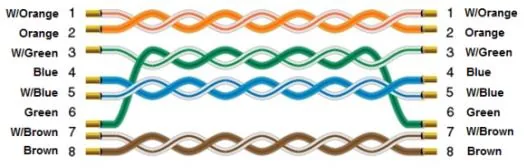
NOTE: Use a standard Ethernet straight-through cable to connect the HMI to the Mitsubishi M80 CNC controller.
The diagram below shows the Ethernet cable wiring.