Introduction
All Maple Systems HMIs programmed with EBPro (EasyBuilder Pro), including every cMT X Series and cMT Series model, are compatible with KONNEX KNXnet/IP. Configure your Controller and HMI/cMT with the following parameters to establish reliable communication.
Supported series: WAGO 750-849
HMI Settings
| Parameters | Recommended | Options | Notes |
|---|---|---|---|
| PLC type | KONNEX KNXnet/IP | ||
| PLC I/F | Ethernet | USE UDP | |
| Multi. Cast IP | 224.0.23.12 | ||
| Port no. | 3671 | ||
| Type | KNXnet/IP Tunneling | KNXnet/IP Tunneling KNXnet/IP Routing | *Note |
NOTE: Gateway must be configured when using routing protocol.
Support Device Types
| Data type | EBPro (EasyBuilder) data format | Memo |
|---|---|---|
| Bool | bit | |
| Byte | 16-bit BCD, Hex, Binary, Unsigned | 8-bit |
| SInt | 16-bit BCD, Hex, Binary, Signed | 8-bit |
| USInt | 16-bit BCD, Hex, Binary, Unsigned | 8-bit |
| Word | 16-bit BCD, Hex, Binary, Unsigned | 16-bit |
| Int | 16-bit BCD, Hex, Binary, Signed | 16-bit |
| UInt | 16-bit BCD, Hex, Binary, Unsigned | 16-bit |
| DWord | 32-bit BCD, Hex, Binary, Unsigned | 32-bit |
| DInt | 32-bit BCD, Hex, Binary, Signed | 32-bit |
| Real | 32-bit Float | 32-bit |
| UDInt | 32-bit BCD, Hex, Binary, Unsigned | 32-bit |
| Array | String |
PLC Settings
Export Tag File from ETS3
Export the tag file using ETS3 software. In ETS3, open the File menu and select Extract Data (e.g. OPC)… to generate the export file.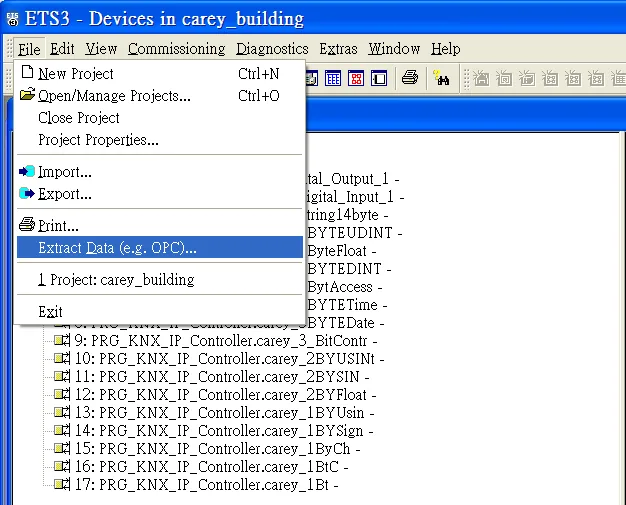
Add Device in EBPro (EasyBuilder)
In EBPro (EasyBuilder), open System Parameter Settings, add KONNEX KNXnet/IP as a device, and then click Import Tag….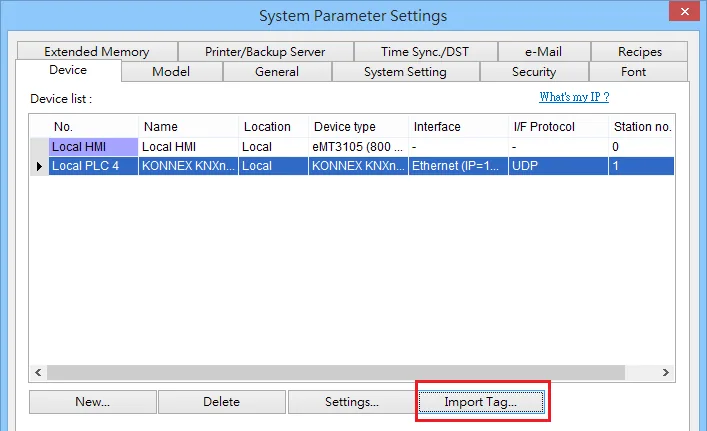
Click Import in Tag Manager
In the Tag Manager dialog box, click Import….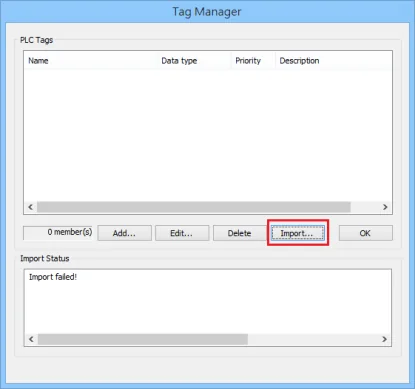
Select ESF File to Import
Select the.esffile and then click OK to finish importing tags.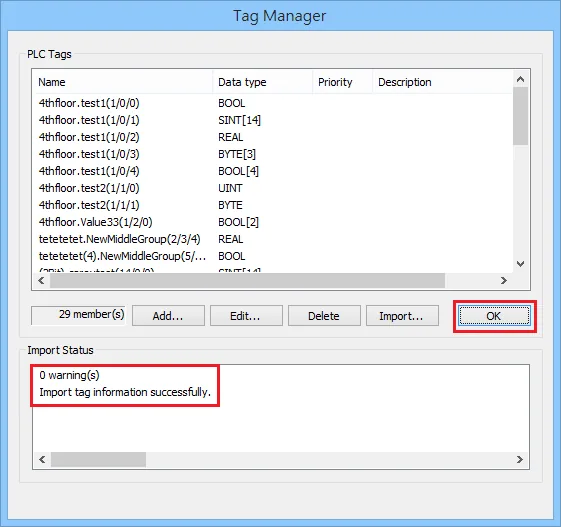
Wiring Diagram
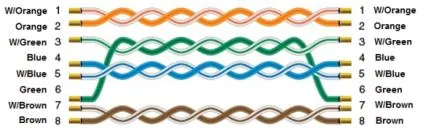
The diagram below shows the Ethernet cable wiring.