Introduction
All Maple Systems HMI Screens programmed with EBPro (EasyBuilder Pro), including every cMT X Series and cMT Series model, are compatible with Control Techniques SI-Ethernet Modbus TCP/IP. Configure your Controller and HMI/cMT with the following parameters to establish reliable communication.
Supported Series: Unidrive M400 and SI Ethernet Module
Website: www.nidec.com
HMI Setting
| Parameters | Recommended | Options | Notes |
|---|---|---|---|
| PLC type | Control Techniques SI-Ethernet Modbus TCP/IP | ||
| PLC I/F | Ethernet | ||
| Port no. | 502 | ||
| Address mode | Standard | Standard / Modified |
Device Address
| Bit/Word | Device type | Format | Range | Memo |
|---|---|---|---|---|
| B | BIT | SSS.MM.PPP | 0 ~ 255.99.999 | Slot.Menu.Parameter |
| Byte | BYTE | SSS.MM.PPP | 0 ~ 255.99.999 | Slot.Menu.Parameter |
| W | WORD | SSS.MM.PPP | 0 ~ 255.99.999 | Slot.Menu.Parameter |
| DW | DWORD | SSS.MM.PPP | 0 ~ 255.99.999 | Slot.Menu.Parameter |
*The standard addressing mode allows parameters up to 99 to be accessed. For any parameter above 99, the modified addressing mode must be used; however, this mode limits the highest accessible menu number to 63.
Modbus Register Addressing Mode
| Register | Description | Minimum | Maximum | Memo |
|---|---|---|---|---|
S.15.013 | Modbus Register Addressing Mode | 0 (standard) | 1 (Modified) | 8 Bit User Save |
When using the macro GetData()/SetData() to set the double word address, you need to multiply the number of words by two.
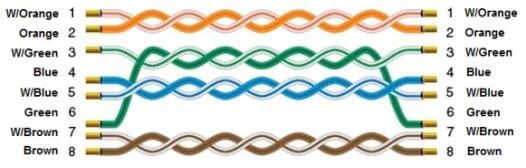
Wiring Diagram
The diagram below shows the Ethernet cable wiring.