Introduction
All Maple Systems HMIs programmed with EBPro (EasyBuilder Pro), including every cMT X Series and cMT Series model, are compatible with VIPA 300S, for ex. 315-4NE12 (Ethernet). Configure your Controller and HMI/cMT with the following parameters to establish reliable communication.
Protocol: Ethernet (SIEMENS S7-300)
HMI Settings
| Parameters | Recommended | Options | Notes |
|---|---|---|---|
| PLC type | VIPA 300S, for ex. 315-4NE12 (Ethernet) | ||
| PLC I/F | Ethernet | ||
| Port no. | 102 | ||
| PLC sta. no. | 1 | 0–31 |
Device Address
| Bit/Word | Device type | Format | Range | Memo |
|---|---|---|---|---|
| B | I | DDDDo | 0 ~ 99997 | Input (I) |
| B | Q | DDDDo | 0 ~ 99997 | Output (O) |
| B | M | DDDDo | 0 ~ 99997 | Bit Memory |
| B | DBnBit | FFFFFDDDDo | 0 ~ 6553599997 | Data Register Bit |
| B | DBxBit | FFFFFDDDDDo | 0 ~ 10700655327 | |
| B | DB0Bit–DB99Bit | DDDDDo | 0 ~ 655357 | Data Register Bit |
| W | IW | DDDD | 0 ~ 9999 | Input (I) |
| W | QW | DDDD | 0 ~ 9999 | Output (O) |
| W | MW | DDDD | 0 ~ 9999 | Bit Memory |
| DW | MD | DDDD | 0 ~ 9998 | Bit Memory Double |
| DW | MD_Anyaddr | DDDD | 0 ~ 9998 | Bit Memory Double Word |
| W | DBn | FFFFDDDD | 0 ~ 40969999 | Data Register (must be even) |
| DW | DBDn | FFFFFDDDD | 0 ~ 655359999 | Data Register Double Word |
| W | DBn_String | FFFFFDDDD | 0 ~ 655359999 | |
| DW | DBDn_String | FFFFFDDDD | 0 ~ 655359999 | |
| W | DB0 ~ DB99 | DDDDD | 0 ~ 65535 | Data Register (must be even) |
| Byte | MB | DDDD | 0 ~ 9999 | Bit Memory Byte |
| Byte | DBBn | FFFFFDDDD | 0 ~ 655359999 | Data Register Byte |
| Byte | DBBx | FFFFFDDDDD | 0 ~ 1070065535 | |
| W | DBx | FFFFFDDDDD | 0 ~ 1070065535 | |
| DW | DBDx | FFFFFDDDDD | 0 ~ 1070065535 | |
| DW | DBDn_Anyaddr | FFFFFDDDD | 0 ~ 655359999 | Data Register Double Word |
| W | DBx_String | FFFFFDDDDD | 0 ~ 1070065535 | |
| W | DBn_String1 | FFFFFDDDD | 0 ~ 655359999 | (must be even) |
| W | DBx_String1 | FFFFFDDDDD | 0 ~ 1070065535 | |
| DW | DBDx_String | FFFFFDDDDD | 0 ~ 1070065535 |
NOTE: Double word and floating point value must use DBDn device type.
How to Import Tag
SIEMENS STEP 7 allows building user-defined tag files (*.dif and *.AWL) that can be imported into EBPro (EasyBuilder8000/EasyBuilderPro) via System Parameter Settings. The following describes how to build and import both file types.
Building a *.dif File
Create user-defined tags in Symbols
In SIMATIC Manager, open your S7 project and navigate to the CPU’s S7 Program. Click the Symbols folder to open the Symbol Editor. Define your tags with the appropriate addresses and data types.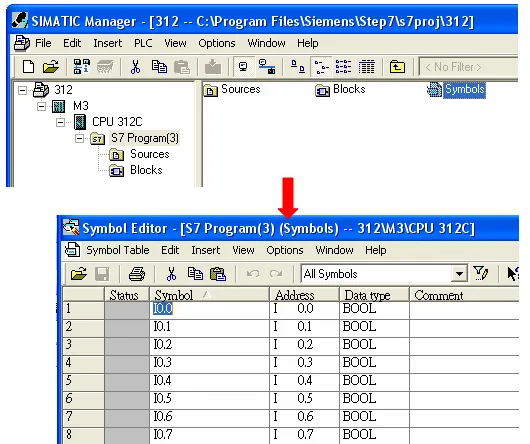
Export the tag file as a .dif file
In the Symbol Editor, click Symbol Table u0026gt; Export. In the Export dialog, set the file name (e.g.PLC_Tag.dif), set Save as type to Data Interchange Format (.DIF)*, choose a save location, and click Save.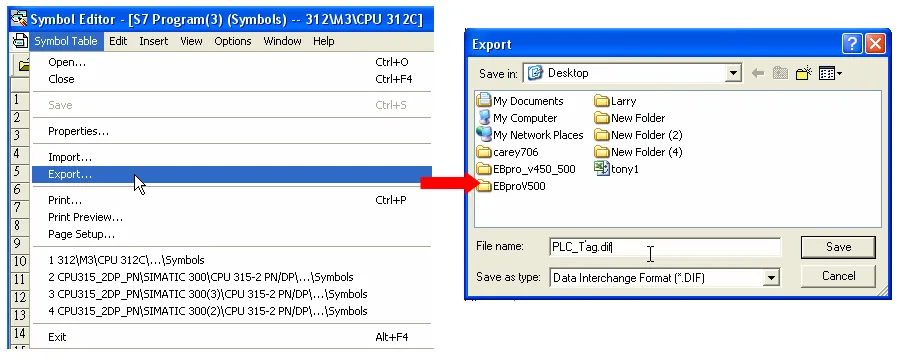
Building a *.AWL File
Create data blocks in the Blocks folder
In SIMATIC Manager, select the Blocks folder under your CPU’s S7 Program. Create the required data block (DB) items as needed for your project.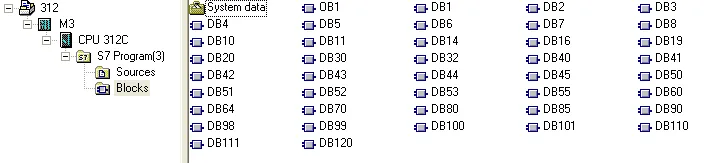
Open LAD/STL/FBD and run Generate Source
From the Windows Start menu, navigate to STEP 7 u0026gt; LAD, STL, FBD – Programming S7 Blocks. In the LAD/STL/FBD window, click File u0026gt; Generate Source.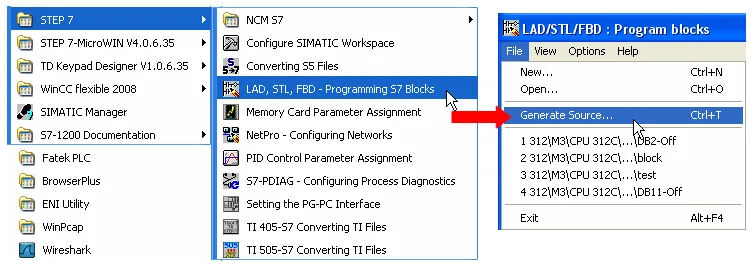
Set the storage path to Sources and specify the object name
In the New dialog, select Sources as the storage path under your S7 Program. Enter an object name (e.g.Object_Tag) and click OK.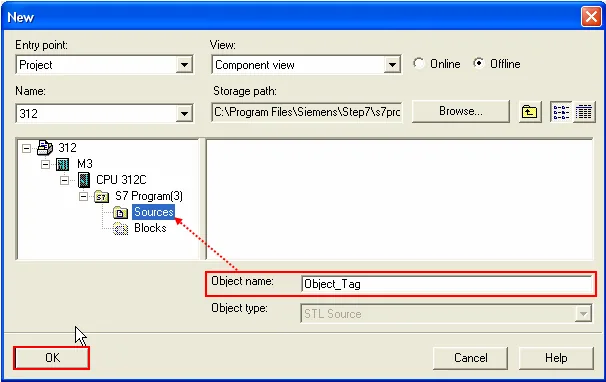
Select the blocks to export and click OK
In the Generate Source dialog, move the desired data blocks from Blocks Not Selected to Blocks Selected using the arrow buttons. Set addresses to Absolute, then click OK.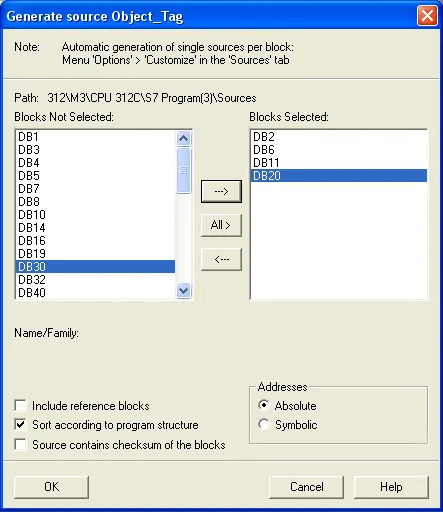
Export the source to build the *.AWL file
Under Sources in SIMATIC Manager, right-click the saved object and select Export Source. In the Export Source dialog, confirm the file name and click Save. This generates the*.AWLfile.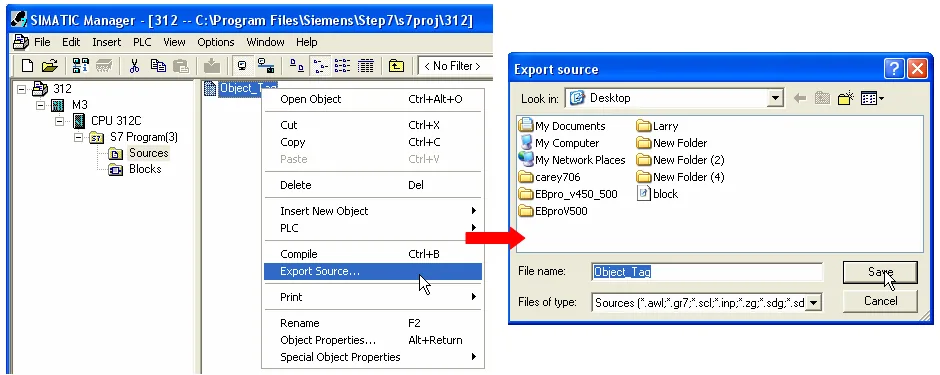
Import Tags into EBPro (EasyBuilderPro)
The generated *.dif and *.AWL files can be imported into EasyBuilder8000/EasyBuilderPro System Parameter Settings by clicking **Import Tag**.
Import tags in EBPro (EasyBuilderPro) System Parameter Settings
In EBPro (EasyBuilderPro), open System Parameter Settings and select your SIEMENS S7-300 PLC device. Click Import Tag. In the Import Address Tag dialog, check Import DIF file and browse to yourPLC_Tag.diffile. Check Import AWL file and browse to yourObject_Tag.AWLfile. Click OK.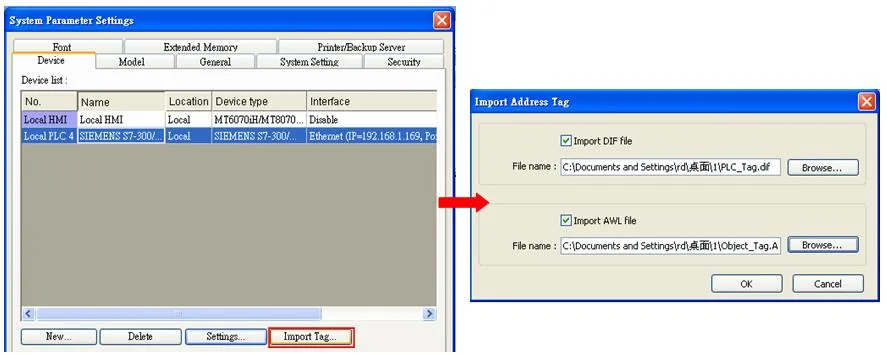
Confirm successful tag import
A confirmation dialog appears indicating that tag information was imported successfully. Click OK to close.
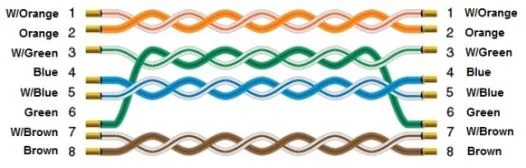
Wiring Diagram
The diagram below shows the Ethernet cable wiring.