Introduction
All Maple Systems HMIs programmed with EBPro (EasyBuilder Pro), including every cMT X Series and cMT Series model, are compatible with BACnet IP Server. Configure your Controller and HMI/cMT with the following parameters to establish reliable communication.
HMI Setting
| Parameters | Recommended | Options | Notes |
|---|---|---|---|
| PLC type | BACnet/IP Server | ||
| PLC I/F | Ethernet | ||
| Port no. | 47808 | 47808 is the standard communication port of BACnet protocol. | |
| HMI Device ID | 4194302 | 0 ~ 4194302 | *Note |
NOTE: LW-12245 BACnet server id (Support online changes)
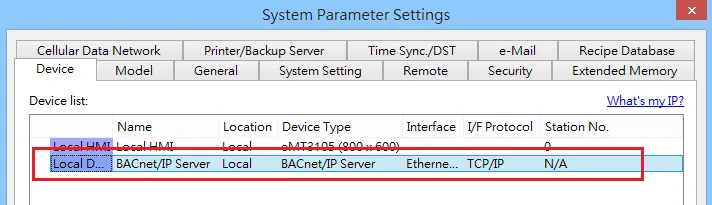
The following steps explain how to build the tag list.
- In [System Parameter Settings] add [BACnet/IP Server] driver.
- Click [Tag Manager].
-
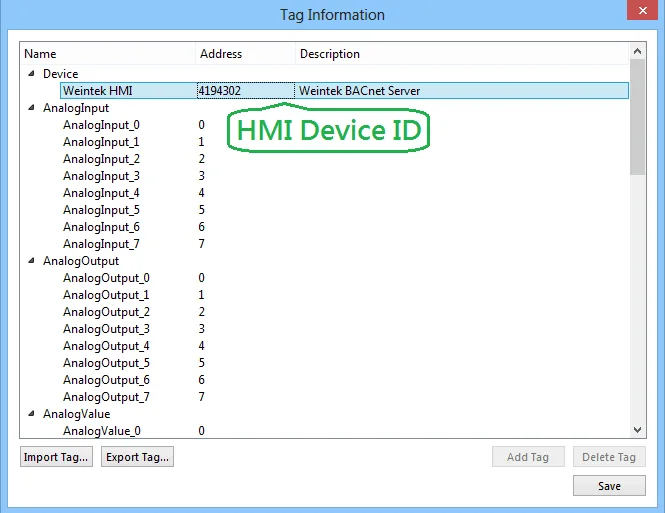
Configure tag information as shown below.
- HMI Device ID: Set the range to 0 ~ 4194302.
- Tag Name: Add these tags: Analog Input, Analog Output, Analog Value, Binary Input, Binary Output, Binary Value…
- Specify the quantity of the selected tag, the allowable range: 1 ~ 100
- [Add Tag]: According to the selected tag and the specified quantity, the added tags will be shown in the list.
- [Delete Tag]: Delete a single tag or multiple tags.
- [Import Tag] [Export Tag]: Import an existing CSV file or export current data as a CSV file. Please note that current data will be removed after importing a CSV file.
Object
| Object ID | Object Name | Object Structure |
|---|---|---|
| 0 | Analog Input | Description |
| Object Identifier | ||
| Object Name | ||
| Object Type | ||
| Present Value | ||
| Units | ||
| Event State | ||
| CovIncrement | ||
| StateFlags | ||
| OutOfService | ||
| 1 | Analog Output | Description |
| Object Identifier | ||
| Object Name | ||
| Object Type | ||
| Present Value | ||
| Priority | ||
| Priority Array | ||
| Priority Reset | ||
| Units | ||
| Event State | ||
| CovIncrement | ||
| StateFlags | ||
| OutOfService | ||
| RelinquishDefault | ||
| 2 | Analog Value | Description |
| Object Identifier | ||
| Object Name | ||
| Object Type | ||
| Present Value | ||
| Priority | ||
| Priority Array | ||
| Priority Reset | ||
| Units | ||
| Event State | ||
| StateFlags | ||
| CovIncrement | ||
| OutOfService | ||
| RelinquishDefault | ||
| 3 | Binary Input | Description |
| Object Identifier | ||
| Object Name | ||
| Object Type | ||
| Present Value | ||
| Event State | ||
| StateFlags | ||
| OutOfService | ||
| 4 | Binary Output | Description |
| Object Identifier | ||
| Object Name | ||
| Object Type | ||
| Priority | ||
| Priority Array | ||
| Priority Reset | ||
| Present Value | ||
| Event State | ||
| StateFlags | ||
| OutOfService | ||
| RelinquishDefault | ||
| 5 | Binary Value | Description |
| Object Identifier | ||
| Object Name | ||
| Object Type | ||
| Priority | ||
| Priority Array | ||
| Priority Reset | ||
| Present Value | ||
| Event State | ||
| StateFlags | ||
| OutOfService | ||
| RelinquishDefault | ||
| 13 | MultistateInput | Description |
| Object Identifier | ||
| Object Name | ||
| Object Type | ||
| Present Value | ||
| Event State | ||
| Number Of State | ||
| StateFlags | ||
| OutOfService | ||
| 14 | MultistateOutput | Description |
| Object Identifier | ||
| Object Name | ||
| Object Type | ||
| Present Value | ||
| Event State | ||
| Number Of State | ||
| Priority | ||
| Priority Array | ||
| Priority Reset | ||
| StateFlags | ||
| OutOfService | ||
| RelinquishDefault | ||
| 19 | MultistateValue | Description |
| Object Identifier | ||
| Object Name | ||
| Object Type | ||
| Present Value | ||
| Event State | ||
| Number Of State | ||
| Priority | ||
| Priority Array | ||
| Priority Reset | ||
| StateFlags | ||
| OutOfService | ||
| RelinquishDefault | ||
| 21 | LifeSafetyPoint | Description |
| Object Identifier | ||
| Object Name | ||
| Object Type | ||
| Present Value | ||
| Event State | ||
| Mode | ||
| Silenced | ||
| StateFlags | ||
| OutOfService | ||
| 22 | LifeSafetyZone | Description |
| Object Identifier | ||
| Object Name | ||
| Object Type | ||
| Present Value | ||
| Event State | ||
| Mode | ||
| Silenced | ||
| StateFlags | ||
| OutOfService |
Error Code
![Tag manager showing ServerErrorStatement (SINT[40]) and ServerErrorCode (SINT) tags under the Weintek HMI device tree.](https://media.maplesystems.com/wp-content/uploads/2026/06/03-tag-manager-server-error-code-statement-tags.webp)
| Object Name | Value / String | Object Structure |
|---|---|---|
| ServerErrorCode | 0 | Default |
| 1 | Error occurred | |
| ServerErrorStatement | No error | Default |
| Invalid data type | Invalid data type | |
| Write access denied | Write access denied | |
| Unknown property | Unknown property | |
| Service request denied | Service request denied | |
| Unknown object | Unknown object | |
| Value out of range | Value out of range |
Diagram
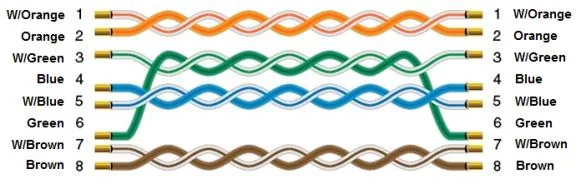
The diagram below shows the Ethernet cable wiring.