Introduction
All Maple Systems HMI Touch Screens programmed with EBPro (EasyBuilder Pro), including every cMT X Series and cMT Series model, are compatible with an Emerson ROC800 Series Free Tag Names. Configure your Controller and HMI/cMT with the following parameters to establish reliable communication.
Supported Series: EMERSON ROC800 Series
Website: www.emerson.com
HMI Setting (Ethernet)
| Parameters | Recommended | Options | Notes |
|---|---|---|---|
| PLC type | EMERSON ROC800 Series – Free Tag Names | ||
| PLC I/F | Ethernet | ||
| Port no. | 4000 | ||
| Device address | 240 | ||
| Device group | 240 | ||
| No. of all alarms | 1 | ||
| Host group | 1 |
HMI Setting (RS-232)
| Parameters | Recommended | Options | Notes |
|---|---|---|---|
| PLC type | EMERSON ROC800 Series – Free Tag Names | ||
| PLC I/F | RS232 | ||
| Baud rate | 19200 | ||
| Data bits | 8 | 7, 8 | |
| Parity | None | None, Odd, Even | |
| Stop bits | 1 | 1, 2 | |
| Device address | 240 | ||
| Device group | 240 | ||
| No. of all alarms | 1 | ||
| Host group | 1 |
How to Import Tags
Click Get Tag Info
Click [Get Tag Info]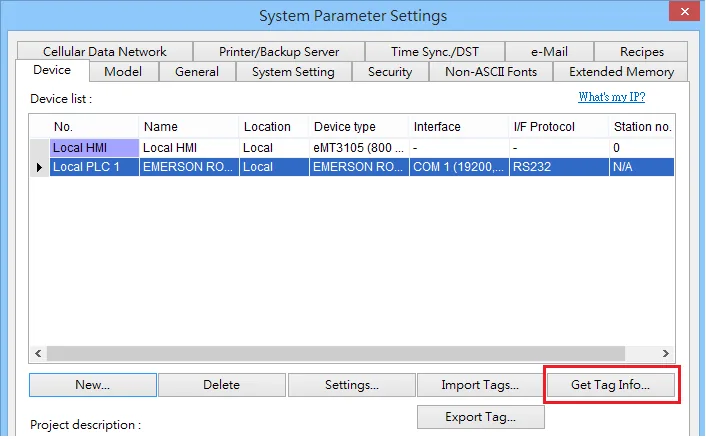
Select All Tags and Confirm
[Select all] → [OK]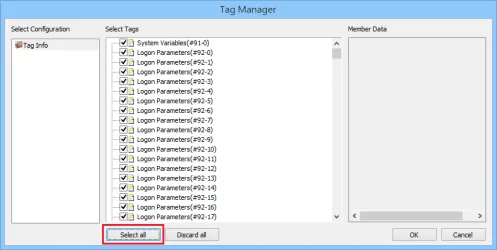
Verify Successful Tag Import
Imported tag information successfully.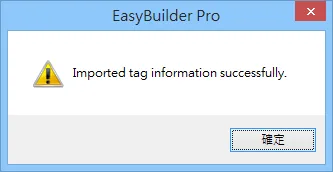
Support Device Type
| Data Type | EBPro (EasyBuilder) Data Format | Memo |
|---|---|---|
| Bool | bit | |
| Word | 16-bit BCD, Hex, Binary, Unsigned | 16-bit |
| DWord | 32-bit BCD, Hex, Binary, Unsigned | 32-bit |
| Real | 32-bit Float | 32-bit |
| String | ASCII input and ASCII display | The length of the setting must be correct |
Wiring Diagram
NOTE: The serial port pin assignments may vary between HMI models.
Diagram 1: RS-232
| HMI | Direction | PLC |
|---|---|---|
| Pin assignments | RS232 Terminal | |
| Rx | ↔ (bidirectional) | TX |
| Tx | ↔ (bidirectional) | RX |
| GND | ↔ (bidirectional) | GND |
Diagram 2: Ethernet
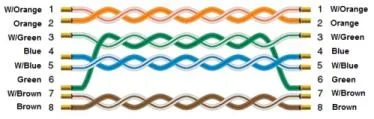
Ethernet cable: