
Introduction
All Maple Systems HMIs programmed with EBPro (EasyBuilder Pro), including every cMT X Series and cMT Series model, are compatible with CoDeSys V2 (Symbolic Addressing). Configure your Controller and HMI/cMT with the following parameters to establish reliable communication.
Supported Series: CODESYS V2
HMI Settings
| Parameters | Recommended | Options | Notes |
|---|---|---|---|
| PLC type | CODESYS V2 (Symbolic Addressing) | ||
| PLC I/F | RS232 | ||
| Baud rate | 38400 | ||
| Data bits | 8 | ||
| Parity | None | ||
| Stop bits | 1 |
How to Import Tags
Add Driver and Open Tag Manager
Click [New] to add [CODESYS V2 (Symbolic Addressing)] driver, and then click [Tag Manager].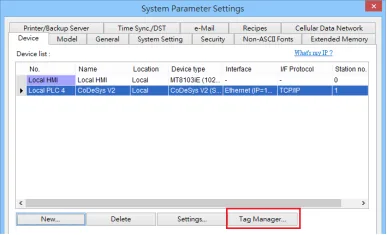
Select and Import SYM_XML Tag File
Select [Get Tags] » [Import Tags], and then select the Tag (.SYM_XML) to be imported.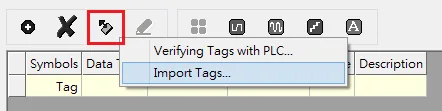
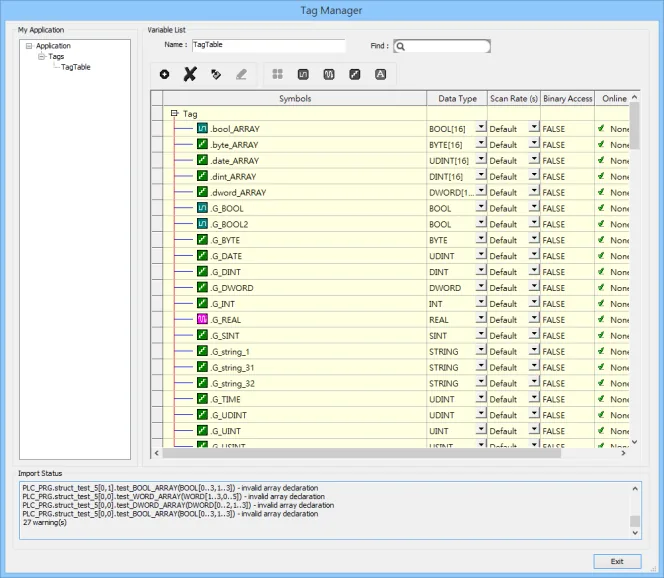
- The successfully imported tags will be listed in a table. If any unsupported data type exists, a warning message will show in [Import Status] field.
Generate *.SYM_XML
Enable Symbol Configuration Options
[Project] -u003e [Options] -u003e [Symbol configuration], select [Dump symbol entries] and [Dump XML symbol table].Export Data Entries from Symbol File
Open [Configure symbol file], select [Export data entries].
Note2: EBPro V6.03.02 or later supports 64 bits data type (cMT Series only), but please note that the address limit range is 48 bits in maximum.
Wiring Diagram
NOTE: The serial port pin assignments may vary between HMI models.
RS-232 (CM1-SC02A: RS-232 9P D-Sub)
| HMI | Direction | PLC |
|---|---|---|
| Pin assignments | RS232 9P D-Sub Male | |
| Rx | ↔ (bidirectional) | 3 TX |
| Tx | ↔ (bidirectional) | 2 RX |
| GND | ↔ (bidirectional) | 5 GND |